
Servers on MeowNest
Once MeowNest is enabled, servers can join it too, not just phones, computers and routers. After a server joins, when an admin (or an account MeowNest is opened to) pulls a subscription in MeowX, the panel rewrites that server’s nodes into “through MeowNest” versions: the client connects to the server’s MeowNest address (100.64.x.y), and traffic goes through MeowNest’s encrypted tunnel (direct when possible, through your own relay otherwise).
Useful when:
- The server has a client IP allowlist: devices coming in through MeowNest don’t use up allowlist slots, and switching networks doesn’t need a new allowlist entry;
- The public route is poor, or you’d rather your own devices didn’t use the public address: you get an extra route through MeowNest;
- The provider blocks the server’s outbound 80/443: the server can still join (see Servers that block outbound 80/443).
The three join modes
Section titled “The three join modes”| Mode | Server | Subscription for MeowX with MeowNest on | Other clients |
|---|---|---|---|
| Join only | Joins MeowNest; reachable by devices of the same account | Unchanged | Unchanged |
| Add MeowNest routes | Same | Original nodes stay; each gets an extra “node name · 喵窝” | Unchanged |
| MeowNest only | Same | Original nodes are replaced by the MeowNest versions (same names) | Unchanged |
Notes:
- A MeowNest node differs only in server address and port (the server’s MeowNest address and the inbound’s port); protocol, password and TLS SNI are the same as the original. Hysteria2 port hopping and Mieru port ranges are dropped (only the inbound’s own port is open inside MeowNest).
- “MeowNest only” does not close the public port: clients without MeowNest and third-party clients still get the public address. It only stops MeowX with MeowNest on from getting the public route.
- Proxy groups get the “· 喵窝” node right after the original one; rules and templates work as usual.
- Through MeowNest an account can reach only the node ports in its own subscription, not other ports on the server.
Panel: join a server
Section titled “Panel: join a server”① Turn on server MeowNest
Section titled “① Turn on server MeowNest”In Servers, click Edit server on the server card, find Server MeowNest near the bottom of the dialog, open it, switch it on and pick a join mode:
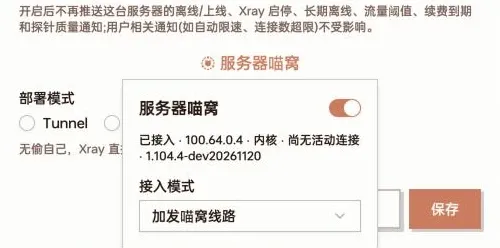
Edit server → Server MeowNest: switch it on and choose a join mode
- “Available after upgrading the Linux agent”: the agent is too old, or it’s the Windows agent. Upgrade the agent first.
- Switch greyed out: MeowNest isn’t enabled, or the agent is offline.
The panel then sends the server a one-time enrollment credential; it usually joins within ten seconds to a minute. You can change the join mode any time; it only changes subscriptions and doesn’t make the server rejoin.
② Check the status
Section titled “② Check the status”Once joined, the server card shows a MeowNest icon; click it for the status:
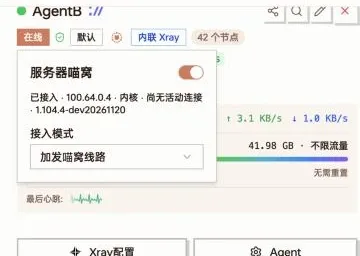
Joined: MeowNest address, network stack, connection path and Tailscale version
| Shown | Meaning |
|---|---|
| Joining | Enrolling |
Joined · 100.64.x.y |
Enrolled; followed by the server’s MeowNest address |
| Kernel / Userspace | Kernel: a mmwx-mesh interface was created on the server; Userspace: in containers without TUN, MeowNest connections are accepted only on node ports; works the same |
| Direct / Relayed / No active connections | The path used by the last device that connected |
| Join failed | The reason is shown below; see Troubleshooting |
| Agent offline | The agent is offline; recovers automatically when it’s back |
Switching it off makes the server leave MeowNest, and the MeowNest nodes disappear from subscriptions.
Client: turn on MeowNest and use the MeowNest routes
Section titled “Client: turn on MeowNest and use the MeowNest routes”MeowX asks the panel for MeowNest nodes only when all of these hold:
- You’re signed in to the panel with an admin account or an account MeowNest is opened to;
- MeowNest is on under Networking (iOS, Android, Windows, Linux: Me › Networking; macOS: menu bar panel Settings › Networking) and the device has joined;
- Whitelisted nodes through MeowNest is on under Networking (on by default);
- The subscription is from this panel (other providers’ subscriptions aren’t affected).
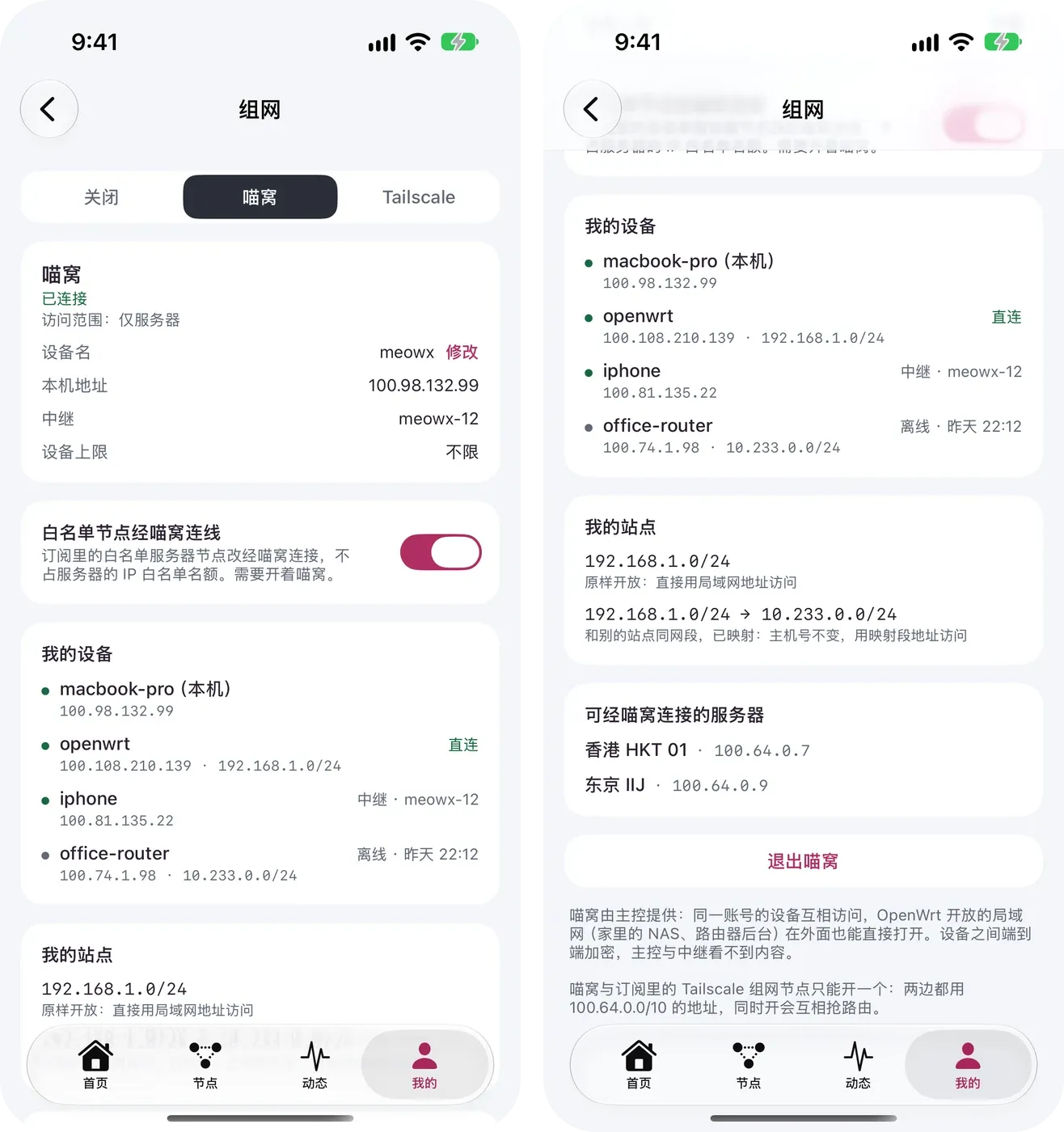
iOS Me › Networking with MeowNest selected: the “Whitelisted nodes through MeowNest” switch sits under the status card; further down, “Servers reachable through MeowNest” lists the joined servers and their MeowNest addresses (sample data; the app UI is in Chinese here)
“Servers reachable through MeowNest” appears only when servers have joined and this account can use them.
When you turn MeowNest on or off, or toggle “Whitelisted nodes through MeowNest”, MeowX re-pulls this panel’s subscription by itself; no manual refresh needed.
MeowNest nodes then show a 喵窝 badge in the node list:
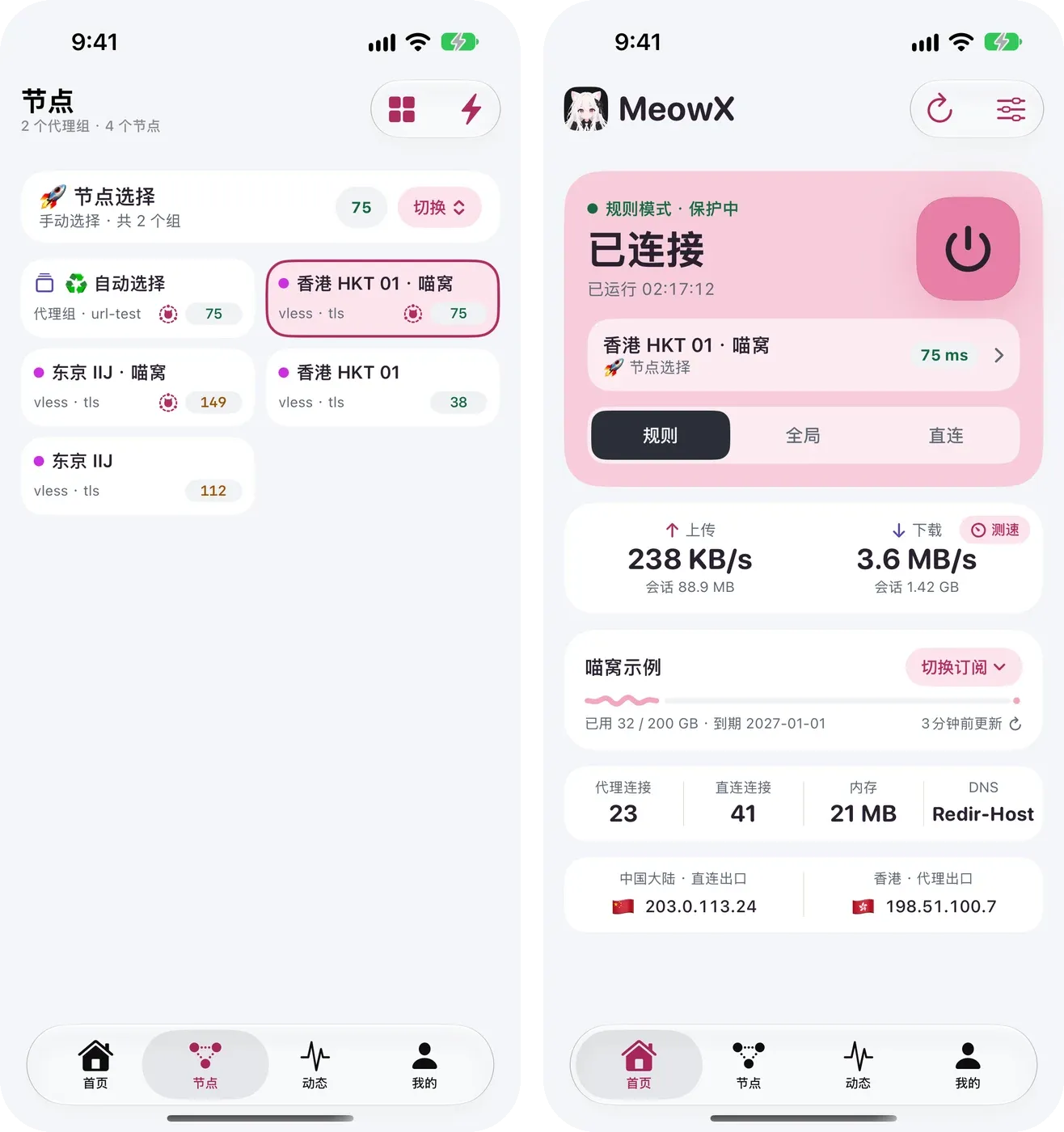
Left: “· 喵窝” nodes on the Nodes page carry a cat badge; right: after picking one, Home shows it connected (sample data)
- “Add MeowNest routes”: pick “node name · 喵窝” to go through MeowNest, or the original node for the public route;
- “MeowNest only”: the original node already is the MeowNest version; pick it as usual.
MeowNest nodes always dial through MeowNest. When MeowNest is turned off or you sign out, the client removes these nodes from its config, so no unreachable leftovers stay behind.
Servers that block outbound 80/443
Section titled “Servers that block outbound 80/443”Some providers block a server’s outbound 80/443. Set these servers up per Servers that block outbound 80/443 first: configure the agent alternate address and connect the server through it. MeowNest enrollment adds a few points.
The control address switches to the alternate address
Section titled “The control address switches to the alternate address”To join, the server has to reach MeowNest’s control address. By default that’s the panel domain (443), which a blocked server can’t reach. Since panel v0.6.4-beta.8 this is handled automatically:
- For servers marked “connect through the alternate address” whose control address is on 80/443, enrollment uses the agent alternate address as the control address;
- If the control address isn’t on 80/443 to begin with (e.g. a dedicated entry on 8443), it’s used as is.
Alternate-address sites in the panel-managed Nginx / Caddy allow MeowNest’s control paths (/key, /ts2021, /machine/) automatically. If you run the reverse proxy yourself (your own Nginx, BT Panel, etc.), add these to the alternate-address site:
# MeowNest control connection (for servers joining through the alternate address)location = /ts2021 {    proxy_pass                          http://127.0.0.1:12889;    proxy_http_version                  1.1;    proxy_set_header Upgrade            $http_upgrade;    proxy_set_header Connection         "upgrade";    proxy_set_header Host               $host;    proxy_set_header X-Forwarded-For    $proxy_add_x_forwarded_for;    proxy_buffering                     off;    proxy_send_timeout                  1h;    proxy_read_timeout                  1h;}
location ~ ^/(?:key$|machine/) {    proxy_pass                          http://127.0.0.1:12889;    proxy_http_version                  1.1;    proxy_set_header Host               $host;    proxy_set_header X-Forwarded-For    $proxy_add_x_forwarded_for;    proxy_buffering                     off;    proxy_read_timeout                  120s;}
Replace 12889 with the panel’s own port. An alternate address that connects straight to the panel port (http://IP:12889) needs no reverse proxy (agent v1.3.9-beta.5 or later).
The alternate address must not go through a CDN
Section titled “The alternate address must not go through a CDN”MeowNest’s control connection (/ts2021) is a custom HTTP upgrade, not WebSocket, and CDNs such as Cloudflare (orange cloud) don’t pass it. The agent can reach the panel through a CDN, but MeowNest enrollment times out. If the alternate address goes through a CDN, either:
- Give the alternate address a separate subdomain that bypasses the CDN (Cloudflare grey cloud), same port; or
- Turn on the dedicated entry in MeowNest settings with a non-CDN subdomain and a port other than 80/443 (e.g. 8443), allowed in the panel’s firewall / security group. When the control address isn’t on 80/443, every server uses it directly.
Relay port
Section titled “Relay port”When servers and devices can’t connect directly, traffic goes through the relay. The relay’s TCP port prefers 443, which a blocked server can’t reach; such a server can then only connect directly (UDP). If clients keep failing to reach this server after “No active connections”, check the path in the server’s MeowNest popover and whether the server’s outbound UDP is blocked too.
When no alternate address is set
Section titled “When no alternate address is set”If a server is marked “connect through the alternate address”, the control address is on 80/443 and the panel has no agent alternate address, no enrollment credential is sent; the status shows “Join failed” with the reason: set an alternate address under “Agent communication address”, or turn on the dedicated entry.
Status and troubleshooting
Section titled “Status and troubleshooting”When a server shows “Join failed”, the popover gives the reason. Common ones:
| Message | Cause and fix |
|---|---|
| Can’t reach the control address xxx | The server can’t reach the control address: check the panel’s firewall / security group; for servers that block outbound 80/443, set up the alternate address or dedicated entry as above |
| The control plane didn’t accept this enrollment key | The credential expired or was rejected. The panel resends one after the old one expires (10 minutes); nothing to do. If it keeps happening, check the panel log |
| The control plane no longer recognizes this server’s saved identity | After a restart the server reconnected with its saved identity, but the device is gone from the panel (deleted, or never enrolled). The panel resends a credential automatically |
| License doesn’t include MeowNest server enrollment | Your license lacks the feature; you can only switch it off |
Panel-side logs: search headscale under Logs › System logs to see errors such as enrollment rejected by the control plane.
No “· 喵窝” nodes in MeowX
Check in order: is the account an admin or listed under “Accounts that can use MeowNest”; is MeowNest on in the client and joined; is “Whitelisted nodes through MeowNest” on; is the server’s join mode “Join only” (which doesn’t change subscriptions); is the node in this account’s subscription.