
Template Management
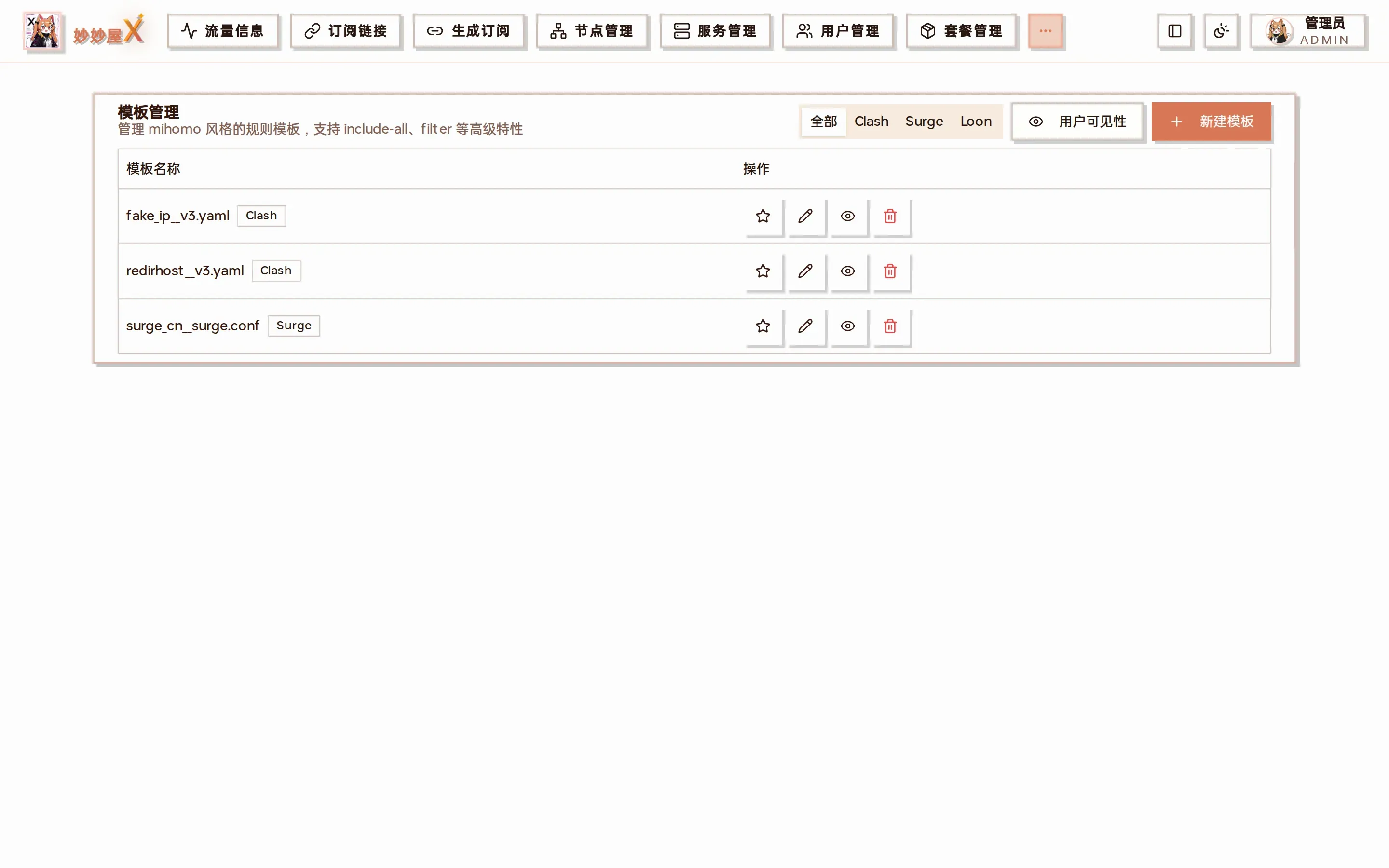
Templates — all templates grouped by Clash / Surge / Loon, with edit / preview / delete and user visibility control
Template Management V3 is MiaoMiaoWu X’s template system. It uses mihomo-style proxy-group syntax with include-all, filter and other advanced features, so you no longer have to edit subscriptions by hand when adding nodes: new nodes are added to subscriptions automatically according to the template.
Admin feature · mihomo compatible · visual editor
Page features
Section titled “Page features”| Feature | Description |
|---|---|
| Category filter | All / Clash / Surge / Loon; built-in defaults include fake ip, redirhost (Clash) and surge cn |
| User visibility | Controls which templates regular users can pick on their subscription page |
| New template | See “Ways to create a template” below |
| Edit | Visual editor + YAML code, two modes |
| Preview | Template on the left, the final subscription rendered with current nodes on the right |
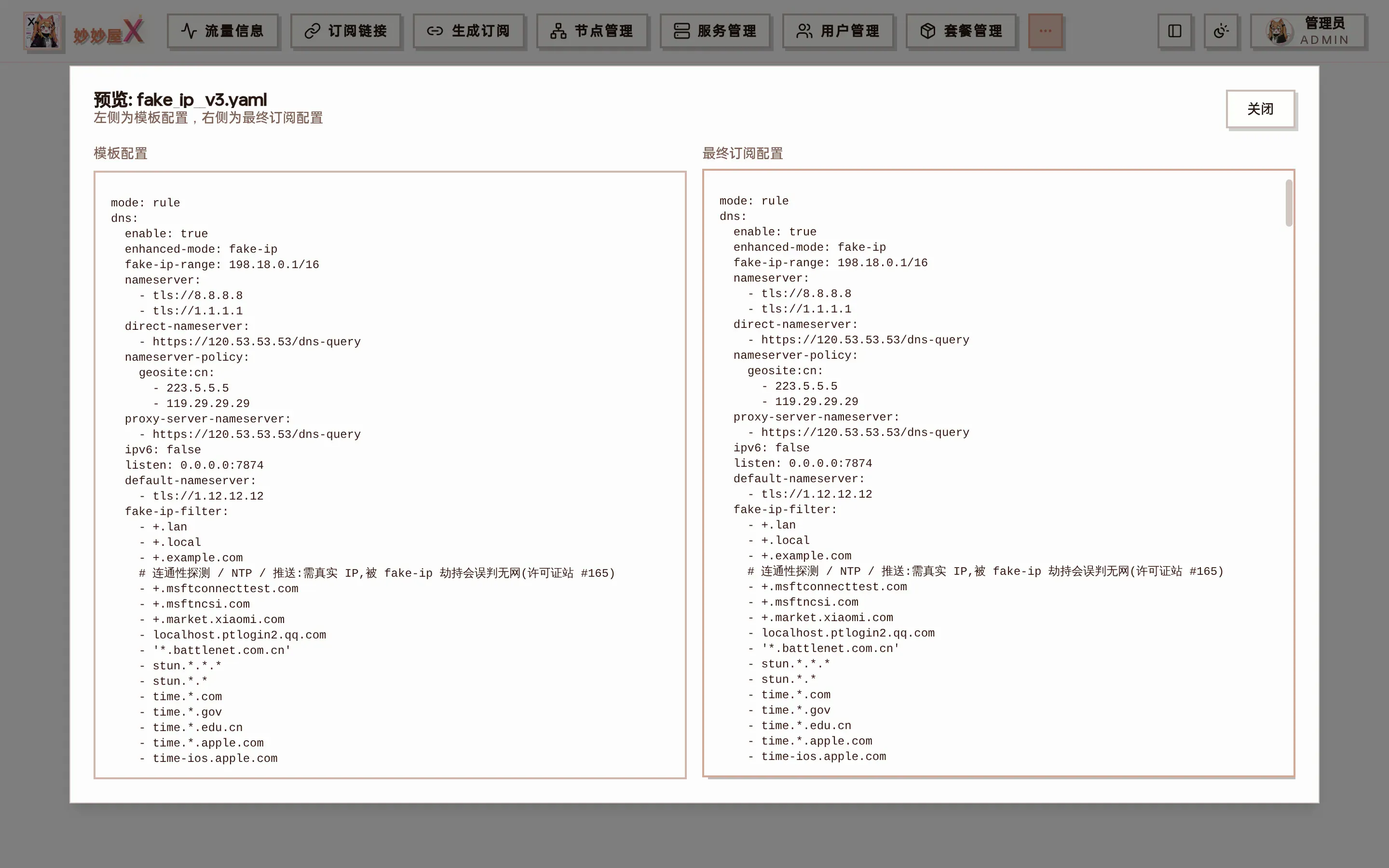
Preview: template YAML on the left, the final subscription rendered from the current node table on the right
Core concepts
Section titled “Core concepts”V3 templates use mihomo proxy-group syntax and assign nodes declaratively:
Node inclusion
Section titled “Node inclusion”include-all- include all nodes and proxy providersinclude-all-proxies- include proxy nodes onlyinclude-all-providers- include proxy providers onlyinclude-type- include by node type
Node filtering
Section titled “Node filtering”filter- keep nodes matching a keywordexclude-filter- drop nodes matching a keywordexclude-type- drop by node type
Proxy-group attributes — each with an example
Section titled “Proxy-group attributes — each with an example”All available proxy-group attributes. Every YAML snippet is taken from the production template redirhost__v3.yaml and can be copied as is.
The group name shown in the client UI; emoji can be written directly into the name (👌 🚀 ♻️ …).
proxy-groups: - name: 🚀 Manual # shown as-is in the client UI type: selectGroup type: select (manual), url-test (fastest), fallback (primary/backup), load-balance, relay (chain via dialer-proxy-group).
# 5 typesproxy-groups:  - name: 🚀 Manual    type: select              # user picks from the list
  - name: ♻️ Auto    type: url-test            # picks the lowest-latency node    url: https://cp.cloudflare.com/generate_204    interval: 300
  - name: 🛡️ Fallback    type: fallback            # ordered, switches when the primary dies
  - name: ⚖️ Balance    type: load-balance        # spreads traffic across nodes    strategy: round-robin
  - name: 🌌 Relay entry    type: select              # relay chains use dialer-proxy-group
proxies
Section titled “proxies”Proxies in the group: other group names, node names, DIRECT/REJECT, or the placeholders __PROXY_NODES__ / __PROXY_PROVIDERS__ (expanded to all nodes / providers at generation time).
proxy-groups: - name: 🚀 Manual type: select include-all: true proxies: - ♻️ Auto # reference another group - __PROXY_PROVIDERS__ # placeholder: all proxy-providers - __PROXY_NODES__ # placeholder: all nodes in the node table - 🌄 Landing - DIRECT # system outbound: direct - REJECT # system outbound: blockinclude-all
Section titled “include-all”Include all outbound proxies + all proxy providers (same as enabling both include-all-proxies and include-all-providers). The most common option and the core of “new nodes sync automatically”.
proxy-groups: - name: 🚀 Manual type: select include-all: true # all nodes + all providers proxies: - __PROXY_NODES__ - __PROXY_PROVIDERS__include-all-proxies
Section titled “include-all-proxies”Only nodes from the node table, no external proxy-providers. For “my own nodes only”.
proxy-groups: - name: 🚀 Nodes only type: select include-all-proxies: true # node table only, no external providers proxies: - __PROXY_NODES__include-all-providers
Section titled “include-all-providers”Only external proxy-providers, no node-table nodes. For mixed subscriptions.
proxy-groups: - name: 🚀 Providers only type: select include-all-providers: true # external providers only proxies: - __PROXY_PROVIDERS__include-type
Section titled “include-type”Include nodes by protocol type, separated by |. Common values: vless / vmess / trojan / ss / hysteria / hysteria2 / tuic … Case-insensitive.
proxy-groups: - name: 🚀 VLESS only type: select include-all: true include-type: 'vless|vmess' # only VLESS and VMess nodes proxies: - __PROXY_NODES__exclude-type
Section titled “exclude-type”Exclude by protocol type. Same syntax as include-type; can be combined with include-* for layered filtering.
proxy-groups: - name: 🚀 No SS type: select include-all: true exclude-type: 'ss|hysteria' # drop SS and Hysteria proxies: - __PROXY_NODES__filter
Section titled “filter”Regex on node names; matches are included. Separate keywords with |, e.g. filter: ‘HK|香港|Hong Kong’.
proxy-groups:  - name: 🌠 Relay    type: select    include-all: true    filter: 中转|CO|co            # names containing any keyword    proxies:      - __PROXY_PROVIDERS__      - __PROXY_NODES__
  - name: 🌄 Landing    type: select    include-all: true    filter: LD|落地|Bage|bage|jinx|ctc   # multi-keyword regex
exclude-filter
Section titled “exclude-filter”Regex on node names; matches are excluded. Typically “test”, “TEST”, “dead” … Can be combined with filter — filter selects first, exclude-filter removes.
proxy-groups: - name: 🚀 Usable type: select include-all: true exclude-filter: 测试|TEST|故障|失效|DEAD # skip these proxies: - __PROXY_NODES__Test URL for url-test / fallback / load-balance. Default https://cp.cloudflare.com/generate\_204 (empty body, fast).
proxy-groups: - name: ♻️ Auto type: url-test include-all: true url: https://cp.cloudflare.com/generate_204 # default interval: 300 tolerance: 50interval
Section titled “interval”Test interval in seconds for url-test / fallback / load-balance, default 300. Smaller = more responsive, more bandwidth.
proxy-groups: - name: ♻️ Auto type: url-test include-all: true url: https://cp.cloudflare.com/generate_204 interval: 300 # seconds, default 300tolerance
Section titled “tolerance”url-test tolerance in ms, default 50. The current node is kept while its latency is below “fastest + tolerance”, avoiding flapping between close nodes.
proxy-groups: - name: ♻️ Auto type: url-test include-all: true url: https://cp.cloudflare.com/generate_204 interval: 300 tolerance: 50 # switch only if >50ms fasterdialer-proxy-group
Section titled “dialer-proxy-group”Relay group name. Traffic of this group first goes through the node selected in the relay group: client → relay → this group’s node → target. The visual editor sets it via the link icon on the right of a group.
proxy-groups:  - name: 🌠 Relay    type: select    include-all: true    filter: 中转|CO|co
  - name: 🌄 Landing    type: select    include-all: true    filter: LD|落地|Bage|bage    proxies:      - __PROXY_PROVIDERS__      - __PROXY_NODES__    dialer-proxy-group: 🌠 Relay           # chain: via the relay group's selected node
hidden
Section titled “hidden”Default false. When true the group is hidden in the client UI but can still be referenced by rules. Useful for internal bridge groups.
proxy-groups: - name: 🔒 Bridge type: select hidden: true # hidden from the client list proxies: - DIRECTGroup icon: an image URL, or simply an emoji in the name.
proxy-groups: - name: 🚀 Manual type: select icon: https://example.com/icons/proxy.png # icon URL (or emoji in the name) proxies: - __PROXY_NODES__YAML variables
Section titled “YAML variables”V3 templates allow custom top-level variables to avoid repeating complex regexes across groups:
- Any non-Clash top-level string field acts as a variable
- filter and exclude-filter can reference the variable name
- Variables are removed from the generated config
hkFilter: 'HK|香港|Hong Kong'
proxy-groups:  - name: 🇭🇰 Hong Kong    type: url-test    include-all: true    filter: hkFilter          # reference the variable  - name: 🇭🇰 HK manual    type: select    include-all: true    filter: hkFilter          # reuse; edit once
sing-box templates (.json)
Section titled “sing-box templates (.json)”Besides Clash / Surge / Loon / Quantumult X, template management also supports sing-box templates. A sing-box template is a complete sing-box configuration (JSON, .json extension); the master fills in the nodes when it generates the subscription.
Pulling nodes into a group
Section titled “Pulling nodes into a group”Put the placeholder {all} in the outbounds of a group (selector / urltest). It expands to every node of the subscription; add a filter in the same group to select by node name:
{ "type": "urltest", "tag": "🇭🇰 Hong Kong", "outbounds": ["{all}"], "filter": [ { "action": "include", "keywords": ["🇭🇰|HK|Hong Kong"] }, { "action": "exclude", "keywords": ["x10|expired"] } ]}keywords are regular expressions (separate alternatives with |); include keeps only matching nodes, exclude removes them. The visual editor exposes them as two inputs, and you can always switch to the code tab and edit the JSON directly.
Using the template
Section titled “Using the template”- Bind it to a subscription file: pick a
.jsontemplate in Subscription management; nodes are selected by tags / node filters like any other template. - Make it the system default: click the star on a sing-box template in the list. When a client fetches a subscription without a bound template in sing-box format, this template is applied to that subscription’s own nodes.
With neither set, sing-box subscriptions keep returning nodes only, exactly as before.
Handled automatically at generation time
Section titled “Handled automatically at generation time”- A group left with no nodes after filtering is reduced to
directonly, so clients do not reject the config - Rules,
finaland DNSdetourentries pointing at a missing outbound lose that reference - Snell nodes are not put into templated sing-box subscriptions (sing-box clients do not support them yet); REALITY nodes with an invalid public key are skipped too
Supported node types
Section titled “Supported node types”include-type and exclude-type accept (case-insensitive):
vless vmess trojan ss shadowsocks hysteria hysteria2 tuic wireguard anytls socks5 http
Region groups
Section titled “Region groups”V3 templates can generate region groups automatically: turn on the “Region groups” switch when editing a template. Nodes are matched to regions by name and grouped accordingly.
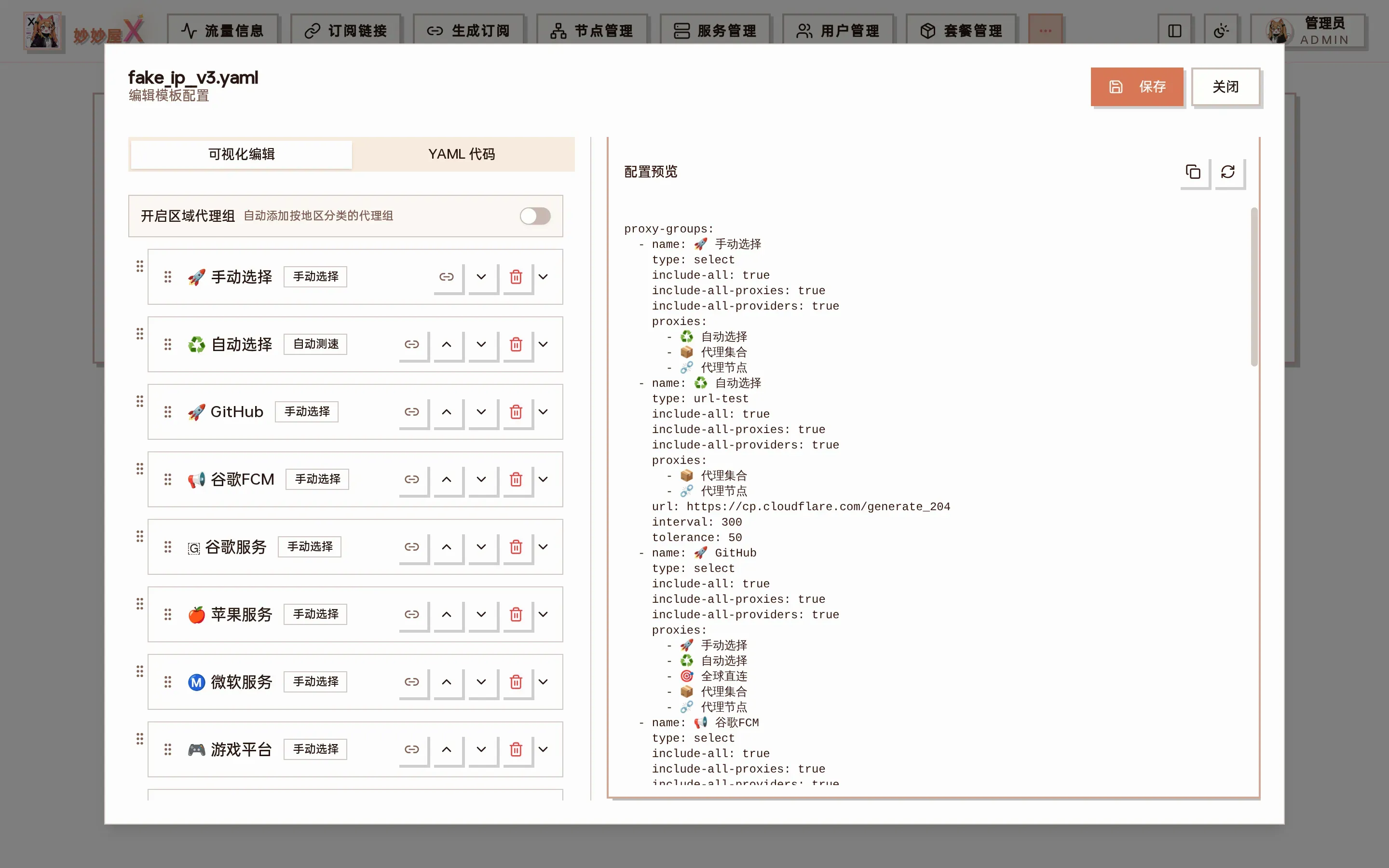
Edit template: “Enable region groups” at the top left, visual editing of each group (manual / auto test) below, switchable to YAML mode
- With the switch on, all region groups can be included
- Groups match region keywords in node names
- “Other regions” collects nodes that match no specific region
- Region groups with no matching nodes are removed from the subscription automatically
Ways to create a template
Section titled “Ways to create a template”Click “New Template”, choose the type (Clash .yaml / Surge .conf / Loon .lcf) and the source:
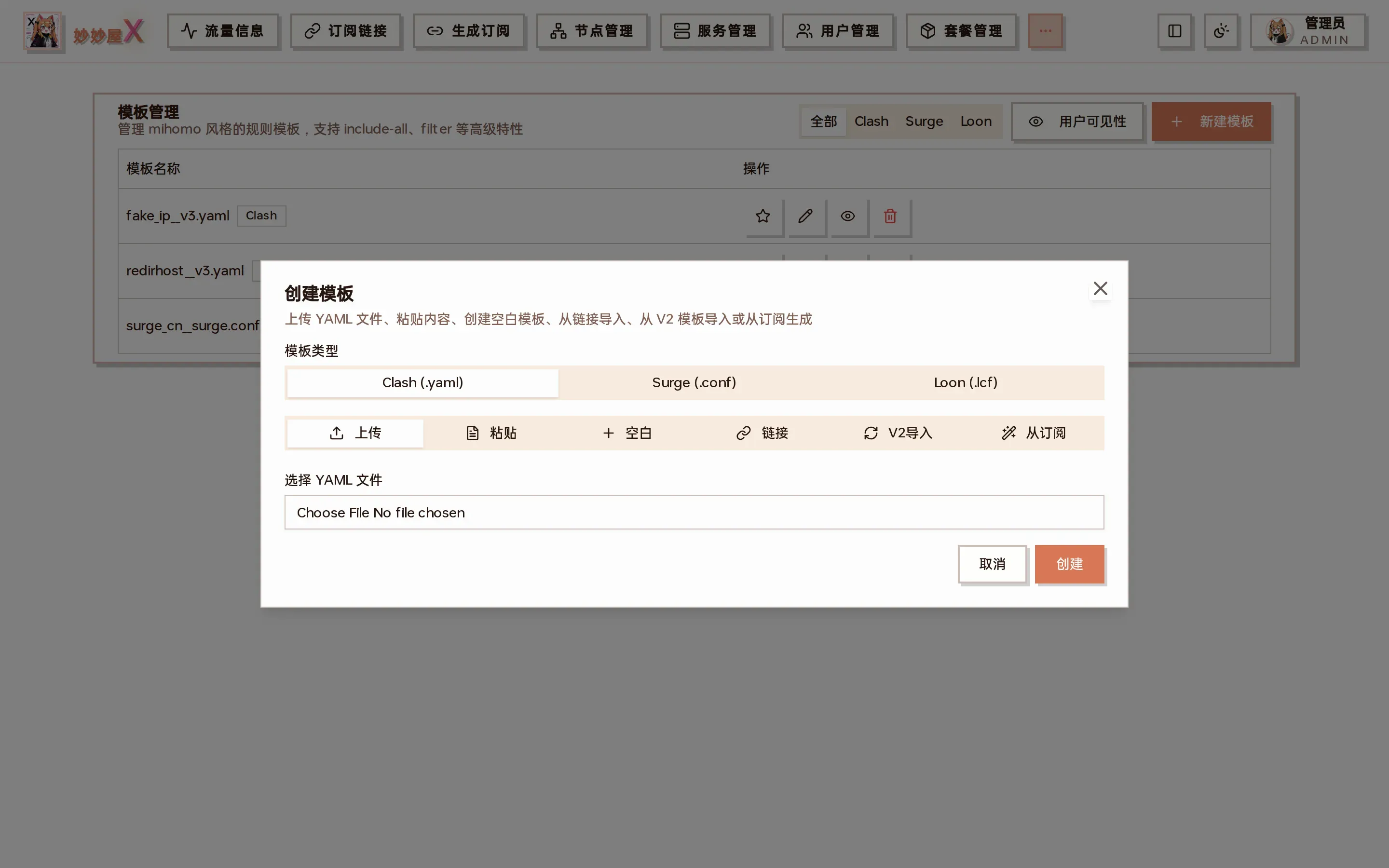
Create template: Upload / Paste / Blank / Link / V2 import / From subscription
Upload a file
Section titled “Upload a file”Upload a local YAML template; the filename becomes the template name.
Paste text
Section titled “Paste text”Paste YAML content and give it a name.
Blank template
Section titled “Blank template”Start from a basic skeleton and add groups in the visual editor.
From a link
Section titled “From a link”Enter a remote YAML URL; it is fetched and saved as a template.
Convert from V2
Section titled “Convert from V2”Convert an existing V2 (subconverter INI) template; custom_proxy_group entries become proxy groups.
From an existing subscription
Section titled “From an existing subscription”Analyze the proxy groups of an existing subscription and generate filter regexes and include-all settings automatically to reproduce its structure.
Visual editor
Section titled “Visual editor”Configure groups without writing YAML:
- Filter keywords: generates the filter regex
- Exclude keywords: generates the exclude-filter regex
- Node types: multi-select types to include / exclude
- Include options: one-click include-all, include-all-proxies …
- Icon & hidden: set the group icon or hide the group
- Group references: pick and drag-sort other groups
- Relay group: the link icon sets dialer-proxy-group for chaining
- Live preview: generated YAML on the right
Visual and YAML modes can be switched at any time; data stays in sync.
Subscription binding
Section titled “Subscription binding”A V3 template can be bound to a subscription; the subscription is then generated entirely from the template:
Binding flow
Section titled “Binding flow”- Find the subscription file in Subscriptions
- Pick the template in the “V3 template” column
- The subscription is regenerated from the template rules
Packages can also set Clash / Surge / Loon templates individually, see Packages.
Behavior after binding
Section titled “Behavior after binding”- The subscription is generated from the template; its previous rules are ignored
- Group filters match against every node in the node table
- Matched nodes are added to the group’s proxies and the top-level proxies
- include-*, filter and exclude-* attributes are stripped at generation time
- One subscription binds one template
Auto-update triggers
Section titled “Auto-update triggers”- Adding a node that matches a group updates bound subscriptions automatically
- Deleting a node removes it from bound subscriptions
- Editing the template regenerates every bound subscription
Common scenarios
Section titled “Common scenarios”Copy these into your template as-is or combine them.
Scenario 1: new nodes sync into subscriptions automatically (most common)
Section titled “Scenario 1: new nodes sync into subscriptions automatically (most common)”- Goal: every new node appears in all subscriptions bound to the template without editing files. The core V3 capability.
- Config: declare include-all (all proxies + providers) or include-all-proxies (nodes only) on a group.
- Effect: each new node is synced to every bound subscription immediately; deletions likewise.
Scenario 2: group by region (HK / JP / US … detected automatically)
Section titled “Scenario 2: group by region (HK / JP / US … detected automatically)”- Goal: subscriptions get “HK nodes”, “JP nodes”, “US nodes” groups and new nodes land in the right one.
- Config: turn on “Region groups” in the edit dialog, or write filters such as
filter: 'HK|香港|Hong'per group. - Effect: a new node named “HK-04” joins the “HK nodes” group; “Other regions” catches the rest and empty region groups are dropped automatically.
Scenario 3: exclude test / dead nodes
Section titled “Scenario 3: exclude test / dead nodes”- Goal: nodes marked “TEST”, “测试”, “DEAD” … never reach users.
- Config: declare exclude-filter on the group; filter and exclude-filter combine — filter pulls in, exclude-filter pushes out.
- Effect: any node containing a keyword is excluded, new nodes included.
Scenario 4: filter by protocol (VLESS only / exclude Shadowsocks)
Section titled “Scenario 4: filter by protocol (VLESS only / exclude Shadowsocks)”- Goal: a group containing only VLESS, or excluding SS.
- Config: include-type to pull by protocol (| separated); exclude-type to drop. Case-insensitive.
- Effect:
include-type: vless|vmessshows only VLESS and VMess;exclude-type: ss|hysteriadrops SS and Hysteria.
Scenario 5: relay chain (client → relay → landing → target)
Section titled “Scenario 5: relay chain (client → relay → landing → target)”- Goal: chained routing, e.g. HK landing via JP relay.
- Config: set
dialer-proxy-group: <relay group>on the landing group, or use the link icon in the visual editor. - Effect: picking a node in “HK landing” routes client → JP relay → HK landing → target.
Useful combinations
Section titled “Useful combinations”- include-all + filter: include everything, then regex-select (e.g. only nodes containing IPLC)
- include-all + exclude-filter + exclude-type: include all → drop keywords → drop protocols
- Top-level variables (e.g. hkFilter: ‘HK|香港’) reused across groups so you edit once
- url-test/fallback groups + include-all + filter: auto-pick the fastest node in a region
Full template example
Section titled “Full template example”Taken from the built-in rule_templates/redirhost__v3.yaml — a good starting point.
mode: ruledns:  enable: true  enhanced-mode: redir-host  nameserver:    - https://8.8.8.8/dns-query/dns-query#🚀 节点选择  direct-nameserver:    - https://120.53.53.53/dns-query  proxy-server-nameserver:    - https://120.53.53.53/dns-query  ipv6: false
proxies: null
proxy-groups:  - name: 🚀 手动选择    type: select    include-all: true    include-all-proxies: true    include-all-providers: true    proxies:      - ♻️ 自动选择      - __PROXY_PROVIDERS__      - __PROXY_NODES__      - 🌄 落地节点  - name: ♻️ 自动选择    type: url-test    include-all: true    proxies:      - __PROXY_PROVIDERS__      - __PROXY_NODES__    url: https://cp.cloudflare.com/generate_204    interval: 300    tolerance: 50  - name: 🌠 中转节点    type: select    include-all: true    filter: 中转|CO|co    proxies:      - __PROXY_PROVIDERS__      - __PROXY_NODES__  - name: 🌄 落地节点    type: select    include-all: true    filter: LD|落地|Bage|bage|jinx|ctc|Jinx|JINX|CTC|Luodi|luodi|LUODI    proxies:      - __PROXY_PROVIDERS__      - __PROXY_NODES__    dialer-proxy-group: 🌠 中转节点  - name: 🚀 GitHub    type: select    include-all: true    proxies:      - 🚀 手动选择      - ♻️ 自动选择      - 🎯 全球直连  - name: 🎯 全球直连    type: select    proxies:      - DIRECT  - name: 🐟 漏网之鱼    type: select    include-all: true    proxies:      - 🚀 手动选择      - ♻️ 自动选择      - 🎯 全球直连
rules: - GEOSITE,private,🎯 全球直连 - GEOIP,private,🎯 全球直连,no-resolve - GEOSITE,github,🚀 GitHub - GEOSITE,cn,🎯 全球直连 - GEOIP,cn,🎯 全球直连,no-resolve - MATCH,🐟 漏网之鱼- Template format: V3 templates are YAML and incompatible with V2 (INI), but can be migrated with the conversion feature
- Node filter rules (filter): by default all nodes are matched; this equals explicitly enabling providers + nodes (include-all)
- Regular expressions: filter and exclude-filter use regex syntax; escape special characters
- Group order: order affects the final config; put frequently used groups first
- Empty groups: a group whose filter matches no nodes is removed automatically
- Binding impact: after binding, the subscription’s own rules are completely overridden by the template