
Subscription Files
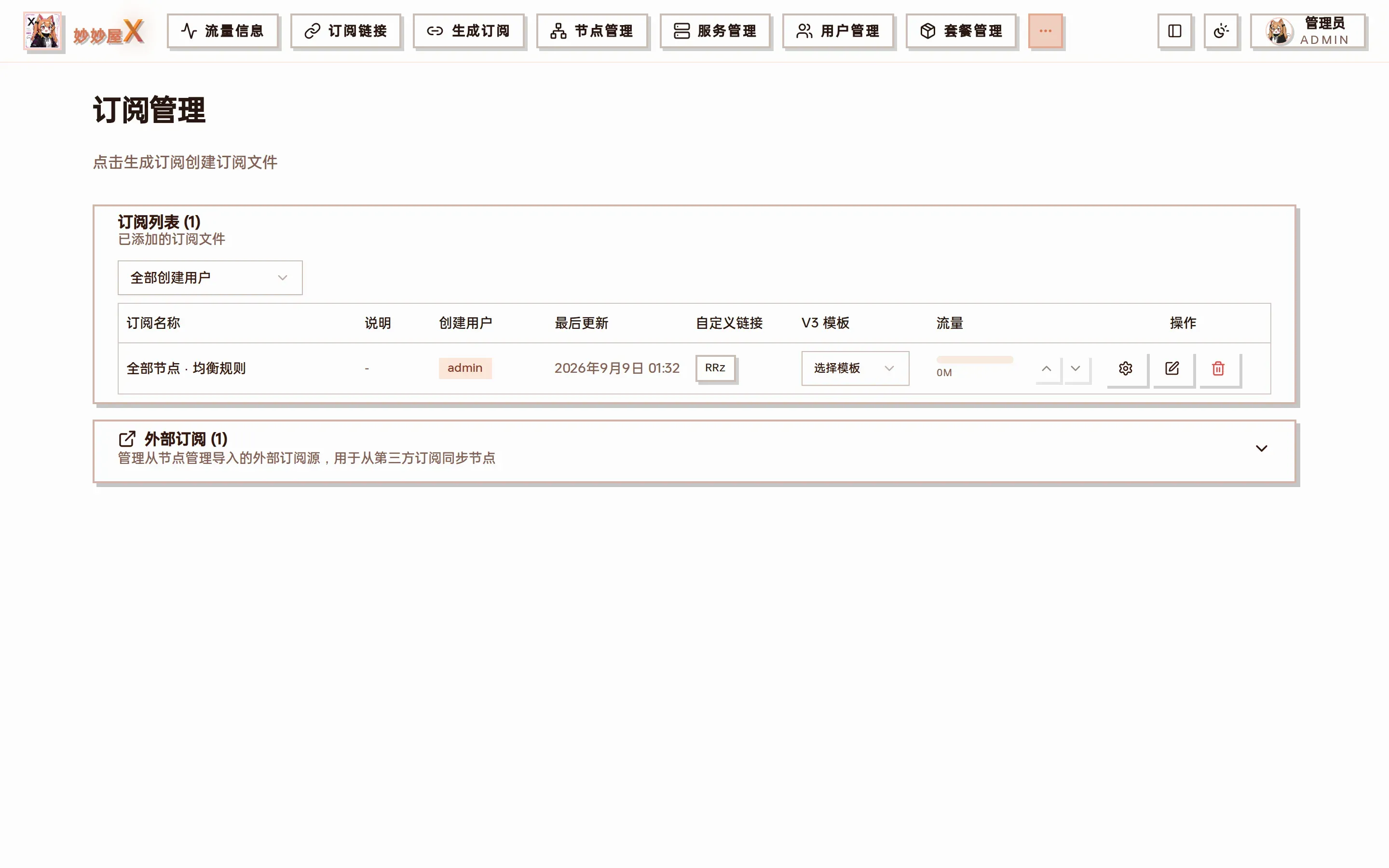
Subscriptions — “Subscription list” (generated files) on top, “External subscriptions” (third-party sources imported from Node Management) below
Overview
Section titled “Overview”The “Subscriptions” page manages two kinds of things:
- Subscription list: files saved from the Generator (YAML files in the subscribes directory). Each file can get a custom short link, a bound V3 template and a traffic display.
- External subscriptions: airport sources imported in Nodes → Import external nodes → Subscription. View, sync or delete them here; imported nodes merge with nodes generated from local Xray inbounds and are distributed through the same subscription system.
Subscription list
Section titled “Subscription list”| Column | Description |
|---|---|
| Name | Name given when saving |
| Created by | The user who generated the file; admins can filter with the dropdown above |
| Last updated | Last generation / regeneration time |
| Custom link | The file’s short code; click to copy the /x/<code> URL, editable to a custom code |
| V3 template | Bind a V3 template; downloads are then rendered dynamically and new nodes join automatically |
| Traffic | Used / limit bar for the subscription; arrows adjust the displayed limit |
| Actions | Settings (node scope / tag filter …), edit content, delete |
Supported external formats
Section titled “Supported external formats”- Clash/mihomo YAML
- Base64 node lists
- Single-line URIs (ss://, vmess://, vless://, trojan://)
Add an external subscription
Section titled “Add an external subscription”External subscriptions are imported on the Nodes page:
- Open “Nodes”, expand “Import external nodes” → “Subscription”
- Enter the URL, choose a User-Agent, optionally a tag
- Click “Import”; nodes are fetched and parsed, confirm with “Save nodes”
- Back in “Subscriptions” the source shows under “External subscriptions”
Auto update
Section titled “Auto update”External subscriptions can refresh on an interval. “System Settings → Subscription” also configures node-name filters, appended subscription info, traffic sync and automatic re-sync when nodes go offline, see System Settings.
| Interval | Use case |
|---|---|
| Manual | Stable nodes |
| Hourly | Frequently changing nodes |
| Daily | General use |
| Custom | As needed |
Traffic column
Section titled “Traffic column”Admins see the aggregate of the selected stat servers (all when none selected); only external subscriptions matched via selected_tags are added using their own upload/download/both rule. Regular users only see files they created: the limit comes from the primary package, usage aggregates all of the user’s package credentials and excludes external subscriptions. A file’s own limit can override the displayed limit. Full definitions: Traffic Accounting.
- Imported nodes are merged with local inbound nodes in the output
- Imported nodes can be enabled/disabled and renamed
- After changing a subscription URL, trigger one manual update