
WSS nodes behind Cloudflare / Lucky
For a VLESS + WSS node, xray only accepts plain WebSocket on 127.0.0.1:<local port>. TLS and the public port are handled by the reverse proxy in front of it. By default the master configures nginx and the certificate on the server for you. You can instead set up the reverse proxy yourself with Cloudflare Tunnel, Cloudflare CDN, Lucky, or your own nginx / Caddy.
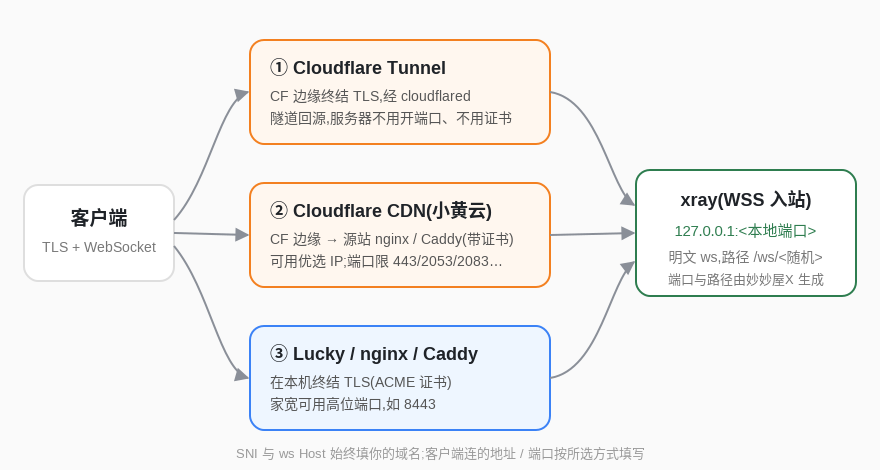
In every option the reverse proxy terminates TLS and forwards plain ws to xray on the same machine. The client’s SNI and ws Host are always your domain. The diagram labels are in Chinese.
Which option to choose
Section titled “Which option to choose”| Option | Good for | Ports to open on the server | Certificate | Public port |
|---|---|---|---|---|
| Cloudflare Tunnel | No public IP, no open ports, hide the origin IP | None | Not needed | 443 |
| Cloudflare CDN | Using Cloudflare preferred IPs | Origin HTTPS port | Required on the origin | 443 / 2053 / 2083 / 2087 / 2096 / 8443 |
| Lucky | Home broadband, NAS, soft routers already running Lucky | Lucky’s listening port | Issued by Lucky via ACME | Any; use a high port on home broadband |
| nginx / Caddy | You already run your own reverse proxy | Proxy port | From your proxy | Proxy port |
Step 1: create the WSS node in the panel
Section titled “Step 1: create the WSS node in the panel”-
Go to Nodes → Add node (or Server management → Xray inbounds → Add inbound), choose VLESS as the protocol, WSS as the transport, and Expert mode.
-
Choosing WSS opens the “VLESS WSS 入站环境检查” (WSS environment check) dialog. If nginx or a certificate is missing, click 我自己设置 WSS 反代 (set up the WSS proxy myself), then 继续创建节点 (continue).
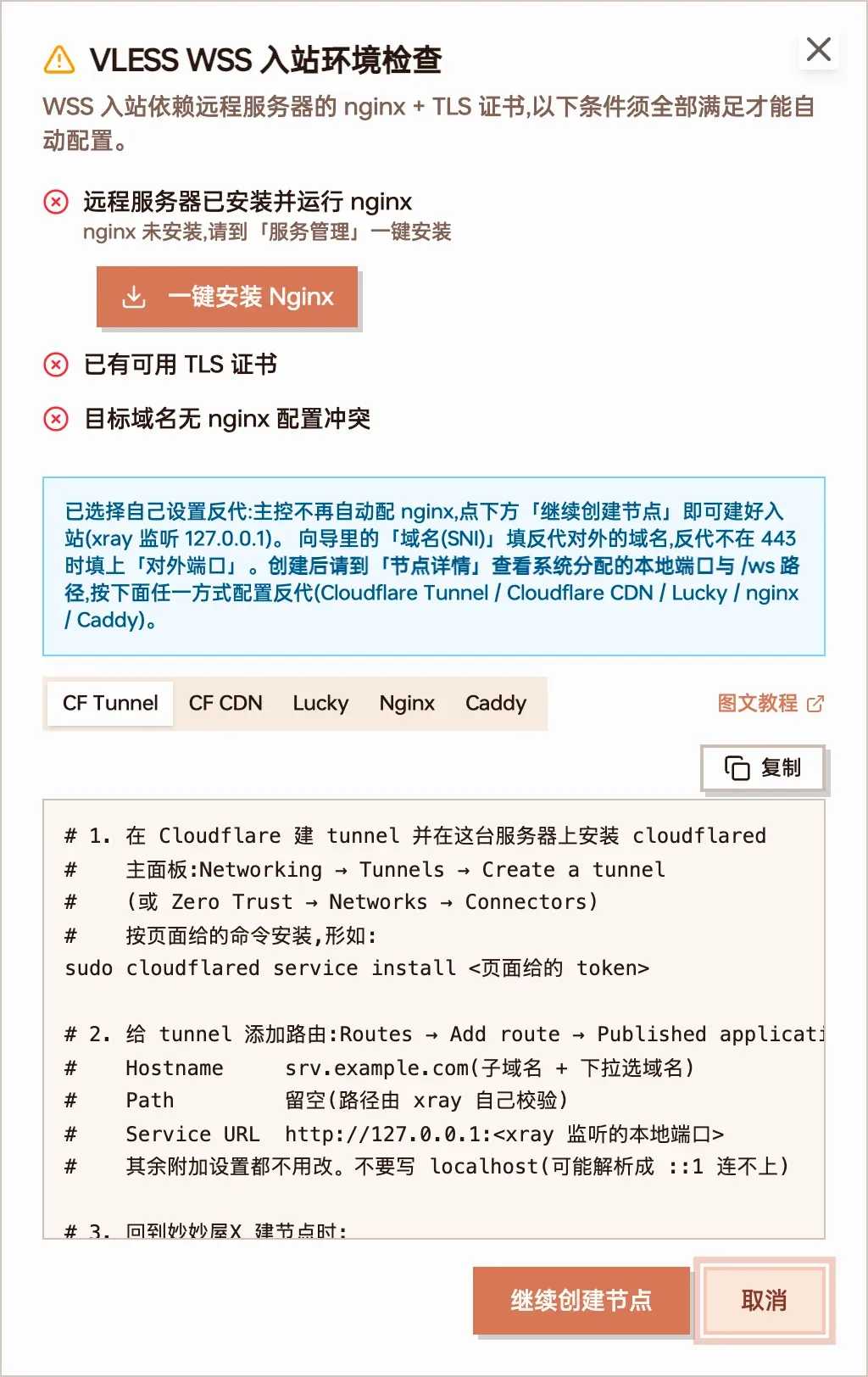
Templates for CF Tunnel / CF CDN / Lucky / Nginx / Caddy are shown below and can be copied directly.
-
If nginx and the certificate are already in place, the check passes and the dialog closes by itself. Tick 自己配置反代 (set up the reverse proxy yourself) under the WSS hint in the wizard instead.
-
Fill in these three fields for the option you chose:
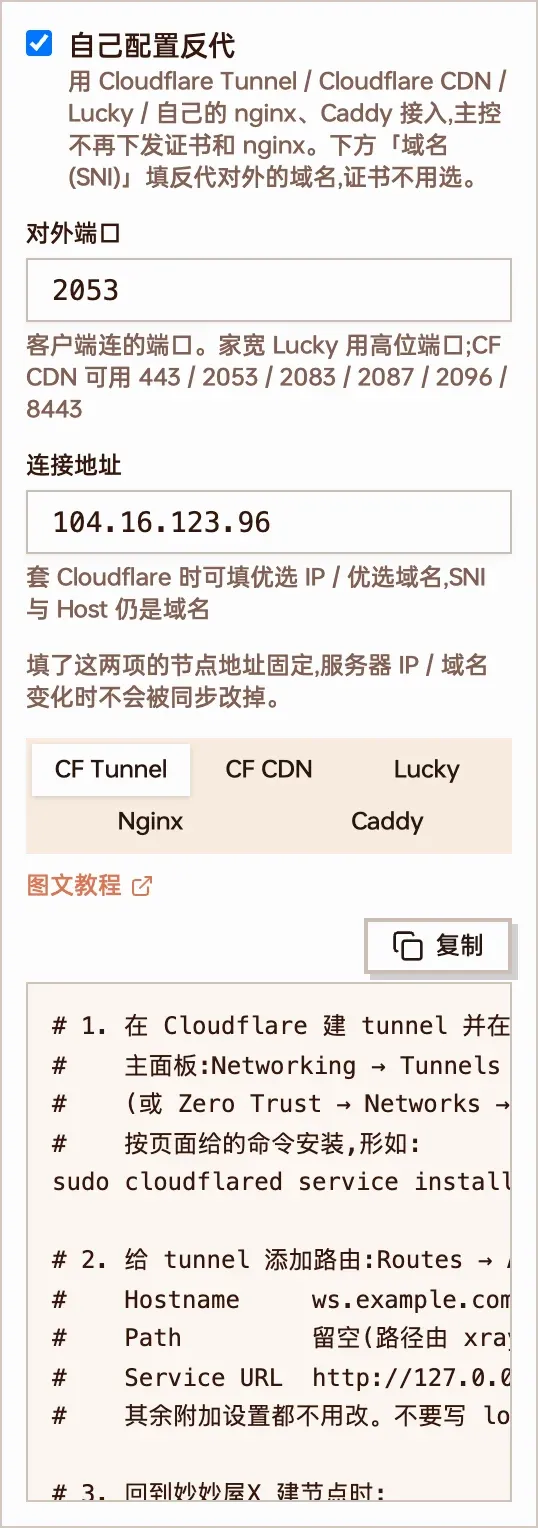
This example is filled for Cloudflare CDN: public port 2053 and a Cloudflare preferred IP as the connect address.
Field What to enter Server name (SNI) (in the security settings) The proxy’s public domain, e.g. ws.example.com. Used for both the client SNI and the ws Host对外端口 (public port) The port clients connect to. Empty = 443 连接地址 (connect address) The address clients connect to. Empty = the domain above. Behind Cloudflare you can enter a preferred IP or domain 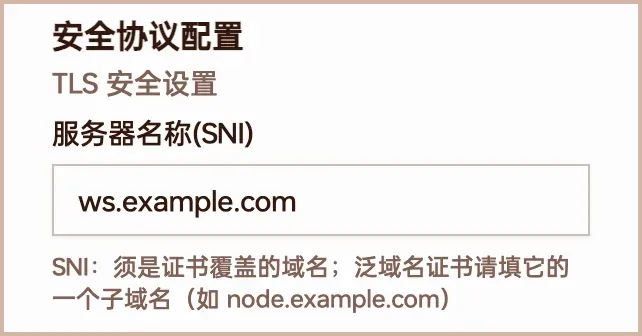
The certificate belongs to the proxy, so the wizard hides the certificate fields and no longer replaces the SNI with the server’s own domain.
-
After submitting, open node details to find the generated local port and ws path (like
/ws/abcd1234). You need both to configure the proxy.
Cloudflare Tunnel
Section titled “Cloudflare Tunnel”cloudflared runs on the same server as the agent and connects out to Cloudflare. The server does not open any inbound port and needs no certificate. The domain must be on Cloudflare.
-
In the Cloudflare dashboard open Networking → Tunnels and click Create a tunnel. Give it a name.
- You can also create it under Networks → Connectors in the Zero Trust dashboard; both manage the same tunnel.
-
Pick your OS on the page and run the install command on the server:
Terminal window sudo cloudflared service install <token from the page>Click Continue once the page shows the connector as connected.
-
On the tunnel’s Routes tab click Add route and choose Published application:
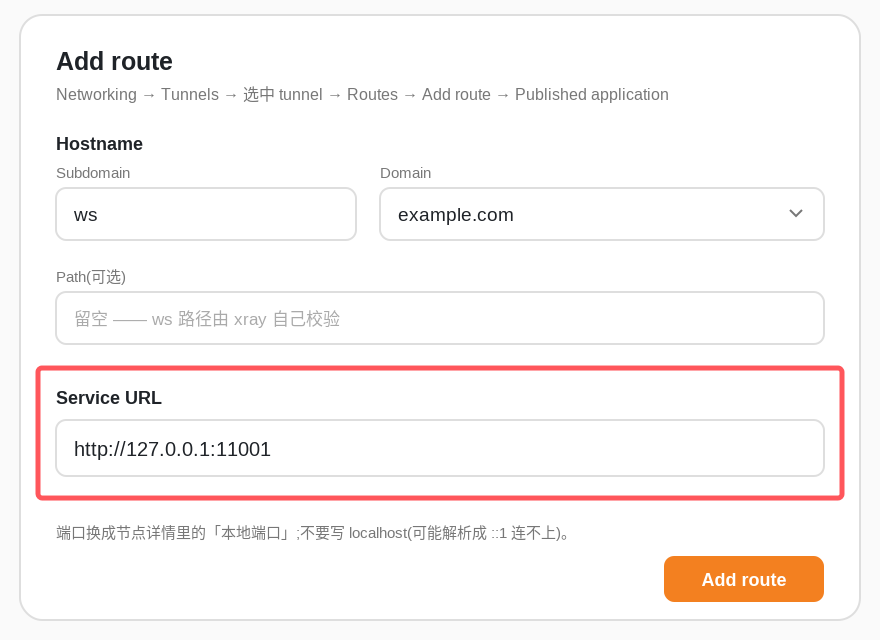
Illustration only; follow the actual Cloudflare UI.
Field Value Hostname Subdomain + domain, e.g. ws+example.comPath Leave empty. xray checks the ws path itself Service URL http://127.0.0.1:<local port>Leave the additional settings unchanged.
-
Back in the panel, set the node SNI to
ws.example.com, leave the public port empty (443), and leave the connect address empty or enter a preferred IP.
Cloudflare CDN (orange cloud)
Section titled “Cloudflare CDN (orange cloud)”With the domain proxied by Cloudflare, clients connect to the Cloudflare edge, which then connects to your server. The origin still needs an HTTPS reverse proxy — either the nginx configured by the master, or your own nginx / Caddy.
-
Origin: first make sure
https://<domain>:<port>/<ws path>handshakes without Cloudflare.- Master-managed: leave “set up the reverse proxy yourself” unchecked when creating the node.
- Self-managed: use the nginx / Caddy templates below.
-
Change three settings in Cloudflare:
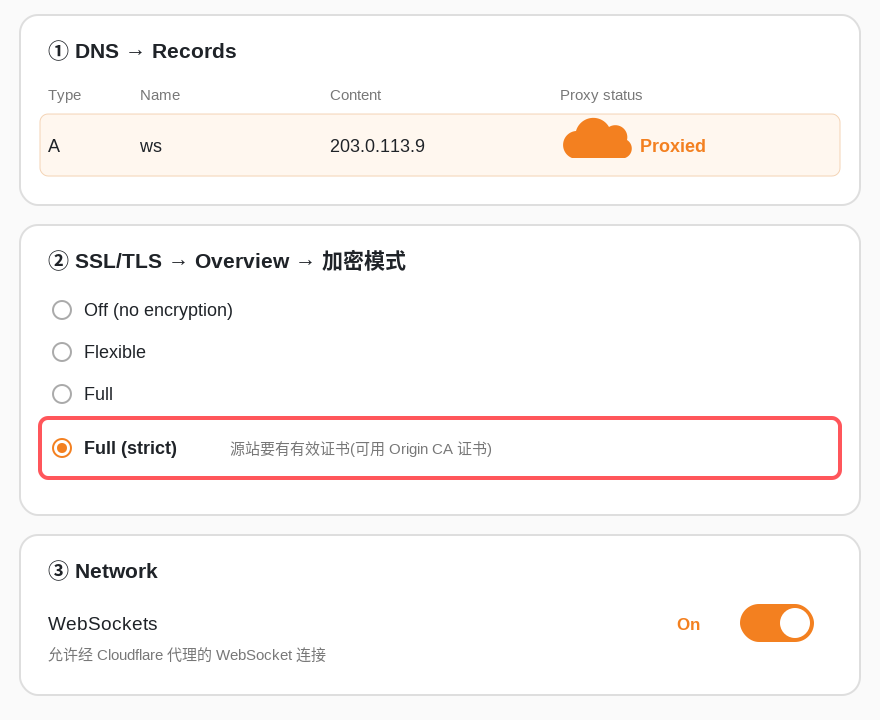
Illustration only; follow the actual Cloudflare UI.
- DNS → Records: set the domain’s A / AAAA record Proxy status to Proxied (orange cloud).
- SSL/TLS → Overview: choose Full (strict). The origin certificate can be Let’s Encrypt, or a Cloudflare Origin CA certificate from SSL/TLS → Origin Server → Create Certificate.
- Network: make sure WebSockets is On.
-
Back in the panel, fill in the node:
- SNI: your domain.
- Public port: must be one of Cloudflare’s proxied HTTPS ports —
443,2053,2083,2087,2096,8443. - Connect address: a preferred IP or domain, or empty to connect to the domain directly.
Lucky’s Web service reverse proxy and SSL certificates (ACME) can replace nginx. Lucky must run on the same machine as the agent so it can forward to 127.0.0.1. The labels below are the Chinese labels shown in Lucky.
-
Certificate: open SSL证书 → 添加 (SSL certificates → Add) and choose ACME.
- Certificate authority: ZeroSSL or Let’s Encrypt.
- DNS provider: your domain’s DNS host, with its API key.
- Domain list: the node domain, e.g.
ws.example.com. - Do not upload a Cloudflare Origin CA certificate; clients will not trust it.
-
Web service rule: open Web服务 → 添加Web服务规则 (Web service → Add rule).
- Listen type: IPv4 and/or IPv6.
- Listen port: home broadband usually blocks 80 / 443, so use a high port such as
8443. - TLS: on. HTTP3: off.
-
Sub-rule: click 添加子规则 (add sub-rule) under that rule.
- Web service type: 反向代理 (reverse proxy).
- Frontend address: domain only, e.g.
ws.example.com, withouthttps://or a port. - Backend address:
http://127.0.0.1:<local port>, without a path.
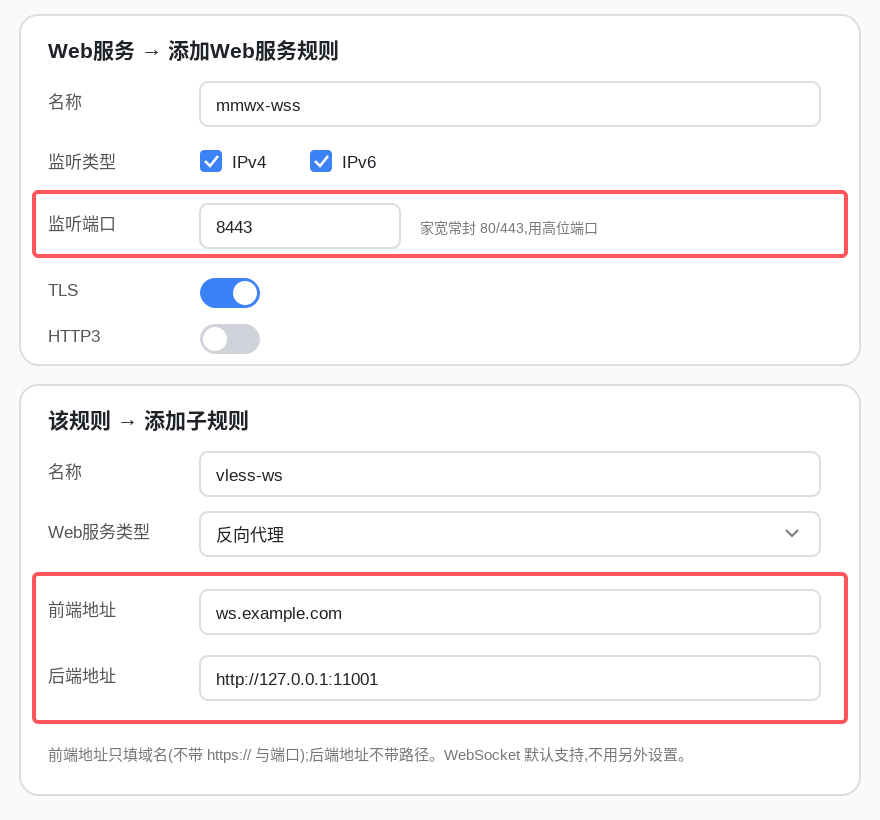
Illustration only; follow the actual Lucky UI. WebSocket is supported by default.
-
Back in the panel, set the node SNI to the frontend domain and the public port to Lucky’s listening port (e.g.
8443). Leave the connect address empty.
nginx / Caddy
Section titled “nginx / Caddy”If you already run nginx or Caddy, proxy the node’s ws path to 127.0.0.1:<local port>. The “set up the reverse proxy yourself” templates in the panel contain the complete configs.
server {    listen 443 ssl http2;    server_name ws.example.com;
    ssl_certificate     /path/to/fullchain.pem;    ssl_certificate_key /path/to/privkey.pem;
    location = /ws/abcd1234 {        if ($http_upgrade != "websocket") { return 404; }        proxy_pass         http://127.0.0.1:11001;        proxy_http_version 1.1;        proxy_set_header   Upgrade    $http_upgrade;        proxy_set_header   Connection "upgrade";        proxy_set_header   Host       $host;        proxy_read_timeout 5d;    }}
proxy_http_version 1.1 and both the Upgrade and Connection headers are required, or the WebSocket handshake fails.
ws.example.com { @ws path /ws/abcd1234 handle @ws { reverse_proxy 127.0.0.1:11001 } handle { respond 404 }}Caddy obtains the certificate and handles WebSocket automatically. Keep the two handle blocks: Caddy runs directives in its own fixed order where respond comes before reverse_proxy, so writing them side by side makes every request, including the ws path, return 404.
Replace the domain, /ws/abcd1234 and 11001 with the values from node details.
Check the connection
Section titled “Check the connection”Import the subscription into a client and connect once. If it fails, check in this order:
-
Is xray listening on the server:
ss -lntp | grep <local port>should show127.0.0.1:<local port>. -
Does the proxy handshake: from any machine (replace address, port and path):
Terminal window curl -i --http1.1 -H "Connection: Upgrade" -H "Upgrade: websocket" \-H "Sec-WebSocket-Version: 13" -H "Sec-WebSocket-Key: dGhlIHNhbXBsZSBub25jZQ==" \https://ws.example.com:443/ws/abcd1234101 Switching Protocolsmeans the proxy reaches xray. A 404 usually means a wrong path; a 502 usually means a wrong local port, or the proxy and xray are on different machines. -
Client parameters: SNI and ws Host are the domain, the port is the public port, and the path matches node details.
Related: Nodes, VLESS, Certificates, Publish the master with Cloudflare Tunnel.