
Xray Routing Management
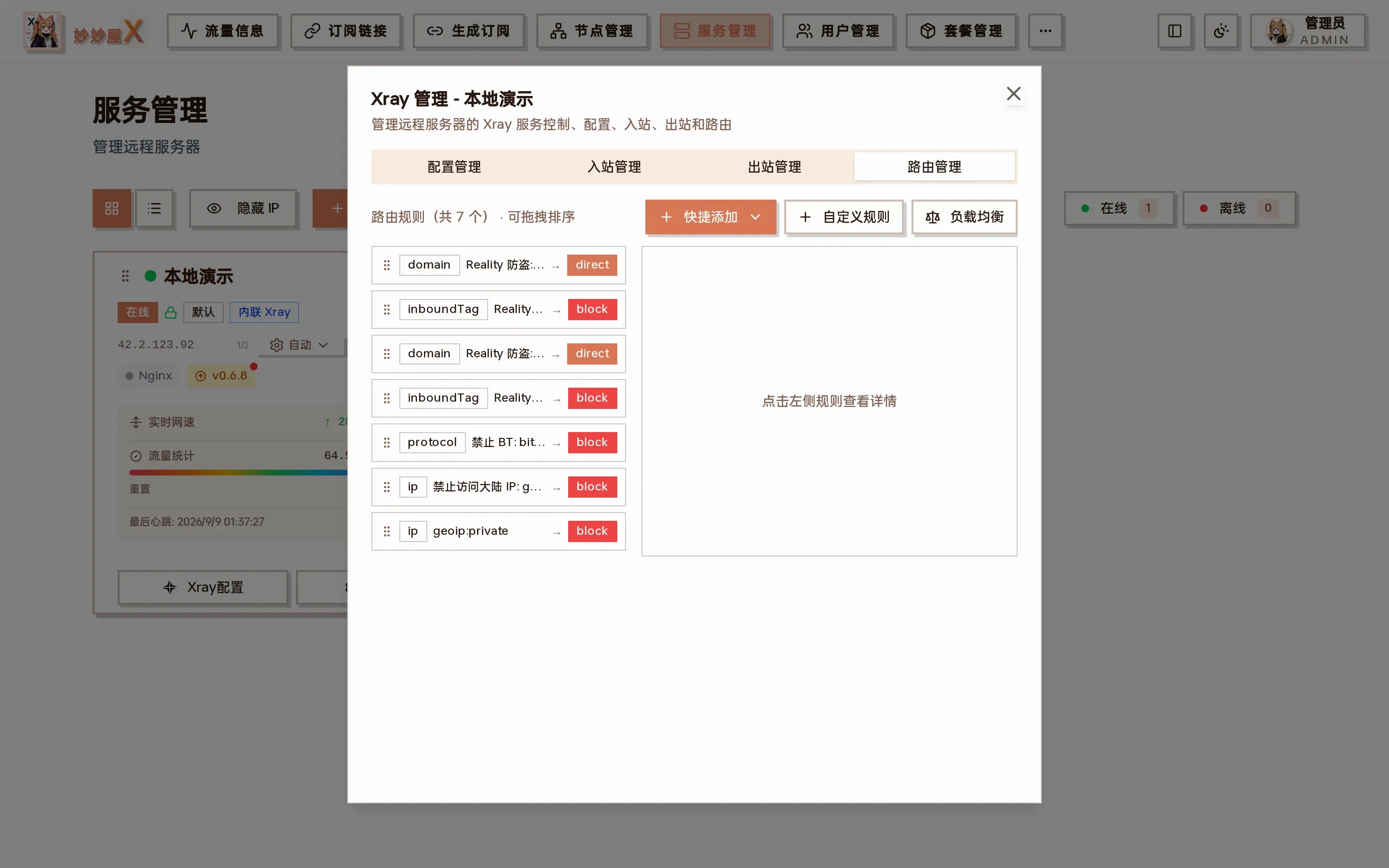
Xray management → Routing: drag-sortable rule list with “Quick add / Custom rule / Load balancer” at the top
Overview
Section titled “Overview”Xray routing is first-match: rules are evaluated top to bottom, the first hit wins, and unmatched traffic goes to the default outbound (outbounds[0]). MiaoMiaoWu X offers two entry points:
| Entry | Location | Description |
|---|---|---|
| Node routing | Nodes → the “Node routing” button on a node row | View and manage rules for a single node (inbound) |
| Routing panel | Servers → Xray Config → Routing tab | Manage all rules of a server, drag to reorder |
Matching semantics
Section titled “Matching semantics”- Rules match top to bottom; the first hit stops evaluation (first-match)
- Conditions inside one rule are AND (e.g. domain + protocol must both match)
- A rule with only inboundTag + outboundTag is a catch-all matching 100 % of that inbound
- Global rules after a catch-all no longer apply to that inbound
- Unmatched traffic uses outbounds[0] (default outbound)
Order therefore matters: specific rules first, catch-all last.
Node routing
Section titled “Node routing”Every remote server node in Nodes has a routing button opening the node routing dialog.
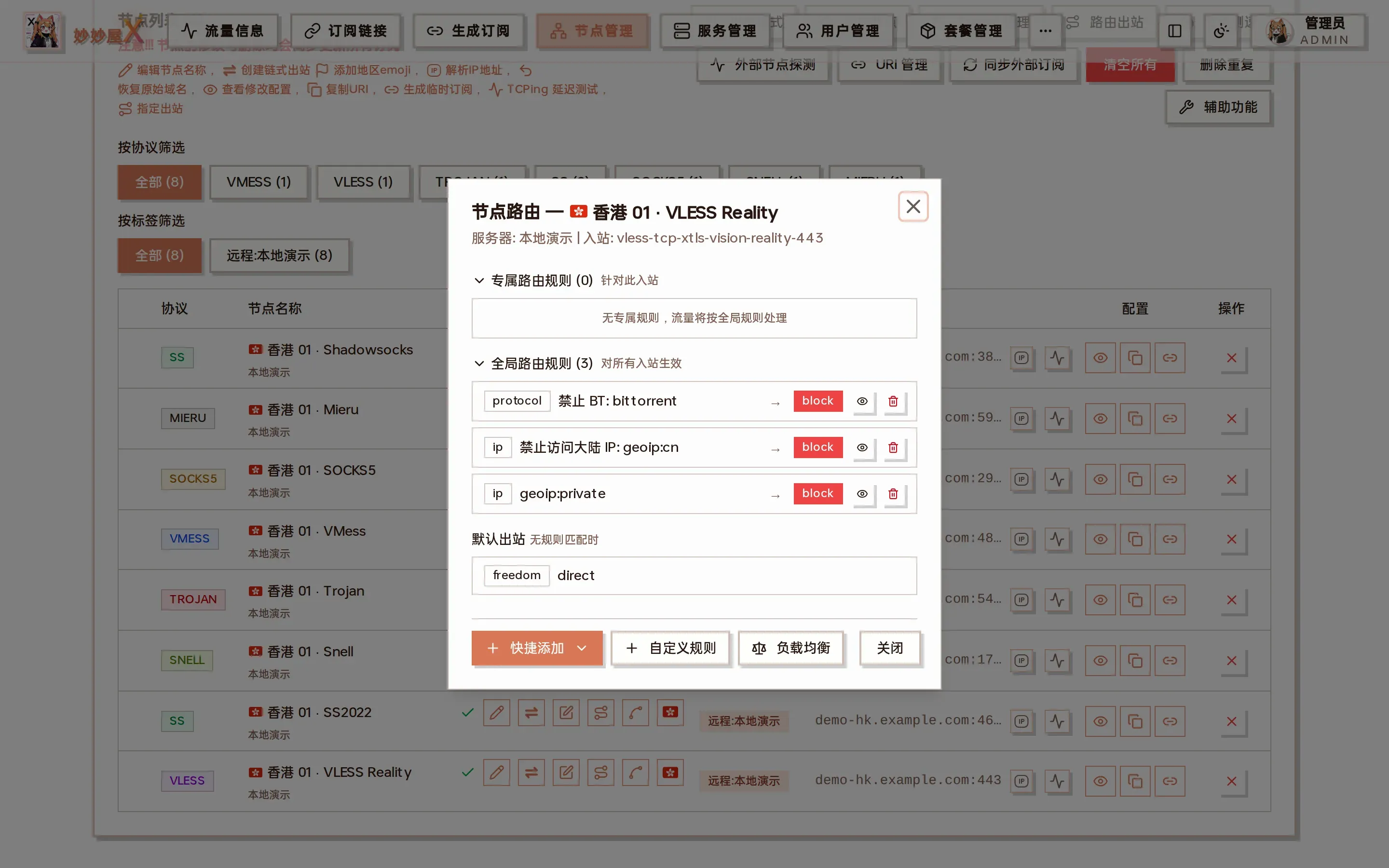
Node routing: dedicated rules for this inbound on top, global rules and the default outbound below
Dedicated vs global rules
Section titled “Dedicated vs global rules”- Dedicated: rules containing the node’s inboundTag, effective for this inbound only
- Global: rules without inboundTag, effective for all inbounds
Catch-all detection
Section titled “Catch-all detection”If a dedicated catch-all exists (inboundTag + outboundTag only), the global rules and default outbound are hidden with a notice:
⚠ All traffic is routed to [outboundTag]; later global rules and the default outbound no longer apply
Outbound name resolution
Section titled “Outbound name resolution”outboundTag values are resolved to node names by matching the outbound’s server:port with node clash_config addresses.
Routing panel
Section titled “Routing panel”Open a server card’s “Xray Config” and switch to “Routing” to manage all rules. The screenshot shows rules added automatically by the system:
- REALITY anti-theft: inbounds with “Prevent REALITY theft” get two rules — allow the serverNames domain to direct, block everything else coming through the anti-theft tunnel
- Block BT / Block mainland IPs / geoip:private → block: default safety rules, removable
Two-pane layout
Section titled “Two-pane layout”- Left (40 %): rule list, drag to sort, click to select
- Right (60 %): fields of the selected rule + JSON preview + delete
Drag to sort
Section titled “Drag to sort”Because routing is first-match, order changes results. Drag the handle on the left of a rule card; the order is saved and Xray restarts on drop.
Sorting uses action: ‘set’ to replace the whole rule list; API rules (outboundTag api) stay at the top automatically.
Quick rules
Section titled “Quick rules”Built-in quick rules, added with one click from “Quick add”:
| Rule | Condition | Outbound | Description |
|---|---|---|---|
| Block BT | protocol: bittorrent | block | Block BitTorrent |
| Block mainland IPs | ip: geoip:cn | block | Block mainland China IPs |
| OpenAI direct | domain: geosite:openai | direct | OpenAI domains direct |
| Block private networks | ip: geoip:private | block | Block private addresses |
| RFC EMBY | domain: rfc.uhdnow.com | choose | EMBY unlock, needs an outbound |
| TikTok unlock | domain: geosite:tiktok | choose | TikTok unlock, needs an outbound |
| Avoid China redirection | geosite:google + meta | warp-v4 | Only on servers with WARP installed |
Outbound load balancing
Section titled “Outbound load balancing”Create a balancer to spread traffic matching a rule across a group of outbounds for multi-landing splitting / failover. Available from the Servers routing panel and the Nodes routing dialog.
- Click “Load balancer” in the routing panel.
- Use an outbound prefix (selector) to choose the participating outbounds (matched by tag prefix).
- Choose a strategy (table below).
- Add a routing rule whose balancerTag points at the balancer instead of a single outboundTag.
- When created from the node routing dialog, the default rule’s inboundTag is the node’s tag; it can be widened to all nodes.
| Strategy | Description |
|---|---|
| random | Pick a random outbound |
| roundRobin | Rotate through the outbounds |
| leastPing | Lowest latency (needs observation; observatory is enabled automatically) |
| leastLoad | Lowest load (needs observation) |
leastPing / leastLoad automatically configure observatory / burstObservatory to probe candidates; random / roundRobin need none.
Custom rules
Section titled “Custom rules”Custom rules support every Xray routing field; empty fields are omitted. Separate multiple values with commas.
| Field | Type | Example | Description |
|---|---|---|---|
| domain | array | geosite:openai, example.com | Domain match, supports geosite:, domain:, full:, regexp: |
| ip | array | geoip:cn, 10.0.0.0/8 | IP match, supports geoip:, CIDR, plain IP |
| protocol | array | bittorrent, http, tls | Protocol match |
| port | string | 80, 443, 1000-2000 | Target port, ranges allowed |
| sourcePort | string | 1234 | Source port |
| network | string | tcp / udp / tcp,udp | Network type |
| source | array | 10.0.0.1 | Source IP |
| user | array | user@example.com | User identifier |
| inboundTag | array | inbound-tag-1 | Inbound tag limiting the rule’s scope |
| attrs | string | attrs[‘:method’] == ‘GET’ | Attribute expression |
Example: send only one inbound’s Netflix traffic to a US landing
Section titled “Example: send only one inbound’s Netflix traffic to a US landing”- In Nodes, “Create chained outbound” on the node and pick the US landing node; a proxy outbound tagged
landing-<inbound tag>-<timestamp>is created - Open the node’s “Node routing” → “Custom rule”
- domain
geosite:netflix, inboundTag = this inbound, outboundTag = the landing outbound just created - Save; Xray restarts and the rule appears under “Dedicated rules”; other traffic still follows global rules and the default outbound
Auto restart
Section titled “Auto restart”Adding, deleting or reordering rules on a remote server restarts Xray automatically and shows a toast when done.
API reference
Section titled “API reference”| Endpoint | Method | Description |
|---|---|---|
| /api/admin/remote/routing?server_id=N | GET | Get the server’s routing config |
| /api/admin/remote/routing?server_id=N | POST | Modify routing: add_rule / remove_rule / set |
| /api/admin/remote/outbounds?server_id=N | GET | List the server’s outbounds |
| /api/admin/remote/services/control?server_id=N | POST | Service control (restart Xray) |