
Migrate from MiaoMiaoWu to MiaoMiaoWu X
Full migration wizard (demo)
Section titled “Full migration wizard (demo)”Below is a local mock of the real master /migrate-from-mmw page — all 5 steps, every interaction, form, and scan result is clickable, but everything is mocked and no network call is made. Walk through it here to get familiar before doing it on the real master.
- 客户端订阅 URL 不变 — 用户的 Clash / Shadowrocket 不用改
- xray UUID / password 不变 — 协议层无感切换
- nginx 配置不动 — 反代继续指向同一个端口
- SSL 证书不动 — certbot 不需要重新申请
- mmw 不会被删除 — systemctl 只是停掉服务,失败可回滚
- 你已经把妙妙屋X 二进制装好,并通过 systemd 跑在 mmw 同一端口上
- 当前 mmwx 数据库是空的(无套餐 / 节点 / 用户) — 否则会被 mmw 数据覆盖
- 具备 root SSH 访问到部署 mmw 的机器
- 所有 mmw 时代的远程节点服务器都已安装
mmw-agent并接入 mmwx 主控
迁移流程概览
- 停止 mmw 并备份 — 防止数据继续变化 + 失败回滚
- 导入 mmw.db — 上传 / 填路径,主控读取并迁移 schema
- 认领节点 / 用户 — 把 xray 现有 client 绑定到 mmwx 用户
- 验证并完成 — 测一个客户端订阅 URL 是否仍可用
Who Needs This
Section titled “Who Needs This”Already using MiaoMiaoWu (mmw) for subscription + node management, wanting to upgrade to MiaoMiaoWu X (mmwx) but don’t want to:
- Have clients re-add subscriptions (URL stays unchanged)
- Re-apply SSL certificates / change nginx reverse proxy config
- Modify xray server UUID / password (protocol layer transparent)
- Manually rebuild packages / users / nodes / subscription templates
This migration wizard is designed for you. All operations only touch the mmw database, not clients, not nginx, not certificates. Failure is rollbackable.
Migration Guarantees vs Prerequisites
Section titled “Migration Guarantees vs Prerequisites”Guarantees
Section titled “Guarantees”- Client subscription URL unchanged – Clash / Shadowrocket etc. don’t need changes
- xray UUID / password unchanged – protocol layer transparent
- nginx config untouched – reverse proxy continues pointing to same port
- SSL certificate untouched – certbot doesn’t need re-application
- mmw service rollbackable – systemctl only stops, doesn’t delete any files
- User short codes / subscription short codes preserved – previously distributed /x/
<code>short links continue working
! Prerequisites
Section titled “! Prerequisites”- Have saved a complete data backup of MiaoMiaoWu
- Have installed mmwx binary (direct install or Docker) and running on the same port as mmw via systemd
- Current mmwx database is empty (fresh install state, no packages / nodes / users), otherwise mmw data will overwrite
- Have root SSH access to the mmw deployment machine
- All remote node servers used during mmw era have mmw-agent installed and connected to mmwx master, see Agent Deployment
- Clients will experience a 1-2 minute brief disconnection during migration (mmw stops -> mmwx takes over subscription)
Entry Point
Section titled “Entry Point”After logging into mmwx with an admin account, click the avatar menu in the top right -> Migrate from MiaoMiaoWu to enter the 5-step wizard. This entry is invisible to regular users. All 6 /api/admin/migrate/* endpoints are protected by RequireAdmin middleware; non-admin calls return 403.
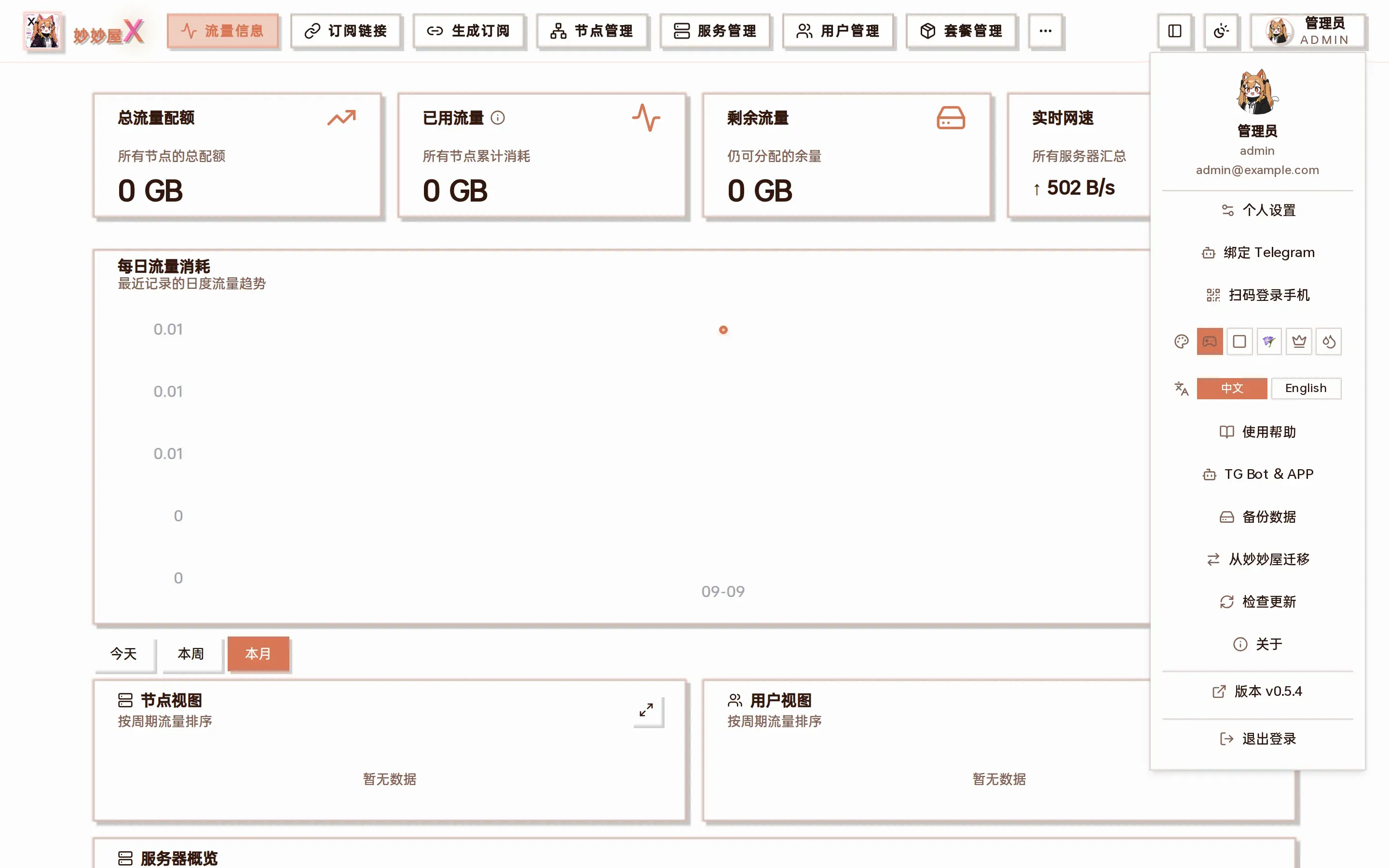
Avatar menu: the “Migrate from MiaoMiaoWu” entry is only visible to admins
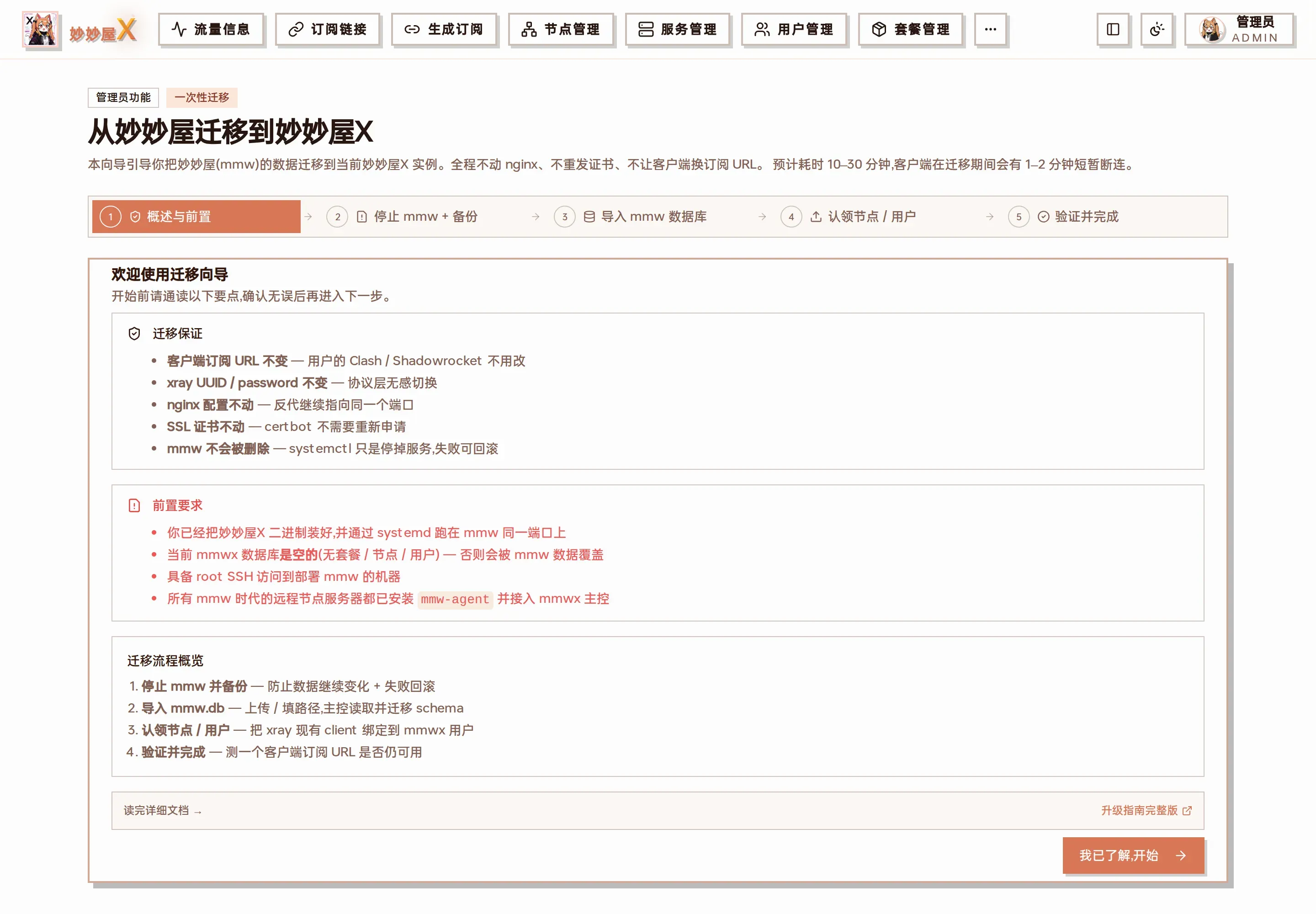
Step 1 of the real migration wizard: guarantees and prerequisites
Estimated total time: 10-30 minutes (mainly depends on mmw data size and SSH network).
Step 1 – Overview & Prerequisites
Section titled “Step 1 – Overview & Prerequisites”The wizard homepage lists the guarantees + prerequisites above. Please review carefully – especially the ‘mmwx database must be empty’ requirement, otherwise continuing will fail or overwrite existing data. Confirm and click ‘I understand, begin’.
Step 2 – Stop mmw + Backup
Section titled “Step 2 – Stop mmw + Backup”Auto Mode (Recommended)
Section titled “Auto Mode (Recommended)”- Enter mmw master address, admin username / password
- mmwx master logs into mmw with that account, calls mmw’s /api/admin/backup/download to pull a complete backup zip (database + subscription files) to mmwx local /tmp/mmwx-migrate/
- Extract, record db path, subscription file count, show for confirmation
- SSH to mmw machine, systemctl stop miaomiaowu to stop service, preventing mmw data changes during migration
Manual Mode
Section titled “Manual Mode”Don’t want to give mmw credentials / can’t run SSH? Switch to manual mode, the wizard provides complete command snippets:
# 在 mmw 机器上:systemctl stop miaomiaowucd /path/to/miaomiaowuzip -r /tmp/mmw-backup.zip data/ subscribes/scp /tmp/mmw-backup.zip 你@mmwx 主控:/tmp/Copy the zip to any path on the mmwx master, tell the wizard the path in the next step.
Failure rollback: This step only does systemctl stop, doesn’t delete any files. If anything goes wrong, SSH in and systemctl start miaomiaowu to restore mmw.
Step 3 – Import mmw Database
Section titled “Step 3 – Import mmw Database”Two import methods supported
Section titled “Two import methods supported”- Auto mode continuation: Step 2 already pulled backup locally, path is shown here, click Import
- Upload zip: Browser upload the entire mmw backup zip (database + subscribes/), backend auto-extracts
What the import does
Section titled “What the import does”- Uses SQLite ATTACH DATABASE to mount mmw.db as src, each table INSERT OR IGNORE INTO main.X SELECT … FROM src.X
- Migrated tables: users, user_tokens, nodes, subscribe_files, user_subscriptions, user_settings, templates, custom_rules, override_scripts, external_subscriptions
- User short codes + subscription short codes preserved as-is (from user_tokens / subscribe_files), previously distributed /x/
<code>short links continue working - Copy yaml template files from subscribes/ directory to mmwx subscribes/ (same-name files keep existing mmwx version, no overwrite)
- Set created_by to the first admin username for subscribe_files / templates rows where created_by is empty
The entire import runs in one SQLite transaction. If any table fails -> complete rollback, database stays in pre-import state.
Step 4 – Claim Nodes / Users
Section titled “Step 4 – Claim Nodes / Users”mmw-era node configs exist as clash_config (raw vless / vmess / trojan / hy2 configs) without a ‘remote server’ concept – servers were manually maintained. mmwx uses a ‘Server + Inbound + Node’ three-layer model, requiring mmw nodes to be linked to mmwx managed xray servers. This step does two things:
- Add Servers – The wizard lists all deduplicated server addresses from mmw nodes. Click ‘Go Add’ to auto-create a remote server in mmwx (address / name auto-filled from node info), generate agent token, and prompt you to install mmw-agent on the server.
- Take Over External xray + Scan to Fill Emails – For externally managed xray from the mmw era, if choosing embedded mode redeployment, one-click merge /etc/xray/config.json + /etc/xray/conf/*.json to mmwx standard path /usr/local/etc/xray/config.json (originals archived as .before-mmwx-
<ts>). Then scan all inbound clients in the xray config, fill in emails and bind to admin’s sub-accounts (mmw era didn’t have this concept; after migration, these ‘custom clients’ are unified under admin).
Smart Claiming, No Duplicate Nodes
Section titled “Smart Claiming, No Duplicate Nodes”After scanning, the master syncs xray inbounds to the mmwx node table. If an inbound’s protocol:port matches an already-imported ‘external node’ (original_server=‘’) from mmw, it automatically claims that node (binds server + inbound_tag) instead of creating a duplicate. Result shown as toast: ‘Scan complete, auto-bound X existing nodes, added Y new nodes’.
Step 5 – Verify & Complete
Section titled “Step 5 – Verify & Complete”3 Required Verifications
Section titled “3 Required Verifications”- Client subscription works – Refresh a subscription URL from an original mmw user (unchanged) in Clash, verify nodes are still there and connectable.
- Node speed test – Open the node speed test workbench in Node Management, test a few migrated nodes to confirm they work.
- User login – Try logging into mmwx with a regular user account using the original mmw password, check if the personal subscription page is accessible.
All three pass, migration complete. Keep the mmw binary / data directory, clean up after 1-2 weeks of stable operation.
Import shows ‘INSERT OR IGNORE skipped N rows’
Section titled “Import shows ‘INSERT OR IGNORE skipped N rows’”The mmwx database is not empty; some primary key / unique index conflicts caused rows to be skipped. Recommendation: stop mmwx -> delete data/mmwx.db -> restart mmwx (will re-run setup to create a clean database) -> re-run migration.
Can’t fetch mmw backup API
Section titled “Can’t fetch mmw backup API”mmw’s /api/admin/backup/download requires mmw v0.7+. Older versions can only use manual mode scp.
Some inbounds lost after taking over external xray
Section titled “Some inbounds lost after taking over external xray”Merge logic deduplicates by tag field. Same-named tags in two confdir files keep only the first merged. If lost, restore from /etc/xray/config.json.before-mmwx-<ts> and manually merge into /usr/local/etc/xray/config.json.
Same server:port mmw external node created twice, no auto-binding
Section titled “Same server:port mmw external node created twice, no auto-binding”Claim logic matches by server + port + protocol triple. clash type:ss and xray protocol:shadowsocks equivalence is handled. If still unmatched, usually the mmw node’s stored server address differs from mmwx server config (e.g., one uses IP, the other domain). Manually edit original_server / inbound_tag in node details.
Can regular users call migration APIs?
Section titled “Can regular users call migration APIs?”No. All 6 /api/admin/migrate/* endpoints are protected by RequireAdmin middleware (validates token + checks user.Role == ‘admin’). Non-admins get 403. The frontend menu entry is also admin-only, and the /migrate-from-mmw route’s beforeLoad guard redirects non-admins to the homepage.
Rollback Plan
Section titled “Rollback Plan”Any step that goes wrong can be reverted to mmw:
- SSH to mmw machine: systemctl stop miaomiaowux && systemctl start miaomiaowu
- Original nginx reverse proxy config doesn’t need changes – it points to the same port, whoever starts up takes over
- SSL certificates / client subscription URLs all stay as-is, clients seamlessly switch back to mmw
- Clean up mmwx residual data: rm /path/to/mmwx/data/mmwx.db (next restart rebuilds empty database)
Therefore migration is a low-risk operation: even if it goes wrong, you can switch back in 30 seconds.