
Forwarding
Forwarding (转发管理) links several servers into a forward chain: clients connect to an entry server, traffic is forwarded hop by hop to the exit, and the exit lands on a proxy node. Forwarding is implemented natively by the Agent (not through Xray). Each hop is an independent port forward, and the master orchestrates, pushes and monitors the whole chain.
Typical uses:
- Route optimisation: a client-friendly machine as entry (e.g. a domestic relay), a landing machine as exit, extra relay hops as needed
- A group of entry servers sharing the load, with a failed one taken out automatically
- Several possible routes from a group to the exit, with each server picking its own fastest one
Forwarding is an admin feature. Regular users get “My forwards”, see Opening forwarding to users.
Concepts
Section titled “Concepts”| Concept | Meaning |
|---|---|
| Forward chain | A complete path from entry to exit, made of groups in order |
| Group | The servers of one hop. How connections are spread across its members is decided by this group’s own load strategy and carried out by the previous hop |
| Entry / exit group | The first and last hop. Clients connect to the entry; the exit is either the server hosting a self-built node, or a landing node |
| Relay group | Hops between entry and exit, zero or more |
| Branch | One server of a group detours through its own relay group, then rejoins the next hop |
| Path set | 2–4 routes leaving one group and converging on the same group; each server picks the route with the lowest total latency to the exit |
Chain list
Section titled “Chain list”Open “Forwarding” from the sidebar to see all chains. Two buttons at the top right:
- Classic create: drag servers into entry / relay / exit groups in a dialog — good for simple straight chains
- New on canvas: opens the canvas editor with everything: branches, path sets, per-group engines and more
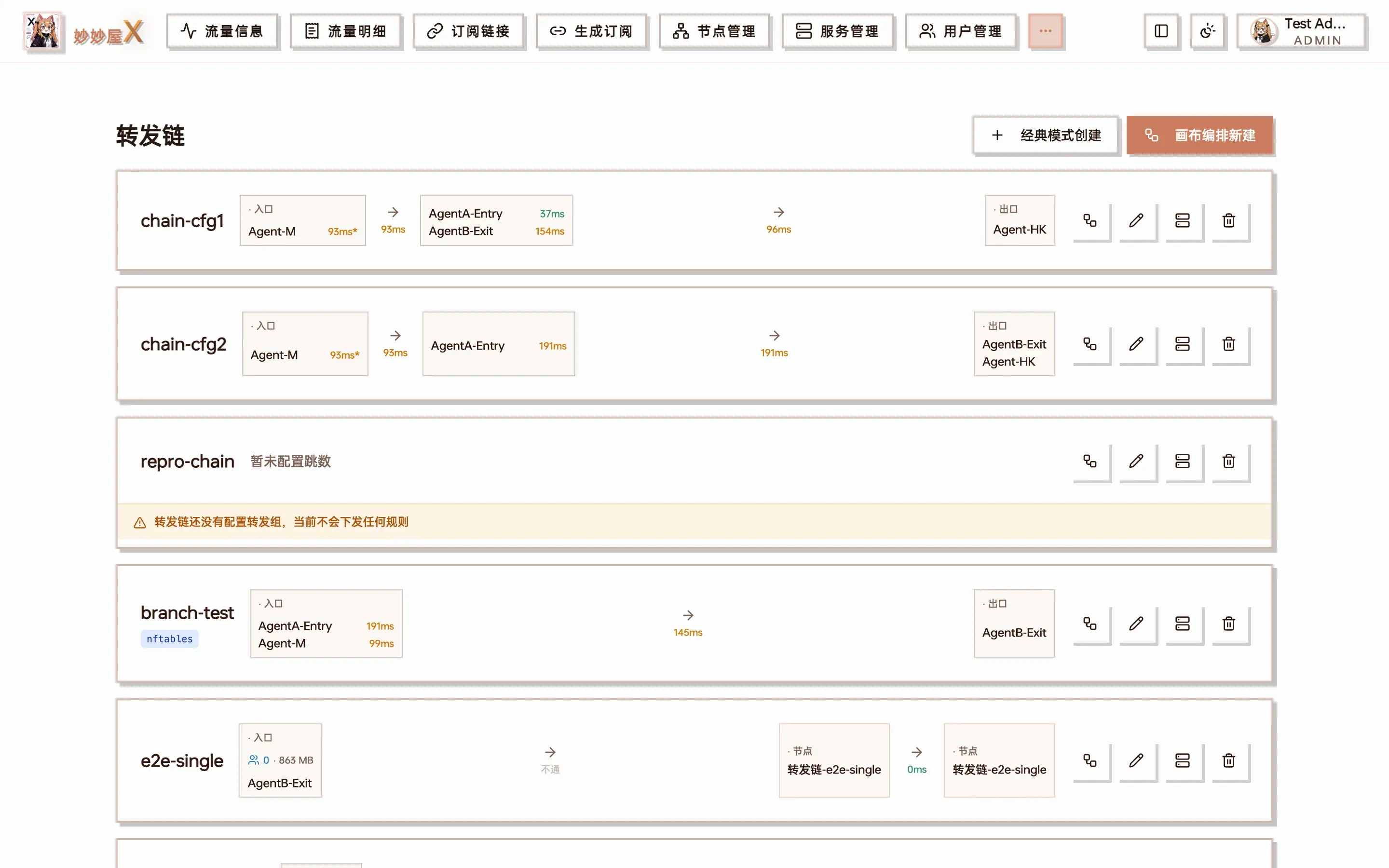
Chain overview (the screenshot shows the previous layout; the description below is current)
The page has three parts: a summary of all chains (average end-to-end latency, port usage) with a topology map, a “To do” list (pending push, unreachable, offline… the same source as Telegram alerts), and a card per chain. Each card shows online members per group, end-to-end latency, loss, 24-hour availability and today’s traffic; latency is coloured green <50ms, orange 50–200ms, red >200ms.
Click a chain name to open its detail page:
- Route and members: latency and loss from each member to the next group, and the route each entry server is actually using
- Latency history, per-hop latency, availability (15-minute cells) and traffic
- “Full-chain speed test”, “Bind nodes” and other actions at the top
A chain with no node bound has no forwarding rules and therefore no regular probe data. When you open the overview or the detail page the master measures each hop once on demand, so unbound chains still show latency instead of “unreachable”.
Canvas editor
Section titled “Canvas editor”The canvas is the main way to build chains. Server pool and node pool on the left, the chain in the middle, settings of the selected item on the right.
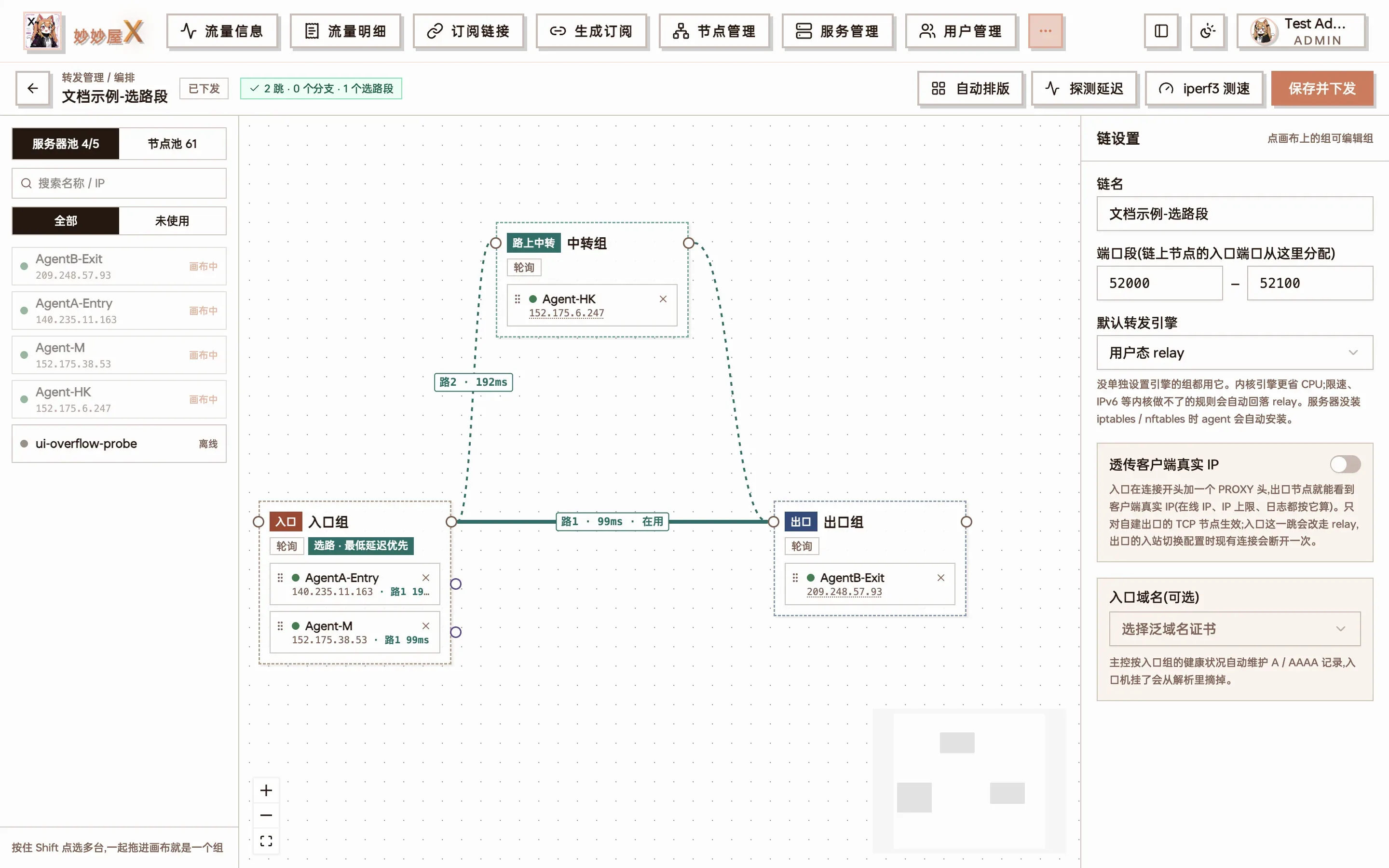
Canvas: entry group (2 servers) → exit group, with two parallel routes — route 1 direct to the exit (in use, 99ms) and route 2 through a relay group; chain settings on the right
Building a chain
Section titled “Building a chain”- Drag servers from the server pool onto the canvas. Hold Shift to multi-select, then click “group the N selected” to make a group at once
- Drag a line from the dot on a group’s right side (the group output) to the next group to form the main line
- Attach the exit: drag servers with self-built nodes into the exit group, or drag a landing node from the node pool into it
- Click “Auto layout” to tidy up, then “Save and push”
Three kinds of lines:
| Line | Meaning |
|---|---|
| Solid (rust) | Main line |
| Dashed (purple) | Branch: one server detouring on its own |
| Teal | Path set: multiple routes leaving the same group |
Double-click a line to delete it. Badges on the canvas show the state: “Draft · not pushed”, “Unsaved changes”, “Pushed”; when something is wrong, an issue badge lists each problem.
Saving validates the chain: the main line must be straight, a server may appear only once per chain, branches must rejoin the next hop, and the exit group cannot branch. Actions that affect live connections — removing landing nodes, switching engines — ask for confirmation before saving.
Group settings
Section titled “Group settings”Select a group to edit:
- Name
- Load strategy: how connections are spread across this group’s members (see Load strategies)
- Forwarding engine: overrides the chain default (see Forwarding engines)
- Failover: temporarily removes a member that is unreachable or slower than a threshold (ms), and adds it back once it recovers
Load strategies
Section titled “Load strategies”| Strategy | What it does | Good for |
|---|---|---|
| Round robin | Takes members in turn | Similar machines |
| Weighted | By member weight; weight 2 gets about twice the connections of weight 1 | Mixed bandwidth / specs |
| Least connections | Prefers the member with the fewest active connections | Long-lived connections, large files |
| Most remaining traffic | More remaining traffic means a higher weight; recalculated every 5 minutes | Members with traffic quotas |
| By period | The closer to the traffic reset day, the higher the weight | Different reset days |
| Lowest latency | The previous hop uses only the member with the lowest total latency to the exit; the rest are standby and take over within seconds (needs a recent Agent) | Latency first |
The entry group is special: it has no previous hop. Which entry server a client reaches is decided by the DNS records of the entry domain, so entry-group strategies are implemented through DNS:
| Entry-group strategy | Actual effect |
|---|---|
| Round robin | Every healthy entry is published in the entry domain and DNS rotates between them; unreachable ones are withdrawn |
| Lowest latency | Only the entry with the lowest total latency to the exit is published, the rest are standby; it is replaced when unreachable, or when another entry is more than 15% faster |
| Most remaining traffic / By period | Entries that lag far behind (less than a quarter of the best one’s remaining traffic, or quota used up) are withdrawn for now |
| Weighted / Least connections | Not possible with DNS (plain records have no weight and cannot follow connection counts); greyed out and treated as round robin |
Entry-group strategies need an entry domain on the chain and take effect with a delay because of DNS caching. Withdrawn entries are marked “standby entry · not published” on the detail page.
Sticky connections
Section titled “Sticky connections”“Sticky connections” is a chain-wide switch (in the chain settings), not a group strategy: when on, the same client IP lands on the same server at every hop.
- Works together with load strategies: weights and failover still apply — clients are spread across members by weight and each client then stays on its member; when a member fails, only its clients are reassigned. “Lowest latency” groups use a single member anyway and are unaffected
- Turns on client IP passthrough automatically: for later hops to recognise the client, the entry writes a PROXY header carrying the client IP, so enabling sticky connections also enables Real client IP passthrough, and hops that carry the header use the relay engine
- UDP cannot carry a PROXY header; each hop sticks by the connection’s source IP
- Every Agent on the chain must be recent; otherwise the UI shows “not in effect” and the chain follows each group’s own strategy
Use it when:
- Sites, games or streaming services tie risk control or login state to the exit IP, and the exit group has several servers
- One application opens many connections (downloaders, video segments) that should share one exit
- You limit concurrent online IPs or keep per-IP statistics and want a client to stay on one exit server
You do not need it when the exit group has a single server, or when you only want traffic spread as evenly as possible.
Chains that used the old “sticky” group strategy are migrated to the chain switch on upgrade, and the group goes back to round robin.
Chain settings
Section titled “Chain settings”Click an empty spot on the canvas to see the chain settings:
- Name
- Port range: ports this chain uses on every server, default 50520–51314; temporary ports for latency probes and iperf3 come from here too
- Default forwarding engine: used by groups without their own setting
- Sticky connections: the same client lands on the same server at every hop, see Sticky connections
- Pass through real client IP: see Real client IP passthrough
- Entry domain: a domain (wildcard certificate required) whose A / AAAA records the master maintains every 17 seconds from entry server health and the entry group’s load strategy — a failed entry server drops out of DNS automatically
Ports per server
Section titled “Ports per server”A binding has a single entry port — the one clients connect to; every server in the entry group listens on it. Later hops (relays, exits) each use their own port:
- If the entry port falls inside the range a server allows, the server reuses it (a chain with no port-restricted servers still uses one port end to end)
- Otherwise the server picks a free port from its own range; the previous hop forwards to that port, and a self-built exit inbound is created on it
The range a server allows defaults to the server’s own port range (set in Servers — fill it in for NAT machines that only map a block of ports); unset means unrestricted. On the canvas, click “Port” on a member row to set a range for this chain only (use the same number twice for a single port).
- A range on an entry server limits which entry ports can be chosen: the entry port comes from the intersection of the entry servers’ ranges, or from the entry range itself when it does not overlap the chain’s port range
- Entry servers whose ranges do not intersect cannot share one entry port — adjust the ranges or enable “separate entries”
- When binding or adding a node, the port field lists the servers that will use a different port; “Random” always returns a port the entry servers allow
- Temporary ports for latency probes and the full-chain speed test follow each server’s own range as well
Branches
Section titled “Branches”Each hop on the main line is a group, and by default every server in it takes the same route to the next hop. If one server needs its own detour (say its direct route to the exit is poor but it is fast through a particular relay), give it a branch:
- Drag from the small purple dot to the right of that member to a “branch relay” group
- Connect the branch relay group back to the next hop of the main line
A branch is a single line and must rejoin the next group of the main line — so the chain always has exactly one exit. Until it does, the canvas warns that the server’s branch has not rejoined the main line.
Path sets and lowest-latency selection
Section titled “Path sets and lowest-latency selection”A branch says “this server always takes this route”; a path set says “every server picks its own fastest route”.
How: from a group’s output dot, draw 2–4 lines through different relays (or direct), all converging on the same group. The canvas colours them teal and the group panel gains a route-selection section.
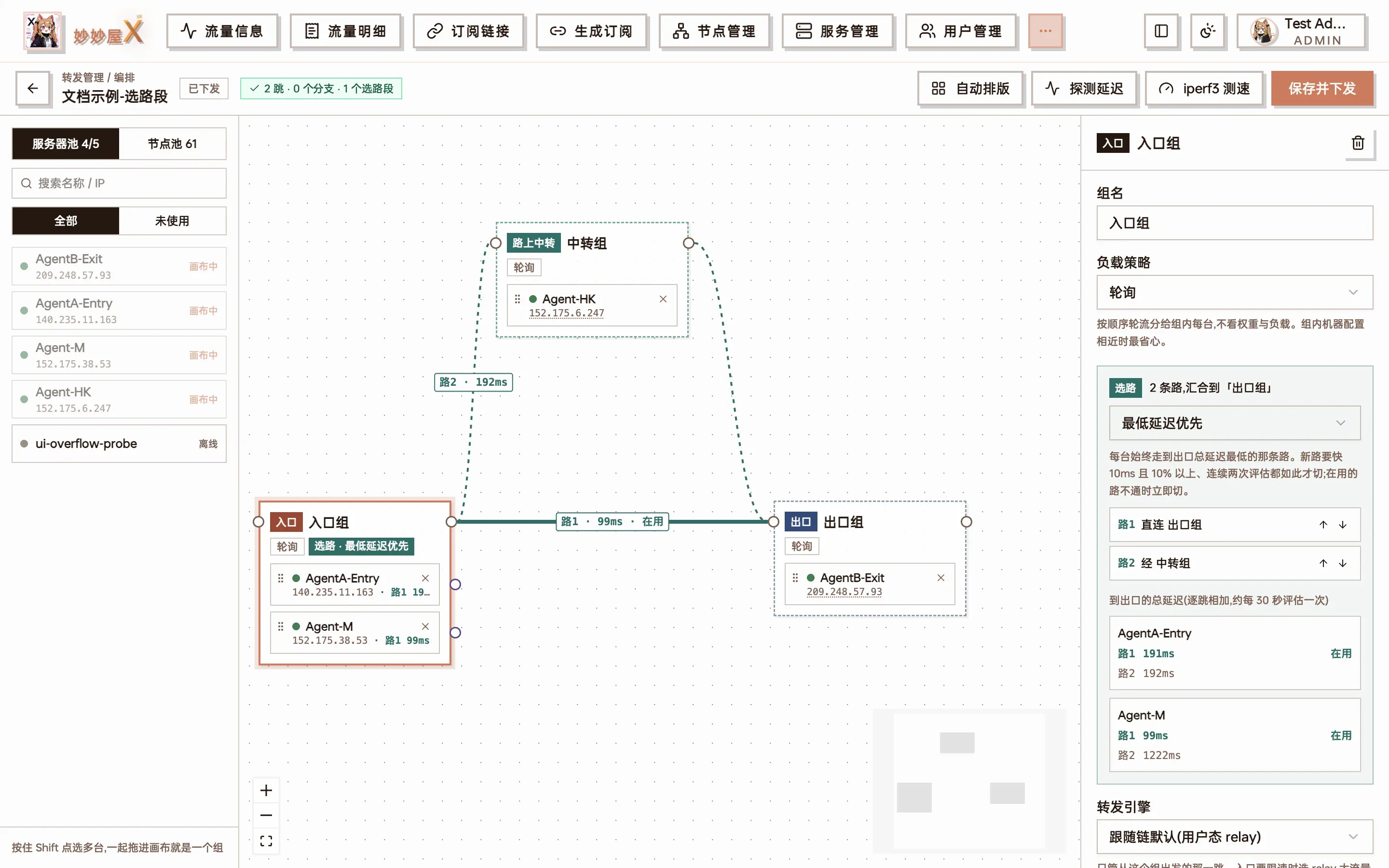
Route selection on the entry group: 2 routes converging on the exit group, route 1 direct and route 2 through a relay group; below, each server’s total latency to the exit per route, with the route it currently uses marked
Each server decides for itself
Section titled “Each server decides for itself”Routes are chosen per server, not by averaging the whole group:
- The master evaluates roughly every 30 seconds. Each server adds up its own measured latencies along every route to the exit and takes the lowest total
- Within one group, server A can use route 1 while server B uses route 2
- To avoid flapping, it switches only when the new route is at least 10ms and 10% faster for two consecutive rounds; if the current route fails, it switches immediately
- The canvas refreshes route choices every 15 seconds and marks the active route “在用” (in use)
Besides “lowest latency”, a path set can also be “primary / backup” (route 2 only when route 1 is down) or “split by weight”.
Limitations:
- All routes of a path set must converge on the same group, and path sets cannot be nested
- The chain needs bound nodes (rules are what get probed); without them there are no route results
- Older Agents receive only the currently chosen route, so a switch waits for the master’s next evaluation and push
Forwarding engines
Section titled “Forwarding engines”| Engine | Description |
|---|---|
| User-space relay (default) | The Agent forwards in user space; most complete feature set |
| Kernel iptables | The kernel forwards via DNAT, bypassing user space, with low CPU use |
| Kernel nftables | Same, using nftables |
Set a default on the chain and override it per group. If an Agent lacks the iptables / nftables command, it installs it through the system package manager and uses relay in the meantime.
Rules the kernel engines cannot handle fall back to relay automatically: rate limits, PROXY headers, IPv6, ports with a client IP whitelist, private upstream addresses and so on. The engine each server actually uses is shown in the forwarding status.
Real client IP passthrough
Section titled “Real client IP passthrough”By default the exit sees the previous relay’s IP as the source. With “Pass through real client IP” on, the entry writes a PROXY protocol v2 header at the start of each connection and the exit restores the real client IP — so node access logs, client IP whitelists and per-IP statistics see the real source.
- Applies to TCP and self-built exit nodes only (landing nodes don’t understand PROXY headers)
- The entry hop is forced to the relay engine (kernel engines can’t write PROXY headers)
- Needs a recent Agent. The master first configures the exit to accept an optional PROXY header from chain servers only, then has the entry start sending it, so nothing disconnects during the switch
Nodes: self-built exit vs landing node
Section titled “Nodes: self-built exit vs landing node”The last hop is attached in one of two ways:
A. Self-built exit: the exit group contains your servers and the node lives on them.
- On a chain card, “Bind nodes → New node”, choosing “entry split” (subscriptions use the entry server’s address) or “exit split”
- Or from “Nodes → Add node”, picking “Forward chain” as the node entry in step one
B. Landing node: the exit group points at an existing proxy node (which may be someone else’s landing machine).
- Drag the landing node from the node pool into the exit group on the canvas, or use “Bind existing node” on the card
- Forwarded protocols: TCP / UDP / TCP+UDP
- If the node has related nodes (its parent node and routed-outbound children of the same parent — they share one IP and port), a dialog lists them when you bind; the ones you tick are pointed at this chain’s entry address too and show the entry address in node management. Deleting the entry node later puts them back on their original address
Exit-group servers and landing nodes are mutually exclusive; WireGuard nodes can’t go through a forward chain.
Latency probes
Section titled “Latency probes”“Latency probe” in the canvas toolbar opens temporary listeners in the chain’s port range and measures every hop:
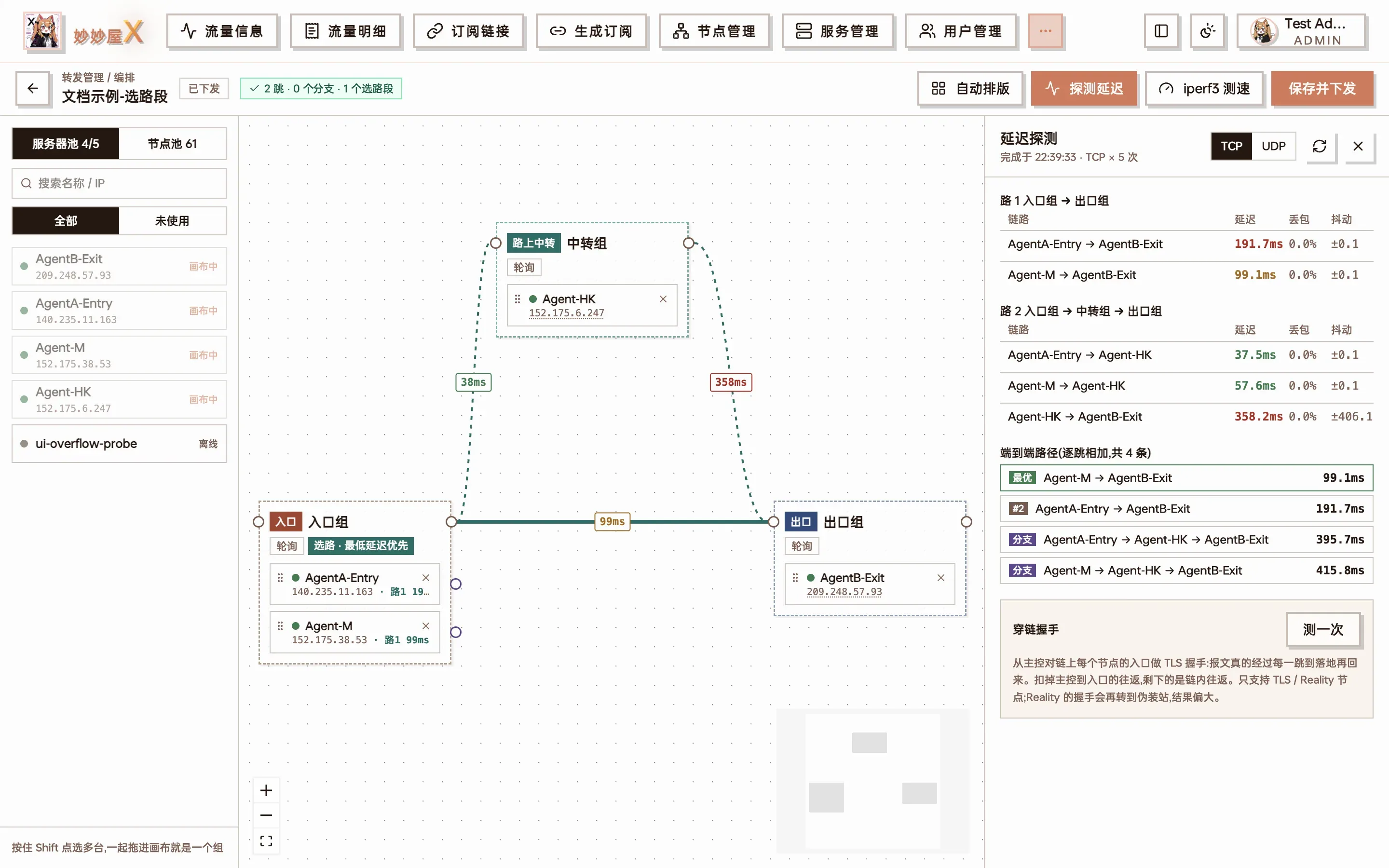
Latency probe: per-hop latency / loss / jitter, an end-to-end ranking of every entry-to-exit combination, and the through-chain handshake result
- TCP or UDP, 5 samples per server pair, reporting latency, loss and jitter
- The end-to-end ranking lists the total latency of every possible entry-to-exit path, best first
- Through-chain handshake: for TLS / Reality nodes, performs a real handshake across the whole chain to confirm the node works through it, not just that ports are open
Speed tests
Section titled “Speed tests”Full-chain speed test (button at the top of the chain detail page): tests every entry server against every exit server over the real forwarding path.
- The master picks a free port from the chain’s port range, pushes temporary test-only forwarding rules, starts iperf3 on the exit and runs the test from the entry, then removes everything; the temporary rules are excluded from traffic, billing and alerts
- Choose upload / download / both, TCP / UDP, duration per pair and a rate limit
- Results are shown as a heat matrix, grouped bars and per-second curves (all entry × exit pairs in one chart); the last 20 runs are kept for comparison
- Closing the dialog does not stop the test; shared servers are skipped; when the exit is a landing node the test stops at the last group of forwarding servers
iperf3 in the canvas toolbar:
- Between servers: bandwidth between any two servers
- Through landing node: real bandwidth across the whole chain to the landing node
iperf3 is installed automatically when missing.
Mobile
Section titled “Mobile”The canvas works on phones too: dragging becomes tapping — after selecting a server or group, a bottom bar offers “Group settings”, “Add server” and more, so grouping, editing settings and pushing all work on a phone.
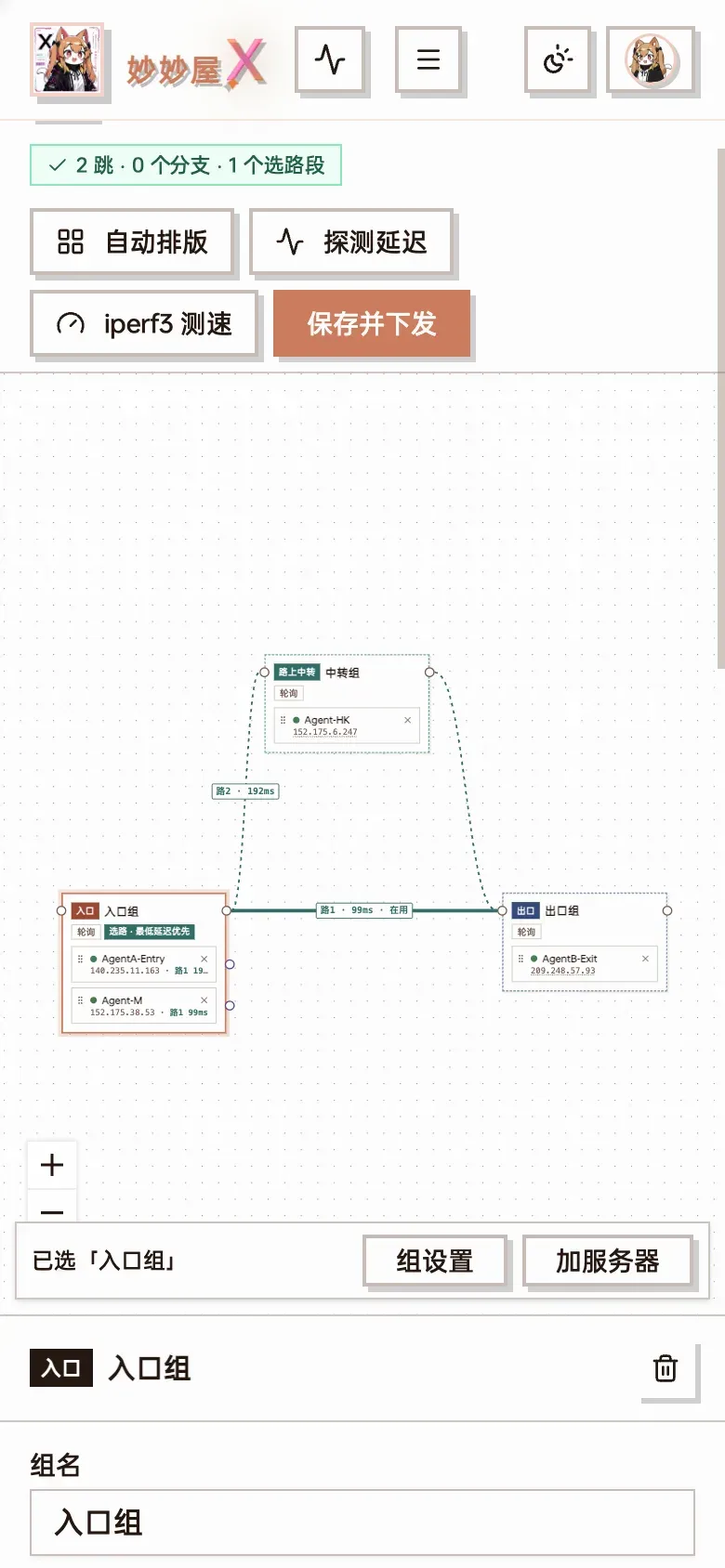
Mobile canvas: with the entry group selected, the bottom bar shows “Group settings / Add server”
Alerts and monitoring
Section titled “Alerts and monitoring”- Forward chain node down alert: under “System settings → Notifications”, on by default. Sends a Telegram notification when a node on a chain has been unreachable for 2 minutes
- Latency and active routes on the overview, detail pages and the canvas refresh continuously; the overview’s “To do” list shows every current problem
Member forwarding address
Section titled “Member forwarding address”Which address the previous hop uses to reach each member can be chosen per member: auto / fixed entry IP / public / domain / private network / manual. Servers in the same data centre can use the private network to save traffic and latency.
Shared servers
Section titled “Shared servers”Shared servers you have received can be used in chains too. The owner master merges the forwarding rules and pushes them to the Agent, and remains the Agent’s sole controller.
Opening forwarding to users
Section titled “Opening forwarding to users”Regular users create forwarding rules for their own nodes under “My forwards”. The admin configures a forwarding quota in the package:
- Number of rules, rate limit, connection count
- Which forward chains are allowed
Only traffic on the entry hop of a user’s bindings is billed; relay and exit hops are not billed again.
Classic mode vs canvas
Section titled “Classic mode vs canvas”Classic mode suits straight entry → relay → exit chains and is quick to learn. Only the canvas supports:
- Branches
- Path sets and lowest-latency selection
- Per-group forwarding engines
Both create the same kind of chain, and a chain made in classic mode can be opened and extended on the canvas at any time.