
Node Rate Limiting
Try it: rate limiting (package + user, two layers)
Section titled “Try it: rate limiting (package + user, two layers)”Click either button below to open the «package limits» or «user limits» dialog. All changes are saved locally in the demo and reflected in the «effective view» table below.
Package general applies to «every node × every user bound to it»; package per-node / user global / user per-node override it in layers. Each layer is detected by «is the input empty»; non-empty (including 0) counts as explicitly set.
| Node | Speed | Devices | Source |
|---|---|---|---|
| 🇭🇰 HK 香港 PRO B | 30 Mbps | ∞ | pkg per-node |
| 🇭🇰 HK 香港家宽(HKT) | 100 Mbps | ∞ | pkg general |
| 🇺🇸 US 美国家宽(ATT) | 100 Mbps | ∞ | pkg general |
| 🇯🇵 JP 日本 PRO R | 100 Mbps | ∞ | pkg general |
| 🇸🇬 SG 新加坡 PRO B | 100 Mbps | ∞ | pkg general |
| 🇹🇼 TW 台湾家宽(HINET) | 100 Mbps | ∞ | pkg general |
Overview
Section titled “Overview”Node rate limiting lets admins configure a download-speed cap and a maximum concurrent-connection count per package. Once a user is assigned a package, the rules are automatically pushed to all inbounds the user is bound to and enforced at the traffic layer by the embedded Xray core.
Node rate limiting is a PRO feature that requires a valid license. Rate limiting only takes effect on servers using embedded Xray mode; external Xray mode does not support rate limit push.
How It Works
Section titled “How It Works”套餐配置 (speed_limit_mbps / device_limit) │ ▼主控查询用户关联的入站 (inbound tags) │ ▼为每个入站构建限速规则 (WSLimiterConfigPayload) │ ▼通过 WebSocket 推送到内嵌 Xray Agent │ ▼Agent 在 Xray 内核层面实施速度和设备限制Rate Limit Parameters
Section titled “Rate Limit Parameters”Rate limits are configured through the package management page. Each package can set the following rate limit parameters:
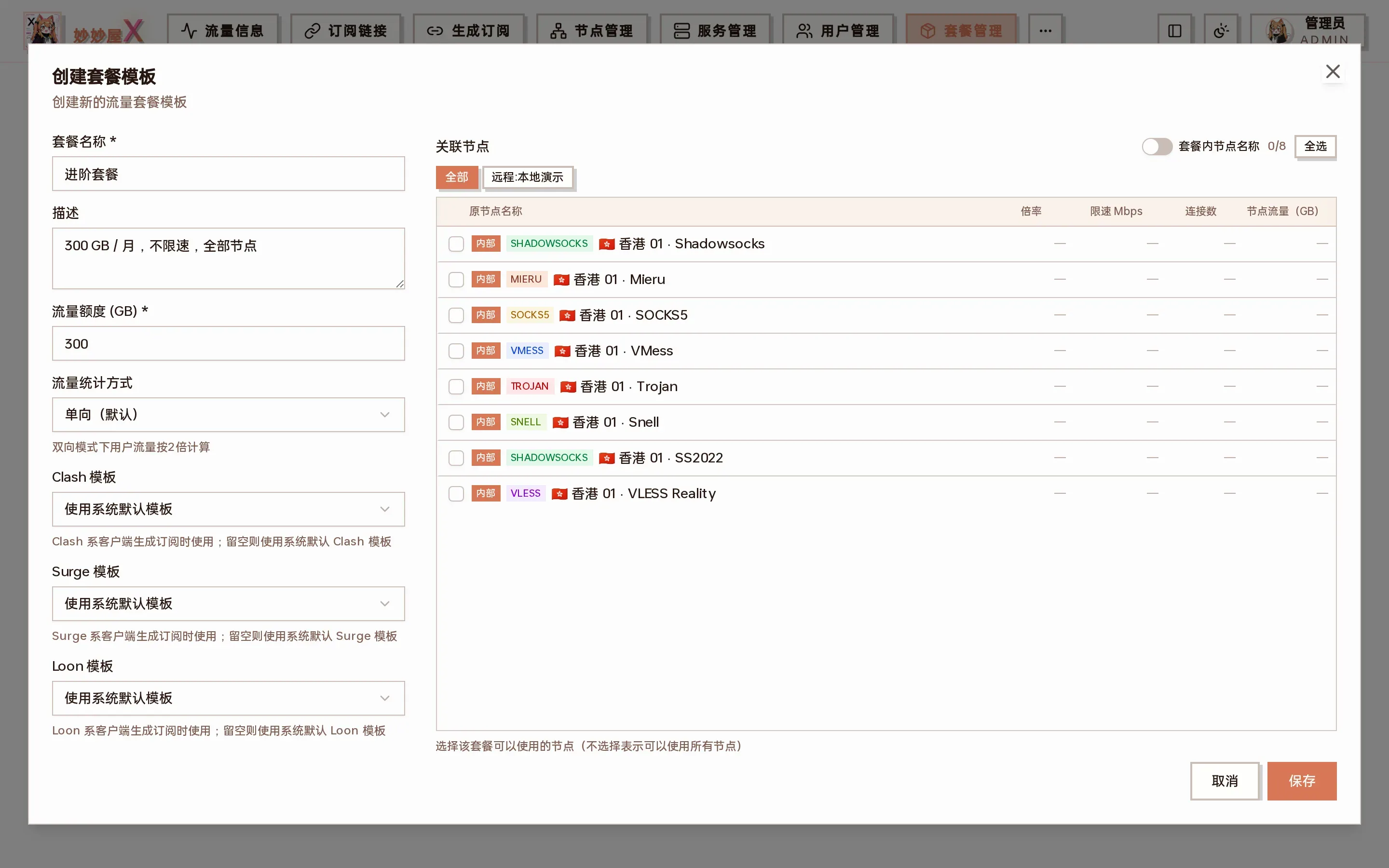
Packages → create / edit package: “Speed limit (Mbps)” and “Connection limit” (PRO) at the bottom
Download Speed Limit (Mbps)
Section titled “Download Speed Limit (Mbps)”| Field | |
| Unit | Mbps (megabits per second) |
| Default | 0 (no limit) |
| Description | Limits the per-user download speed for this package. Set to 0 for no limit. Internally converted to bytes/s: Mbps x 1000000 / 8 |
Connection Limit
Section titled “Connection Limit”| Field | device_limit |
| Default | 0 (no limit) |
| Description | Caps the maximum number of concurrent connections a user may have at any moment (note: connections, not devices). 0 means unlimited. New connections beyond the cap are rejected; existing ones are unaffected. The quota is shared per user + physical node. The field keeps its legacy name device_limit. See “Understanding the Connection Limit” below. |
Understanding the Connection Limit
Section titled “Understanding the Connection Limit”“Connections” here means the number of network connections being proxied at the same moment — not the number of devices. A single device opens many connections at once, so this is a coarse cap to prevent an account from being widely shared/resold, not a precise “how many devices” control.
- Opening one web page ≠ one connection: a browser opens several connections to dozens of hosts (main domain, CDNs, fonts, analytics, ads…). A single page load often peaks at 10–50+ concurrent connections, then falls back as idle connections close.
- Video, short-form feeds, multiple tabs and background apps each add more; every QUIC / HTTP3 (e.g. YouTube) connection also counts as one.
- So one device browsing normally uses tens to over a hundred concurrent connections. Setting the cap to a tiny “device count” like 3 or 5 will simply break page loading.
A brief overage usually shows up as some requests hanging / failing to load, and recovers on its own once idle connections free up — it does not permanently cut off the user.
Recommended Values by Scenario
Section titled “Recommended Values by Scenario”| Scenario | Suggested Limit | Notes |
|---|---|---|
| Single personal device (1 person, 1 phone/PC) | 100 – 150 | Covers normal web/video/app concurrency peaks with headroom, no false hits |
| Multiple personal devices (phone + PC + tablet) | 200 – 400 | Several devices online at once, ~100–150 each stacked |
| Family sharing (4–6 devices) | 500 – 800 | Multiple people/devices incl. TV boxes / IoT background connections |
| Small group (N known people) | ~ N × 150 | Leaves room for one heavy device per person; fewer people → be more generous |
| Strict anti-resale / anti-mass-sharing | expected devices × 100, then tighten | Aims to block dozens of people on one account, but must stay above one person’s daily peak or it hurts legit users |
| Don’t want to affect UX / unsure | 0 (unlimited) or 1000+ | Connection limit is a coarse anti-abuse tool; if unsure leave it off and rely on traffic/speed limits |
These are starting points. After assigning a package, watch a user’s live concurrent connections in the Traffic / Connections view and raise the cap to match the real peak — err on the high side rather than locking out legitimate users.
User-Level Override
Section titled “User-Level Override”In addition to package-level rate limit configuration, individual user-level rate limit overrides are supported, with higher priority than package settings. Open it from “Users” → row action menu “…” → “Rate limit”:
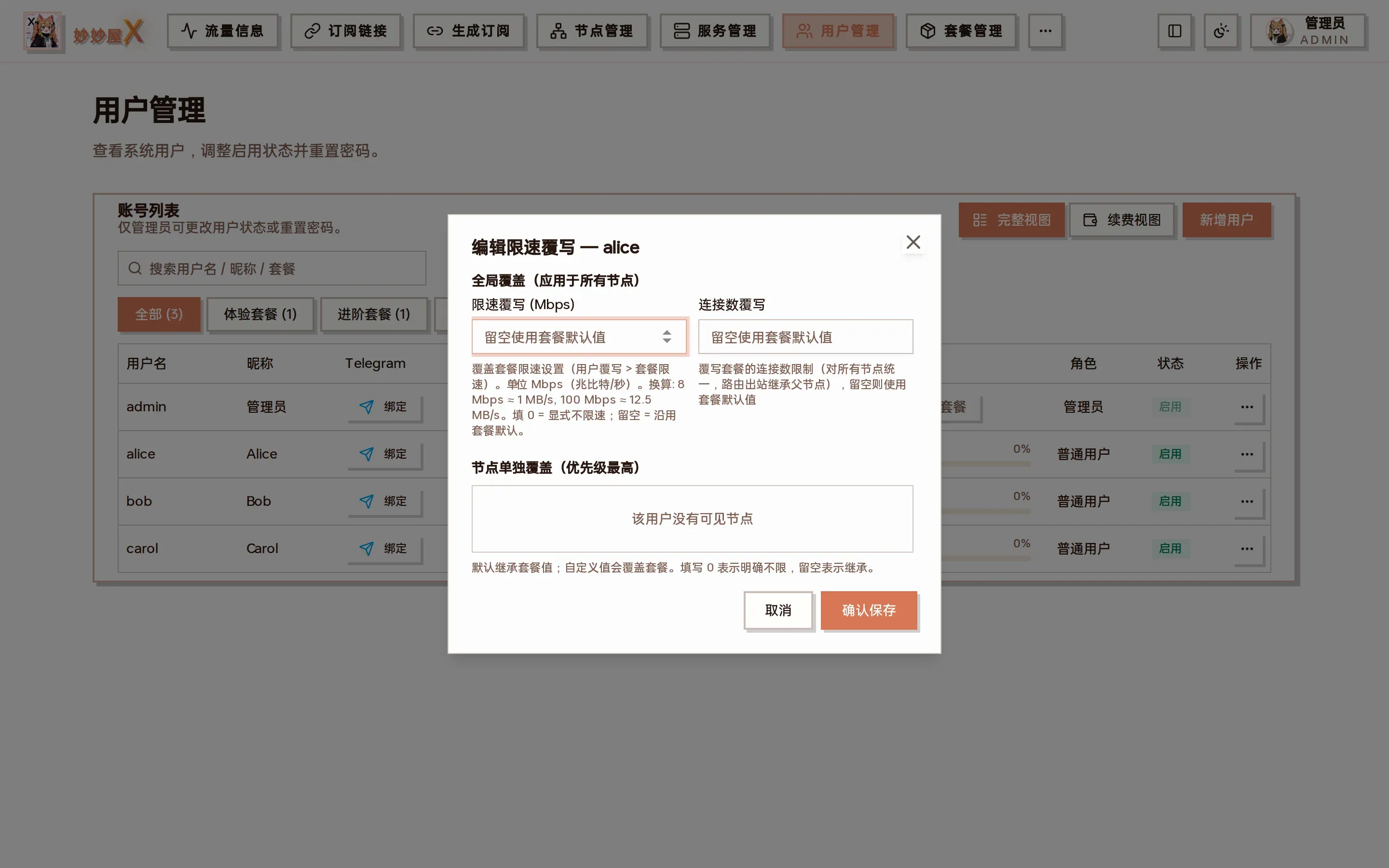
Edit rate limit override: “Global override” applies to all of the user’s nodes; “Per-node override” has the highest priority, 0 = explicitly unlimited, empty = inherit
| Priority | Source | Description |
|---|---|---|
| Highest | User override values | speed_limit_override and device_limit_override set for individual users in user management |
| Default | Package config | speed_limit_mbps and device_limit from the user’s package |
Auto Push Timing
Section titled “Auto Push Timing”Rate limit configurations are automatically pushed to the Agent in the following scenarios, no manual action needed:
| Trigger Event | Behavior |
|---|---|
| Server connection established | After an embedded Xray mode Agent connects to master, automatically pushes rate limit config for all users on that server |
| User package change | After user binds or switches package, re-push that user’s rate limit config |
| User enable/disable | Removes rate limit config when user is disabled (inbounds also disabled), re-pushes when enabled |
| User deleted | Pushes removal of that user’s rate limit config |
| Package expired | Automatically disables all inbounds for that user and removes rate limit config |
Configuration Steps
Section titled “Configuration Steps”- Ensure the target server uses embedded Xray mode (external mode does not support rate limiting)
- Go to the “Package Management” page, create or edit a package
- Set “Download Speed Limit (Mbps)” and “Max Devices” in the package form
- After saving the package, bind users to it
- Rate limit config will be automatically pushed to all embedded Xray servers associated with the user
Full Package Parameters
Section titled “Full Package Parameters”Packages include the following configurations in addition to rate limits:
| Parameter | Description | Default |
|---|---|---|
| Package Name | Display name for the package | - |
| Traffic Quota (GB) | Total traffic quota for the package, disabled when exceeded | 0 (no limit) |
| Cycle Days | Traffic reset cycle | 30 |
| Associated Nodes | Restrict which nodes this package can access | All |
| Download Speed Limit (Mbps) | Per-user download speed limit | 0 (no limit) |
| Connection Limit | Max concurrent connections (field: device_limit) | 0 (no limit) |
| Traffic Counting Mode | Unidirectional (max of upload or download) or bidirectional (upload + download) | Bidirectional |
Rate limiting only works on servers in embedded Xray mode. Servers in external Xray mode will not receive rate limit push, and users on those servers are not speed-limited.
After modifying package rate limit parameters, you need to wait for the next push opportunity (e.g. server reconnect) for changes to take effect on already-connected Agents. It’s recommended to manually restart the Agent or wait for heartbeat auto-push.
The connection limit is enforced by tracking each user’s current active connection count: when the cap is reached new connections are rejected while existing ones continue. The quota is shared per user + physical node — all of a user’s clients/sub-accounts on the same node share one budget.