
Share Server
Try it: server sharing (left: owner / right: consumer)
Section titled “Try it: server sharing (left: owner / right: consumer)”Left is the owner mmwx instance — Server Management lists several servers; click the «share» button to share one. Right is the consumer mmwx instance — once the share token is plugged in, that server appears in its Server Management **with the same card layout** and a purple «Shared» tag in the header, while restricted actions (start/stop, install, edit, reshare, Agent) are locked.
myx- — New inbounds created on this server get this prefix added to their tag to avoid colliding with the owner- • View status, traffic, speed, Xray/Nginx version
- • Add an inbound on the server (tag auto-prefixed)
- • Edit / delete inbounds they created
- • Build nodes off those inbounds for their own users
- • Start/stop Xray or Nginx
- • Install or uninstall Xray / Nginx
- • Edit server (name, address, traffic limit)
- • Reshare this server to a third party (chained sharing)
Overview
Section titled “Overview”Share Server is a PRO feature of MiaoMiaoWu X that allows one MiaoMiaoWu X master (owner) to share its managed remote servers with other MiaoMiaoWu X masters (consumers). Consumers can add inbounds and nodes on shared servers without deploying an Agent, enabling cross-master server resource sharing.
Internally, it uses a Federation architecture: all remote operations from consumers are forwarded through the owner’s federation interface to the Agent. The owner always remains the sole direct controller of the Agent. Communication adds ECDH end-to-end encryption on top of HTTPS, ensuring the owner cannot inspect the consumer’s specific operations.
Share Server requires a PRO license with the server_share feature enabled. Both owner and consumer must hold valid licenses.
Architecture
Section titled “Architecture”消费方主控 ──(HTTPS + ECDH 加密)──▶ 拥有方主控 ──(securechan)──▶ Agent │ │ │ 填入: 拥有方地址 + 分享令牌 │ 始终是 Agent 的唯一控制者 │ 操作: 添加入站、管理节点 │ 转发消费方的管理命令 │ 限制: 不能启停服务、不能编辑服务器 │ 校验令牌、管理分享 │ │ └─── 本地 remote_server 记录 ───────────┘Owner: Share Server
Section titled “Owner: Share Server”The owner generates a share token for their managed server and provides the owner address + share token to the consumer.
- On the Service Management page, find the server to share
- Click the Share button (Share icon) on the server card
- In the popup dialog, click Generate Share Token
- Copy the Owner Address and Share Token, provide to consumer
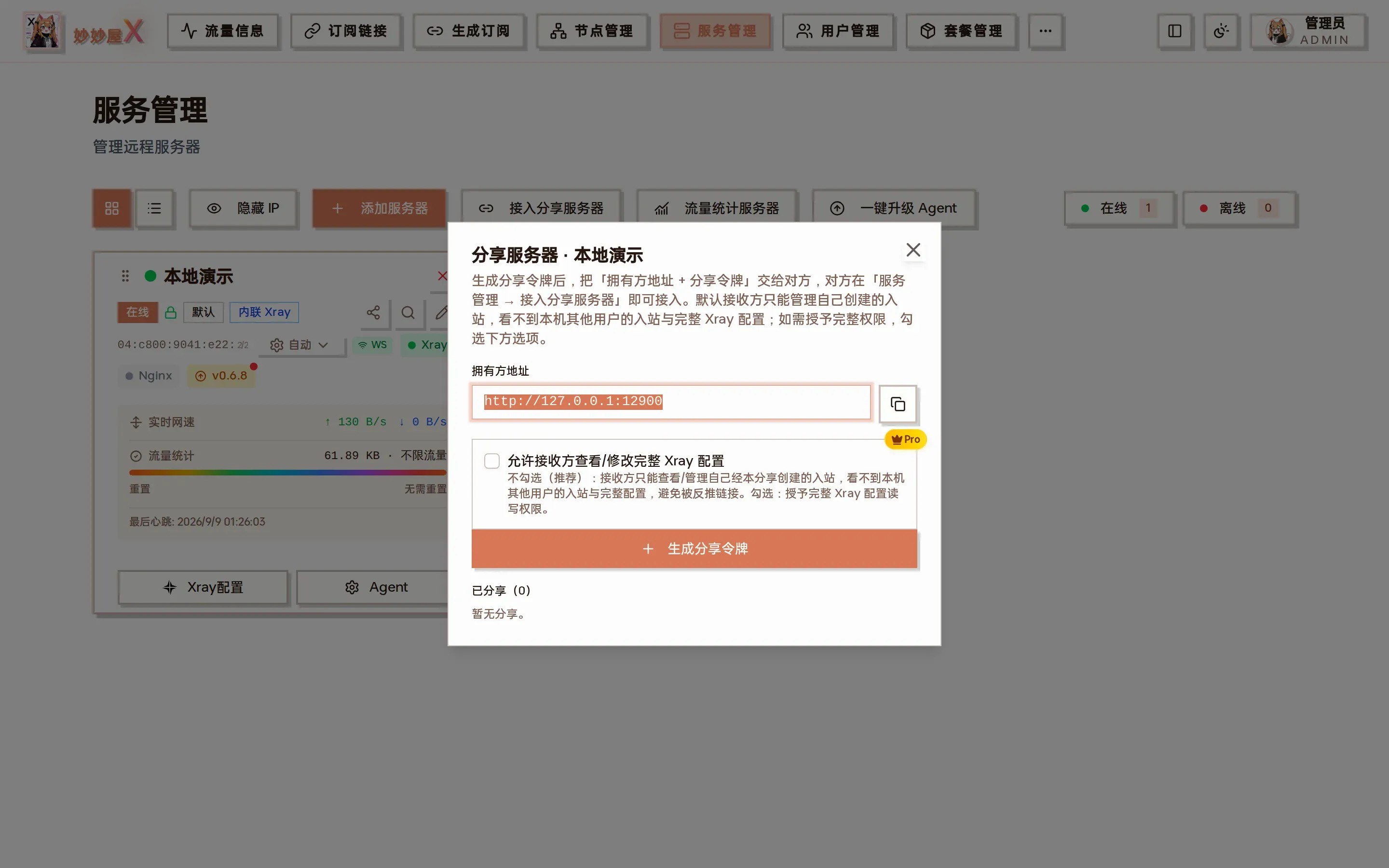
Share server: owner address, the “allow receiver to view/edit the full Xray config” switch (off by default — the receiver only manages inbounds it created), generate share token, shared list
The share token is displayed only once when generated. Copy and save it immediately. Tokens are stored as SHA256 hashes and cannot be viewed again in plaintext.
Token Management
Section titled “Token Management”| Operation | Description |
|---|---|
| Generate Token | Multiple tokens can be generated for the same server, provided to different consumers |
| Revoke Token | After revocation, the token immediately becomes invalid and consumers using it can no longer operate the server |
| View Shared | View the token list and creation times for the server, but cannot view token plaintext |
Consumer: Join Shared Server
Section titled “Consumer: Join Shared Server”The consumer uses the address and token provided by the owner to join the server. After joining, they can add inbounds and nodes as if managing their own server.
Join Steps
Section titled “Join Steps”- On the Service Management page, click the Join Shared Server button
- Fill in the information provided by the owner
- Click Join, the system validates the token
- After successful join, the server appears in the service management list with a purple Shared label
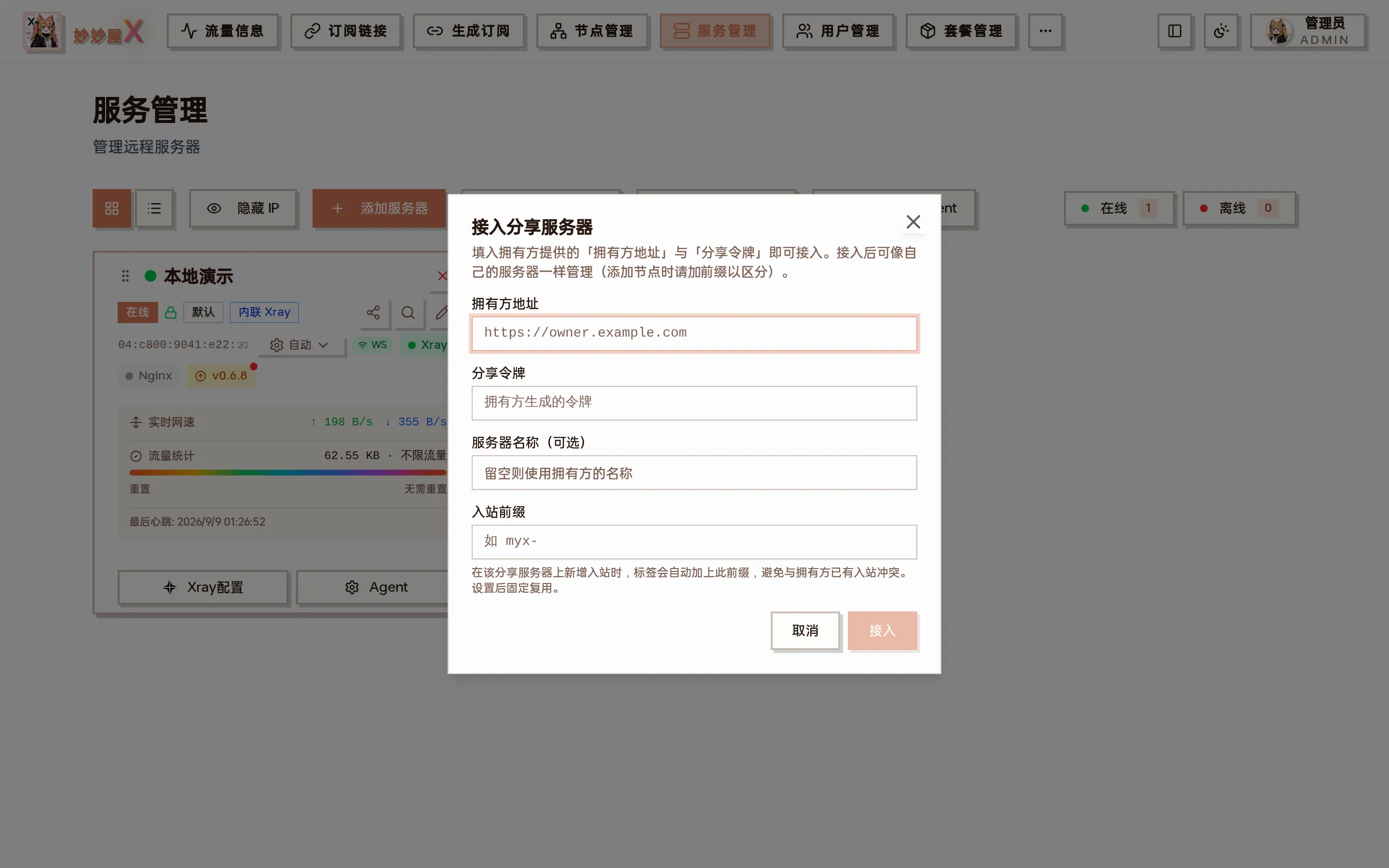
Join shared server: owner address, share token, server name (optional), inbound prefix
Join Parameters
Section titled “Join Parameters”| Parameter | Required | Description |
|---|---|---|
| Owner Address | Yes | The owner’s MiaoMiaoWu X master domain address, e.g., https://owner.example.com |
| Share Token | Yes | The share token generated by the owner |
| Server Name | No | Leave empty to auto-use the owner’s server name |
| Inbound Prefix | No | When adding inbounds on this shared server, tags are automatically prefixed (e.g., myx-) to avoid conflicts with the owner’s inbound tags. Once set, it’s fixed. |
Consumer Permissions & Restrictions
Section titled “Consumer Permissions & Restrictions”The consumer has clear permission boundaries for shared server operations to ensure the owner’s ultimate control.
Can Do
Section titled “Can Do”| Operation | Description |
|---|---|
| View Server Status | View connection status, traffic usage, speed, Xray/Nginx running status |
| Add Inbound | Create new Xray inbound configurations on the shared server (tags auto-prefixed) |
| Manage Inbound | Edit and delete inbounds created by yourself |
| Add Node | Create nodes based on shared server inbounds, assign to users |
| View Service Info | View Xray and Nginx installation status and version info |
Cannot Do
Section titled “Cannot Do”| Restriction | Reason |
|---|---|
| Start/Stop/Restart Xray | Service control is managed by the owner; consumer can only view status |
| Start/Stop/Restart Nginx | Same as above, Nginx is managed by the owner |
| Install/Uninstall Xray or Nginx | Software installation and uninstallation is owner-only |
| Edit Server Info | Server name, address, traffic limits are set by the owner |
| Re-share (secondary sharing) | Shared servers cannot be re-shared to third parties to prevent chain trust propagation |
| Direct Agent Connection | All operations are forwarded through the owner’s federation interface; consumer does not communicate with Agent directly |
Security Mechanisms
Section titled “Security Mechanisms”| Mechanism | Description |
|---|---|
| Token Hash Storage | Share tokens are stored as SHA256 hashes in the database; even the owner cannot view token plaintext |
| ECDH End-to-End Encryption | ECDH key exchange is layered on top of HTTPS between consumer and owner, achieving end-to-end encryption. The owner cannot inspect consumer’s operation content |
| Path Whitelist | Federation forwarding only allows requests under the /api/child/ path to prevent unauthorized access |
| Instant Token Revocation | Owner can revoke tokens at any time; consumer immediately loses access after revocation |
| Auto Downgrade | When the owner doesn’t support encryption, the consumer automatically downgrades to HTTPS + token authentication for compatibility |
Typical Use Cases
Section titled “Typical Use Cases”Multi-admin Server Co-renting
Section titled “Multi-admin Server Co-renting”Multiple MiaoMiaoWu X admins co-rent the same server. One admin deploys Agent as the owner, others join via share tokens, each managing their own inbounds and nodes independently.
Server Resource Rental
Section titled “Server Resource Rental”The owner has multiple servers and shares some to other admins. The owner retains ultimate server control (start/stop services, install/upgrade), while consumers gain the ability to add inbounds and nodes.
Distributed Deployment Management
Section titled “Distributed Deployment Management”Deploy multiple MiaoMiaoWu X masters in different regions, sharing server resource pools across masters via server sharing, unified utilization of geographically distributed servers.
Both owner and consumer must hold PRO licenses with the server_share feature.
Consumers are recommended to set an inbound prefix when joining to avoid tag conflicts with the owner’s inbounds. Once set, the prefix is fixed and cannot be changed later.
After the owner revokes a token, inbounds created by the consumer remain in the Xray configuration, but the consumer can no longer manage or delete them. It’s recommended to notify the consumer to clean up inbounds before revocation.
Consumer operation latency depends on the consumer -> owner -> Agent network path. If the network between owner and Agent is good, the additional latency is usually negligible.