
Traffic accounting
MiaoMiaoWu X exposes server capacity usage, raw Xray node traffic, and billable user-package traffic. They answer different questions and are not expected to match. UI values labelled GB are converted with 1024³ bytes.
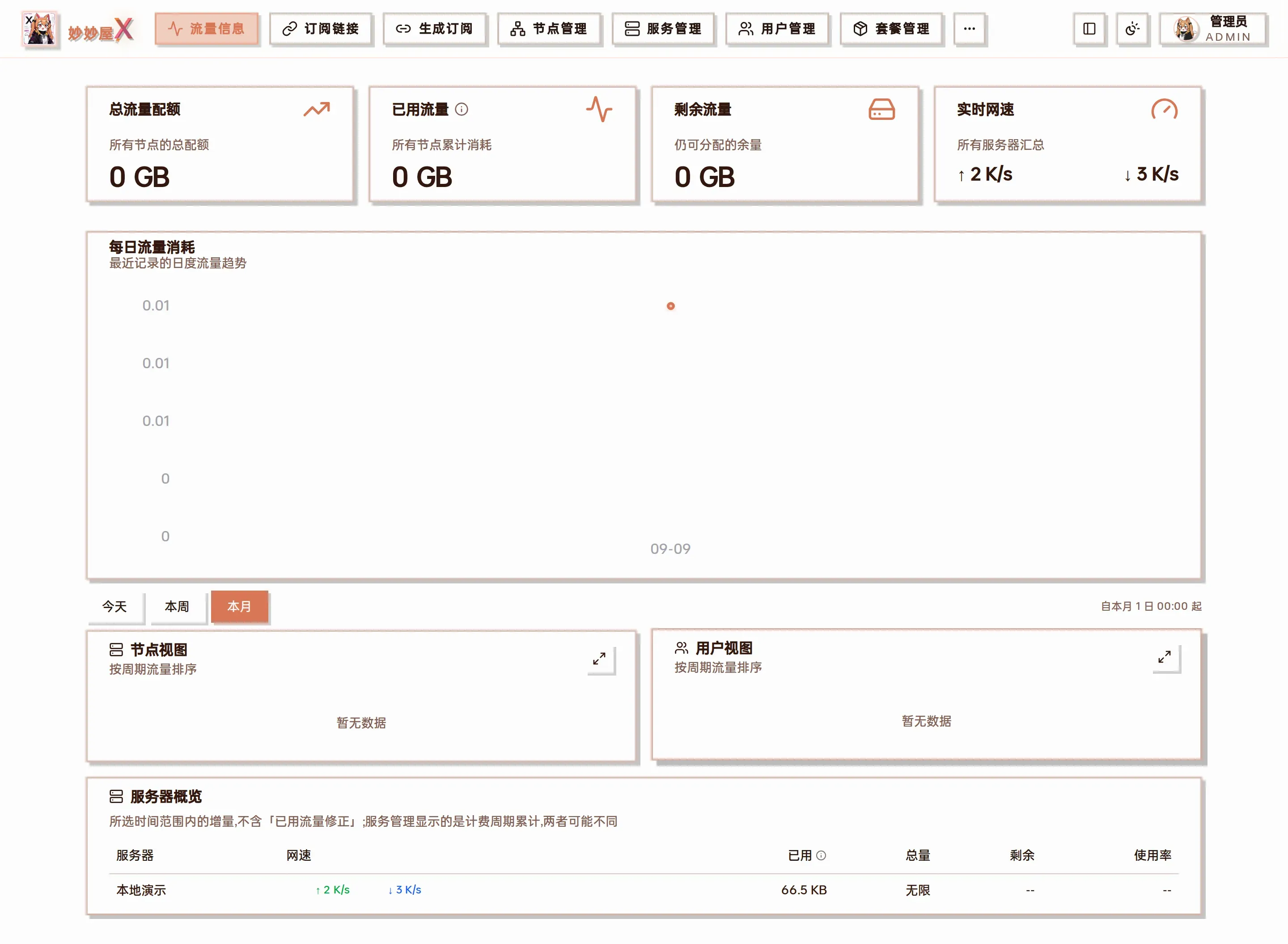
Traffic (admin): KPI cards, daily trend, today / this week / this month, node view, user view, server overview

Server overview: increments within the selected range, excluding “used traffic corrections”, so it may differ from the billing-period totals on the Servers cards
Core definitions
Section titled “Core definitions”Let raw server upload and download be U and D. The server mode M(U,D) is:
| Mode | Formula |
|---|---|
| Both | U + D |
| Upload | U |
| Download | D |
| Maximum | max(U, D) |
With a valid reset cycle, current-cycle server usage is M(U,D) + adjustment. The adjustment reconciles manual calibration, the cycle baseline, and incomplete history. Do not add the card value to its raw directional values. Without a valid reset day, the UI shows “billed since counter reset” and omits cycle directions and this equation.
User billing always uses Xray user/email counters; it is independent of the server’s System NIC/Xray selection. The package and node weights effective at ingestion are frozen into each delta:
billable delta = (raw upload + raw download) × package direction multiplier × node multiplierA package’s one-way mode is ×1, two-way is ×2, and the default node multiplier is ×1. Changing a multiplier does not reprice historical traffic.
Rules by page
Section titled “Rules by page”| Page | Value shown | Source and range |
|---|---|---|
| Home (admin) | Total limit, used, remaining, and 30-day trend | Current KPIs include selected limited servers using each source, mode, and adjustment; unlimited usage is separate. Enabled external subscriptions are added to current KPIs. The trend includes every selected server, including unlimited ones, and applies daily mode without adjustments or external subscriptions. |
| Home (user) | Totals and trend across active package instances | Current KPIs sum each instance’s independent limit and weighted usage, plus enabled external subscriptions. Package-card weighted directions add up to that instance. The trend differences daily aggregate snapshots; resets or missing samples create gaps and it is not per-package daily detail. |
| Traffic · Servers | Today / week / month usage and live rates | The daily ledger selects System NIC or Xray per server, then applies upload/download/both/max. This calendar range is not the server reset cycle and excludes adjustments. Live upload/download rates always come from the system NIC and ignore source/mode. |
| Traffic · Nodes | Raw node directions and node → user detail | Xray counters only; package and node multipliers are not applied. Physical nodes exclude traffic attributed to routed children; routed nodes aggregate their subaccounts. “Unattributed” reconciles traffic that cannot map to a current user. |
| Traffic · Users | Billable directions and user → node detail | With a complete ledger it uses ingestion-time weights. User → node is weighted while node → user is raw. An upgraded database with complete=false falls back to snapshots and estimates with the current package multiplier. |
| Server management | Current-cycle server usage / quota | System source includes selected physical-NIC traffic. Xray aggregates the server’s inbound/outbound node_traffic rows and does not equal the routed-attributed node view. Mode and adjustment apply, and the baseline advances on reset. |
| Node management | Primary-package multiplier badge | This page does not show separate billed usage. A regular user’s ×N comes from the primary package referenced by users.package_id, not every package instance. Use Traffic · Nodes for raw traffic. |
| User management | User summary and per-package progress | Row usage aggregates all billable credentials while its limit comes from the primary package. Each Manage-packages card has its own baseline, quota, and weighted usage and is authoritative with multiple packages. |
| Package management | Billing configuration | Package ×1/×2 and node multipliers affect future deltas only; total-limit edits apply immediately. Enabling a per-node limit establishes a baseline from current totals. Multiple instances isolate total quotas, while per-node enforcement still follows the primary-package compatibility path. |
| Subscription files | Used / limit associated with a file | Admin view totals selected stats servers (all when empty); external usage is added only for external subscriptions matched through selected_tags, using their upload/download/both mode. User view returns only owned files, with the primary-package limit but billable usage across all of the user’s package credentials; it does not add external subscriptions. A file limit overrides the displayed limit. |
Public probes
Section titled “Public probes”With a valid reset cycle, the card’s “billable usage this cycle” matches Server management. “Raw upload/download this cycle” explains the selected source, while “billing adjustment” closes the equation:
billable usage this cycle = raw directions after server mode + billing adjustmentThe trend defaults to the current billing cycle and can switch to the latest seven days. A server without a valid reset day is labelled “billed since counter reset” and shows the latest seven days. Charts show raw directions without applying mode or adjustment. Live rates always come from the system NIC.
“NIC traffic this boot” comes directly from the Agent’s /proc/net/dev counters and restarts when the machine reboots. It is not cycle usage and ignores the server source, mode, and manual adjustment.
See Probe API field reference for field and scope values.
Reconciliation checklist
Section titled “Reconciliation checklist”- Compare the same window: server reset cycle, package-instance cycle, or today/week/month.
- Confirm the source: System NIC includes non-Xray traffic; node and user views are Xray-only.
- Check server mode, package
×1/×2, node multiplier, and manual adjustment. - Use NIC-this-boot only as a host-network observation, never as a quota total.
complete=falsebelongs to the admin/api/admin/traffic/periodendpoint and triggers legacy snapshot fallback. The public probe API has no completeness field.
External-subscription scope
Section titled “External-subscription scope”An external subscription exposes upload, download, total, and a traffic mode. Subscription-file admin rows select directions with that mode, while current home-page KPIs always use upload + download. The two pages currently differ, so reconcile them independently.