
Embedded Xray
Try it: external vs embedded Xray
Section titled “Try it: external vs embedded Xray”Toggle the mode above and watch the «process view» of the 3 servers update live: in external mode mmw-agent and xray are two separate processes; in embedded mode xray-core is baked into mmw-agent, sharing memory and lifecycle.
| Aspect | External Xray | Embedded Xray |
|---|---|---|
| 进程数 | 2 (mmw-agent + xray) | 1 (mmw-agent 含 xray) |
| 磁盘占用 | ~30 MB(agent) + ~30 MB(xray 二进制) | ~50 MB(只装 agent) |
| 内存占用 | agent + xray 各自常驻 | 单进程,共享内存 |
| Xray 升级 | 需重装 xray-core | 随 agent 升级 |
| 配置文件 | /usr/local/etc/xray/config.json | 由 agent 持有 |
| gRPC 通讯 | 需要 | 不需要(进程内调用) |
| 故障隔离 | 独立进程,互不影响 | 同进程,一同生死 |
| 排障熟悉度 | 官方 Xray 标准布局 | 需通过 agent 日志 |
| PRO 许可证 | ✓ 免费 | ✗ 仅 PRO 可用 |
Overview
Section titled “Overview”Embedded Xray is a PRO feature that runs the Xray core as a library directly within the Agent process, replacing the traditional external Xray service. In embedded mode, the Agent has full control over the Xray core, enabling advanced features not possible in external mode, such as real-time rate limit push, device limits, automatic rate limit rules, and precise online user tracking.
Embedded Xray is a PRO feature that requires a valid license with the limiter feature.
Embedded vs External Mode
Section titled “Embedded vs External Mode”| Comparison | Embedded Mode | External Mode |
|---|---|---|
| Xray Execution | Embedded as library in Agent process | Standalone systemd service |
| PRO License | Required | Not required |
| Rate Limit Push | Supported | Not supported |
| Device Limit | Supported | Not supported |
| Auto Rate Limit Rules | Supported | Not supported |
| Online User/IP Tracking | Precise tracking | Not supported |
| XTLS Vision Rate Limit | Supported via Hook | Not supported |
| Hot Update Rate Limit | Takes effect immediately without restart | - |
| Config Path | /usr/local/etc/xray/config.json |
Auto-detect multiple paths |
| Install Xray | No separate installation needed | Requires standalone Xray installation |
How It Works
Section titled “How It Works”Agent 启动 (xray_mode: embedded) │ ├─ 停止外置 Xray 服务 (systemctl stop xray) ├─ 加载 /usr/local/etc/xray/config.json ├─ 注入自定义调度器 (Dispatcher) + 统计 + 策略 ├─ 注册 Vision 限速 Hook └─ 启动内嵌 Xray 内核实例 │ ▼主控通过 WebSocket 推送 limiter_config │ ▼Agent 实时更新限速桶 (Rate Bucket) │ ├─ 每个用户独立的速度限制 (bytes/s) ├─ 每个用户独立的设备数限制 └─ 自动限速规则 (sustained / burst) │ ▼自定义调度器拦截所有流量 │ ├─ RateWriter: 普通连接限速 ├─ VisionLimiterHook: XTLS Vision 零拷贝连接限速 └─ 设备数超限 → 拒绝新连接Core Capabilities
Section titled “Core Capabilities”Real-time Rate Limit Push
Section titled “Real-time Rate Limit Push”The master pushes rate limit configurations to the embedded Xray Agent via WebSocket. The Agent updates rate limit rules instantly without restarting. Each user on each inbound has an independent rate bucket.
| Parameter | Type | Description |
|---|---|---|
inbound_tag |
string | Target inbound tag |
node_limit |
uint64 | Node-level speed limit (bytes/s), 0 = unlimited |
users[].speed_limit |
uint64 | User speed limit (bytes/s), 0 = unlimited |
users[].device_limit |
int | Max devices per user, 0 = unlimited |
XTLS Vision Rate Limiting
Section titled “XTLS Vision Rate Limiting”The XTLS-RPRX-VISION protocol uses zero-copy (splice) optimization, making normal traffic interception ineffective. Embedded mode registers a Vision Limiter Hook to insert a rate limiting layer before splice, enabling precise rate control on Vision connections. When no rate limit is set (no rate bucket), the Hook returns null and the connection uses the original splice path with zero overhead.
Automatic Rate Limit Rules
Section titled “Automatic Rate Limit Rules”Embedded mode includes a built-in SpeedMonitor that can be configured with automatic rate limit rules. When user traffic behavior triggers thresholds, temporary rate limits are automatically applied.
| Rule Type | Trigger Condition | Description |
|---|---|---|
sustained |
Sustained overspeed | Triggered when user speed continuously exceeds threshold for a specified duration. Example: 5 seconds above 100 Mbps -> limit to 50 Mbps for 30 seconds |
burst |
Burst overspeed | Triggered when overspeed count reaches threshold within a time window. Example: exceeding 80 Mbps 3 times within 10 seconds -> limit to 40 Mbps for 60 seconds |
Online User and Device Tracking
Section titled “Online User and Device Tracking”Embedded mode precisely tracks each user’s online IP addresses and connection count. When a user’s connections reach the device limit, new connections are rejected. Existing connections are not affected. Online information is periodically reported to the master via WebSocket.
Custom Dispatcher
Section titled “Custom Dispatcher”Embedded mode replaces the default Xray dispatcher with a custom dispatcher that intercepts all outbound traffic. The custom dispatcher integrates the rate limiting module, applying rate limits to each connection’s write operations via RateWriter while maintaining full traffic statistics capability.
Enable Embedded Mode
Section titled “Enable Embedded Mode”Method 1: Master UI Switch
Section titled “Method 1: Master UI Switch”On the master’s server management page, you can directly switch the server’s Xray mode. After switching, the Agent will automatically restart and run in the new mode.
- Go to the “Servers” page
- Click “Edit server” (pencil icon) on the target server card
- Choose “Embedded Xray” under “Xray mode”
- Save; the Agent restarts automatically and the switch is complete
The mode can also be chosen when creating a server in the “Add Server” dialog:
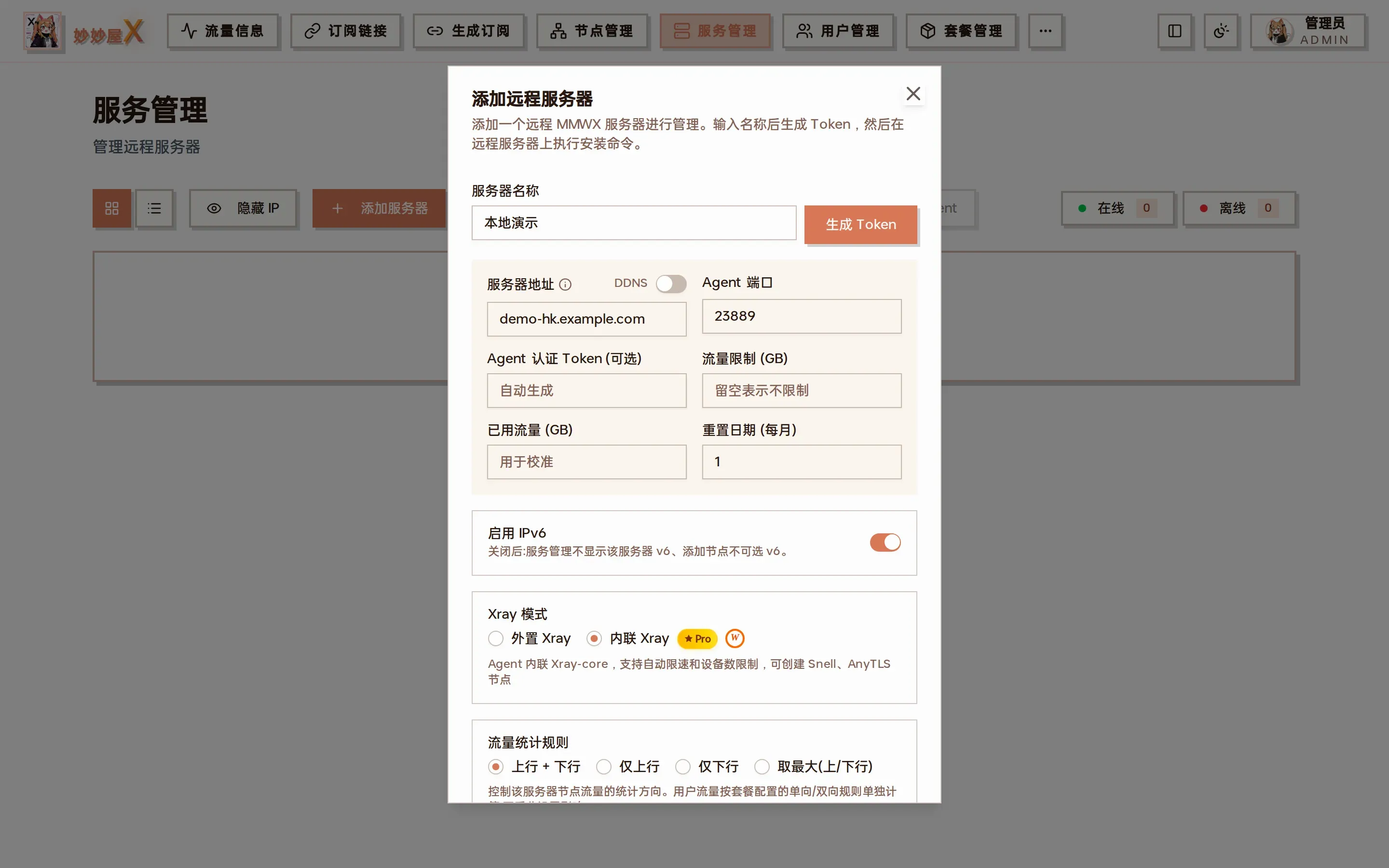
Add / edit server → Xray mode: External Xray or Embedded Xray (PRO); embedded supports auto rate limiting, device limits, Snell and AnyTLS nodes
After switching, the server card shows a blue “Embedded Xray” badge:
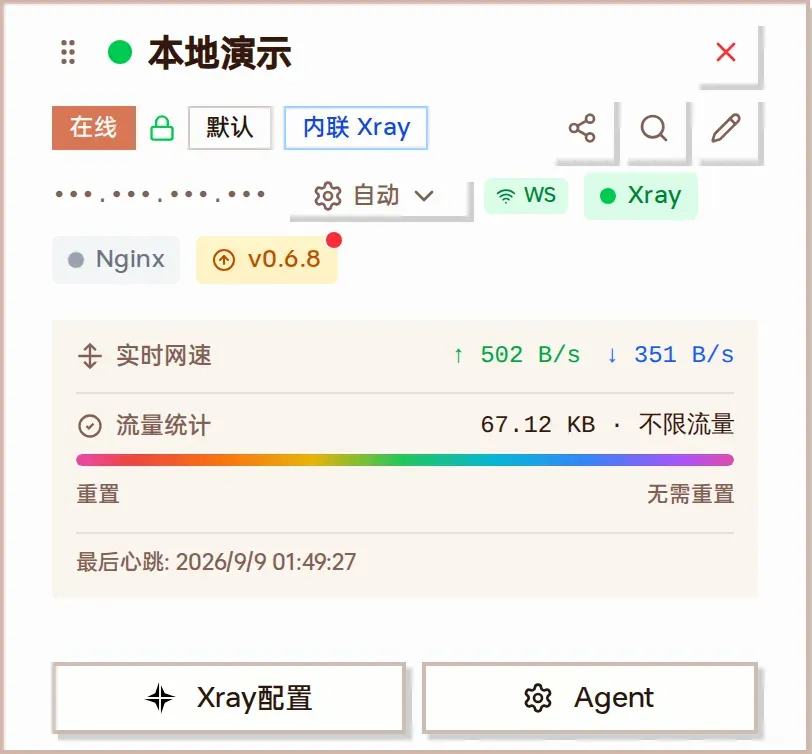
A server card in embedded Xray mode
Method 2: Agent Configuration File
Section titled “Method 2: Agent Configuration File”Edit the Agent’s configuration file config.yaml directly:
xray_mode: "embedded" # 可选值: "external"(默认)或 "embedded"Restart the Agent service after modification: systemctl restart mmw-agent
Startup Behavior
Section titled “Startup Behavior”When the Agent starts in embedded mode, it performs the following steps:
- Stop external Xray - automatically runs systemctl stop xray to avoid port conflicts
- Config migration - if external Xray confdir config exists, auto-merge to standard path
- Ensure geodata - check if geoip.dat / geosite.dat exist
- Inject runtime components - inject custom dispatcher, stats module, and policy config into Xray config
- Register Vision Hook - register XTLS Vision zero-copy connection rate limit interceptor
- Start core - create and start embedded Xray instance
- Connect to master - establish WebSocket connection, start receiving rate limit config push
Traffic Statistics
Section titled “Traffic Statistics”Embedded mode uses Xray’s built-in statistics counters to collect traffic data, supporting per-inbound and per-user statistics:
| Counter Format | Description |
|---|---|
inbound>>>tag>>>traffic>>>uplink |
Inbound uplink traffic |
inbound>>>tag>>>traffic>>>downlink |
Inbound downlink traffic |
user>>>email>>>traffic>>>uplink |
User uplink traffic |
user>>>email>>>traffic>>>downlink |
User downlink traffic |
Counters use cumulative mode (non-destructive reads). The Agent periodically reports incremental data to the master.
When switching to embedded mode, the Agent automatically stops the external Xray service. After switching back to external mode, ensure the Xray service starts normally.
The embedded mode config path is fixed at /usr/local/etc/xray/config.json and does not auto-detect multiple paths like external mode. Ensure this path is accessible.
Rate limit push requires a PRO license with the limiter feature. Without authorization, the Agent ignores rate limit configs pushed by the master.
Embedded mode does not require separate Xray installation - the Agent includes the complete Xray core. Switching modes does not affect existing inbound configurations.
In the master UI, servers in embedded mode display a blue “Embedded” badge, while external mode shows a gray “External” badge for easy identification.