
Connect AI Agent (MCP)
Overview
Section titled “Overview”MiaoMiaoWu X master has a built-in MCP (Model Context Protocol) service mounted on the /mcp route (streamable-HTTP). Any MCP-compatible AI Agent (OpenClaw, Hermes Agent, Claude Code, Cursor, etc.) can connect directly to manage nodes, subscriptions, traffic, servers, users, packages, and more with natural language.
Tool calls reuse the master’s existing API and authentication. Permissions are identical to your login account: admin tokens can perform admin operations, while regular user tokens calling admin tools will be rejected.
Step 1: Generate API Token
Section titled “Step 1: Generate API Token”- Log in to the master, click the avatar at the top right -> “Profile settings” and scroll to “API Tokens” at the bottom.
- Enter a name (e.g.
openclaw) and click “Generate Token”.
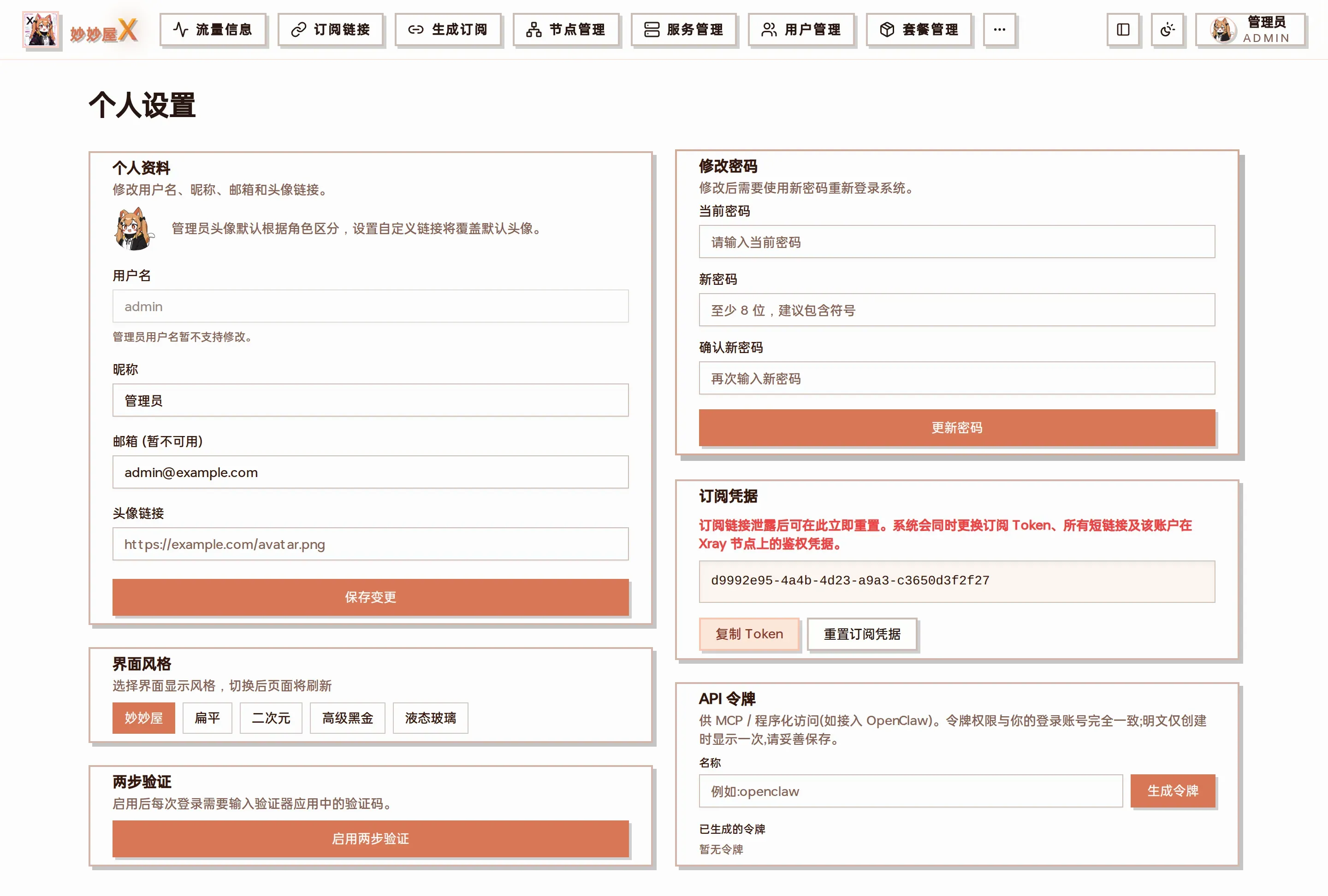
Profile settings: profile, UI style, two-factor auth, password, subscription credentials and “API Tokens” at the bottom
The plaintext is shown only once - copy and save it immediately. The page also provides ready-to-copy client configuration snippets.
Token permissions match the current account; you can delete (revoke) it at any time from the same page.
Step 2: Configure in AI Agent
Section titled “Step 2: Configure in AI Agent”OpenClaw(openclaw.json)
Section titled “OpenClaw(openclaw.json)”{ "mcp": { "servers": { "miaomiaowux": { "url": "https://你的主控/mcp", "transport": "streamable-http", "headers": { "Authorization": "Bearer <你的 API 令牌>" } } } }}Hermes Agent (~/.hermes/config.yaml, add mcp_servers at top level)
Section titled “Hermes Agent (~/.hermes/config.yaml, add mcp_servers at top level)”mcp_servers: miaomiaowux: url: "https://你的主控/mcp" headers: Authorization: "Bearer <你的 API 令牌>" connect_timeout: 15 timeout: 600 # 安装 xray/nginx 等工具会阻塞数分钟,超时给大点 # 可选:只放开想用的工具 # tools: # include: [server_list, user_list, package_list, traffic_summary, node_list]Restart the Agent after adding (MCP connects at startup). On success, the log will show registered 26 tool(s).
Other clients (Claude Code, Cursor, etc.) work the same way: enter the /mcp URL + Authorization: Bearer header.
Tools Overview
Section titled “Tools Overview”26 tools in total, grouped by capability domain. Write operations are marked, and high-risk operations require explicit confirmation.
| Domain | Representative Tools |
|---|---|
| Nodes | node_list、node_speedtest、tunnel_list、node_delete* |
| Subscriptions & Traffic | subscribe_file_list、traffic_summary、traffic_user_detail、temp_subscription_create |
| Servers & Services | server_list、server_service_status/control、server_inbound_list/apply、server_xray_install*、server_sync_nodes |
| Users & Packages | user_list/detail/create/set_status/set_limits/delete*、package_list/create/assign/unassign |
* = High-risk write operation. Agent must include confirm: true in parameters to execute, otherwise only returns a confirmation prompt. Extremely dangerous operations like token reset, clearing all nodes, uninstalling xray/nginx, and modifying admin credentials are not exposed.
Companion Skill Packs
Section titled “Companion Skill Packs”We provide a set of Claude Agent Skills(SKILL.md) that teach the Agent how to combine the above tools for common operations. Place them in the Agent’s skills directory.
| Skill | Usage |
|---|---|
| mmwx-onboard-user | Full new user onboarding (create user -> package -> bind -> subscription) |
| mmwx-add-server | Onboard new server (register -> install xray/nginx -> sync nodes) |
| mmwx-traffic-report | Traffic inspection and over-quota list |
| mmwx-node-speedtest | Batch speed test with report |
| mmwx-troubleshoot | Node offline / subscription anomaly troubleshooting |
Security Recommendations
Section titled “Security Recommendations”Token permissions follow the account: before giving full access to an Agent, confirm that the Agent and its entry point (e.g. Telegram bot) are trusted.
Minimize blast radius: use client tool filtering (e.g. Hermes tools.include) to only expose read-only tools, or use a regular user token.
Token plaintext is shown only once. If leaked, delete it at “Settings -> API Tokens” to revoke.
High-risk operation confirm double confirmation is a safety net, not a substitute for access control.