
Servers that block outbound 80/443
Some providers block outbound ports 80 / 443. On such a server:
- The one-click install command hangs or times out because the Agent cannot be downloaded (the official CDN and GitHub both use 443);
- If the master address is
https://panel-domain(443), the Agent cannot reach the master even after it is installed; - External Xray cannot be installed (it is downloaded from GitHub).
The block is by port, not by protocol: if the master also serves HTTPS (or HTTP) on another port, these servers can connect.
Version requirements
Section titled “Version requirements”| Component | Version | Used for |
|---|---|---|
| Master | v0.5.8-beta.3 or later | Agent alternate address, install script downloading the Agent from the master, license renewal relay |
| Agent | v1.1.5-beta.1 or later, v1.1.5-beta.2+ recommended | One-click upgrade downloading from the master, license renewal through the master |
On v1.1.5-beta.1, Embedded Xray fails to start inside LXC / OpenVZ containers that have a WARP outbound (CreateTUN("wg0") failed); beta.2 fixes it. Many port-blocked machines are containers, so install beta.2 or later directly.
A server installed with the install command always gets the latest Agent, so there is nothing else to check.
Which case are you in?
Section titled “Which case are you in?”| Master address | What to do |
|---|---|
Not on 80 / 443, e.g. http://IP:12889 or https://domain:8443 |
Nothing to configure. Use the install command from the panel. When the script cannot reach the official CDN it downloads the Agent from the master automatically |
https://panel-domain (443), or 443 through a CDN such as Cloudflare |
Configure an Agent alternate address first (below), then add the server |
If unsure, run curl -m 5 -sI https://github.com on the blocked server: a timeout means it is blocked.
Configure the Agent alternate address
Section titled “Configure the Agent alternate address”The alternate address is an address only for Agents, for example https://panel-domain:8443. That port only allows Agent traffic (/api/remote/, including the WebSocket); opening the panel there returns 404.
① Pick the protocol and port
Section titled “① Pick the protocol and port”| Form | Use it when | What it needs |
|---|---|---|
https://domain:8443 |
Recommended whenever you have a certificate | A certificate covering the domain + an Nginx / Caddy reverse proxy |
http://domain-or-IP:8080 |
No certificate, or only an IP | An Nginx / Caddy reverse proxy, no certificate |
http://domain-or-IP:12889 |
You don’t want a reverse proxy | Nothing: connects straight to the master’s own port (12889 by default) |
http is not encrypted: Agent traffic is protected by the encrypted channel, but the token in the install command and the install script itself travel in plain text, so prefer https. Connecting straight to the master’s port also requires that the port is open on the master’s host and that “Disable public access” is off (when on, the master only listens on localhost).
Ports:
- Domain not behind a CDN (DNS points straight at the master): any free port works;
8443is common for https. - Domain proxied by Cloudflare (orange cloud): only Cloudflare’s HTTPS ports
2053,2083,2087,2096,8443work. You can also use a separate DNS-only subdomain (grey cloud) to use any port. - Ports 80, 443 and 8001 (used internally by the master’s Nginx) are not allowed; the master’s own port (12889 by default) only works with http (direct connection).
Remember to allow this TCP port in the master’s firewall / cloud security group.
② Check
Section titled “② Check”In System settings → System → Agent alternate address, choose the protocol and enter the domain (or IP) and port. Leave the domain empty to use the Agent address (the master address if none is set). Click Check. The panel checks:
- whether the domain resolves to the master (or a recognised CDN);
- for https, whether Certificates has a certificate covering the domain (wildcards work);
- whether the master’s Nginx is managed by the master and whether the port is already in use;
- whether the port is allowed when the domain is proxied by Cloudflare.
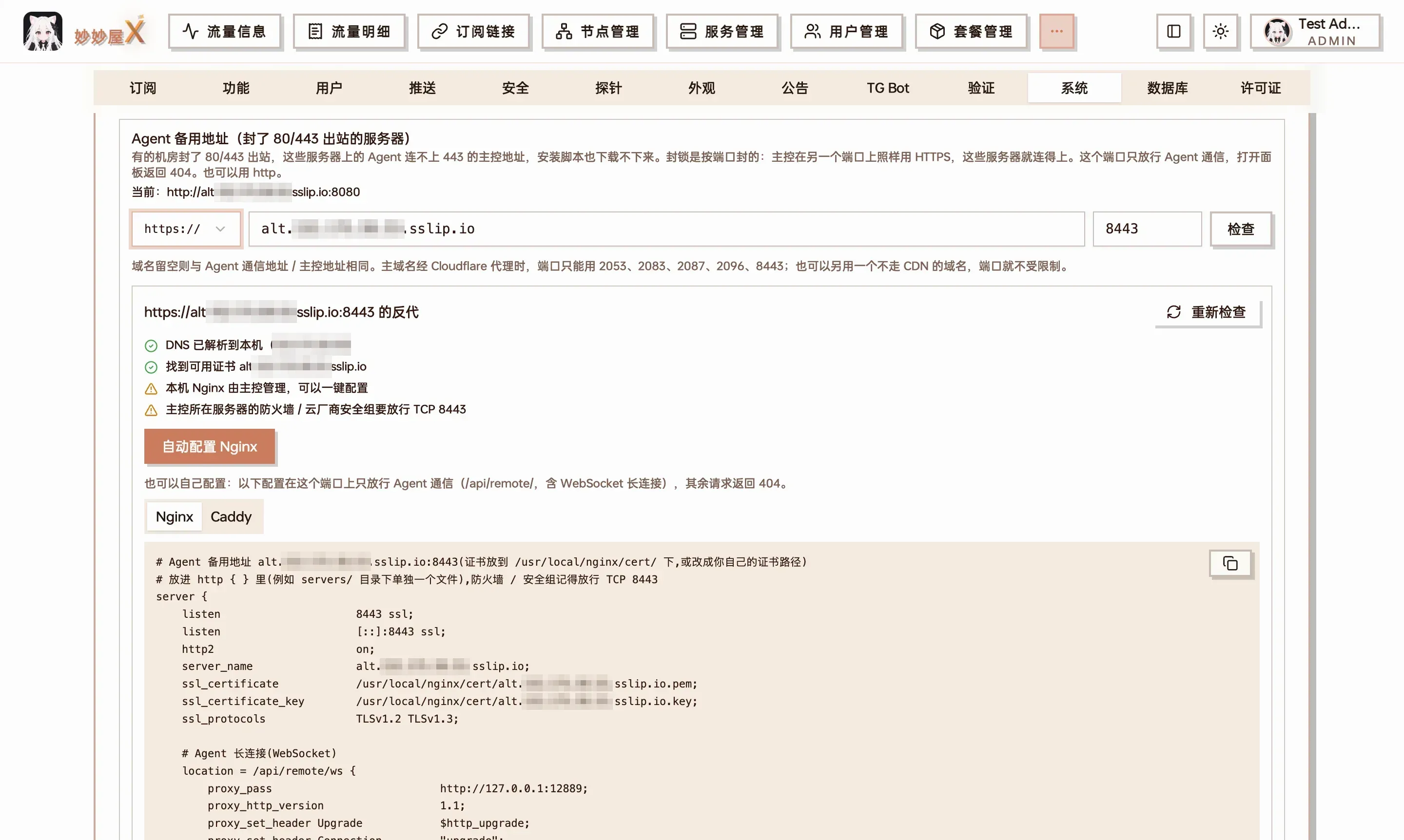
The check passed: the managed Nginx can be configured with one click, and Nginx / Caddy templates are shown below
③ Set up the reverse proxy
Section titled “③ Set up the reverse proxy”Skip this step when connecting straight to the master’s port (http://…:12889).
- HTTPS enabled from the panel (Certificates → “Deploy certificate to master” or “Enable HTTPS”): click Configure Nginx. The master writes a site listening only on this port into Nginx and reloads it; if
nginx -tfails the change is rolled back. - HTTPS you set up yourself (your own Nginx, Caddy, control panels…): add the config shown in the panel (domain, port and certificate paths are filled in), then test and reload.
If you write the config yourself, keep these two headers. The master uses them to recognise that a server connected through the alternate address:
proxy_set_header X-Forwarded-Port $server_port;proxy_set_header X-Forwarded-Host $host;Caddy sends X-Forwarded-Host (including the port) by default.
④ Test and save
Section titled “④ Test and save”Pick an online server and click Test with this server. It makes one authenticated connection to the alternate address (its current address is not changed), confirming that certificate, proxy and firewall all work. Within 30 minutes of a passing test, click Save alternate address.
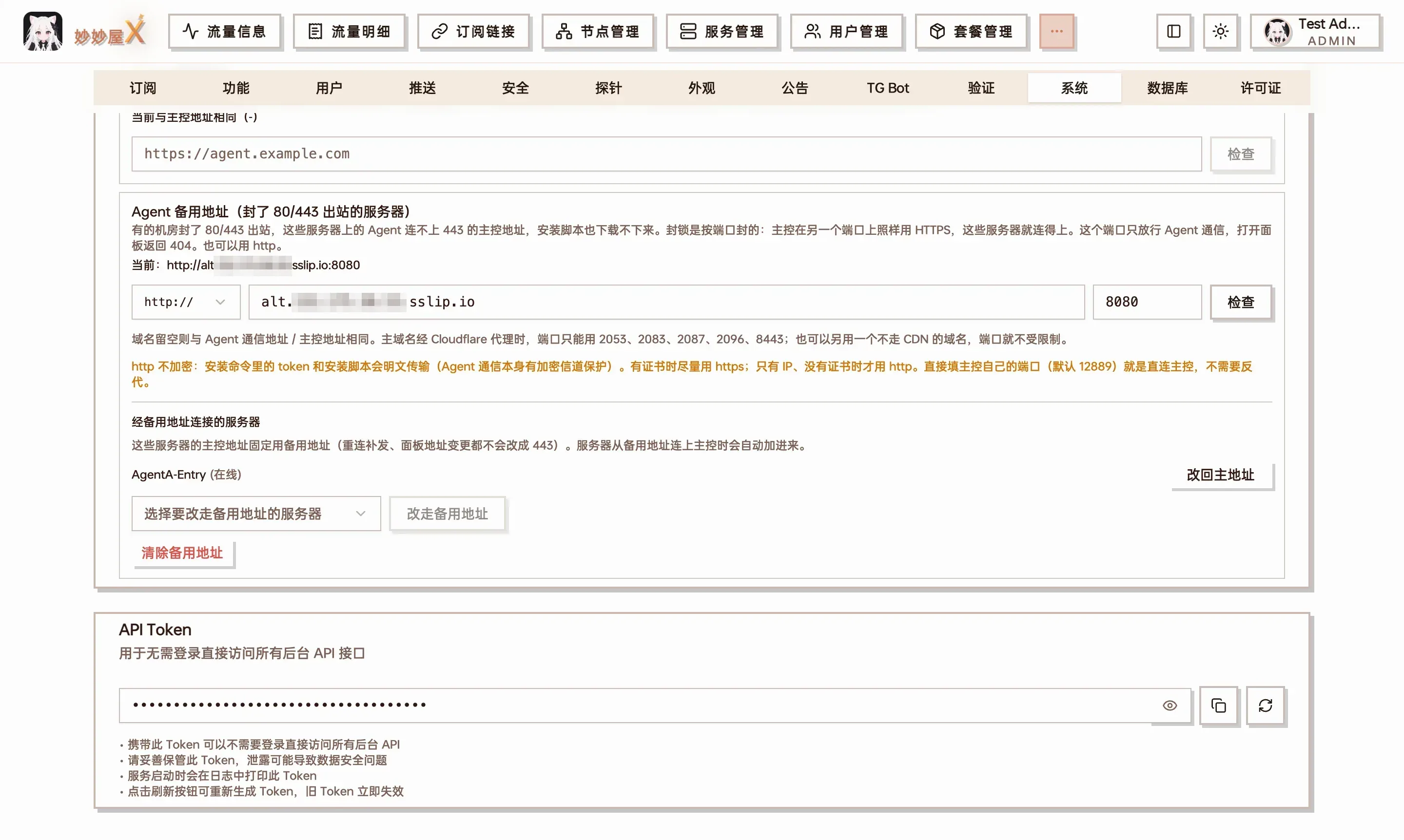
Saved after a passing test; servers connecting through the alternate address are listed below
If no server is online yet, you can save directly.
Add the blocked server
Section titled “Add the blocked server”In Servers → Add server, turn on Connect via alternate address and choose Embedded Xray as the Xray mode (External Xray is downloaded from GitHub and will fail).
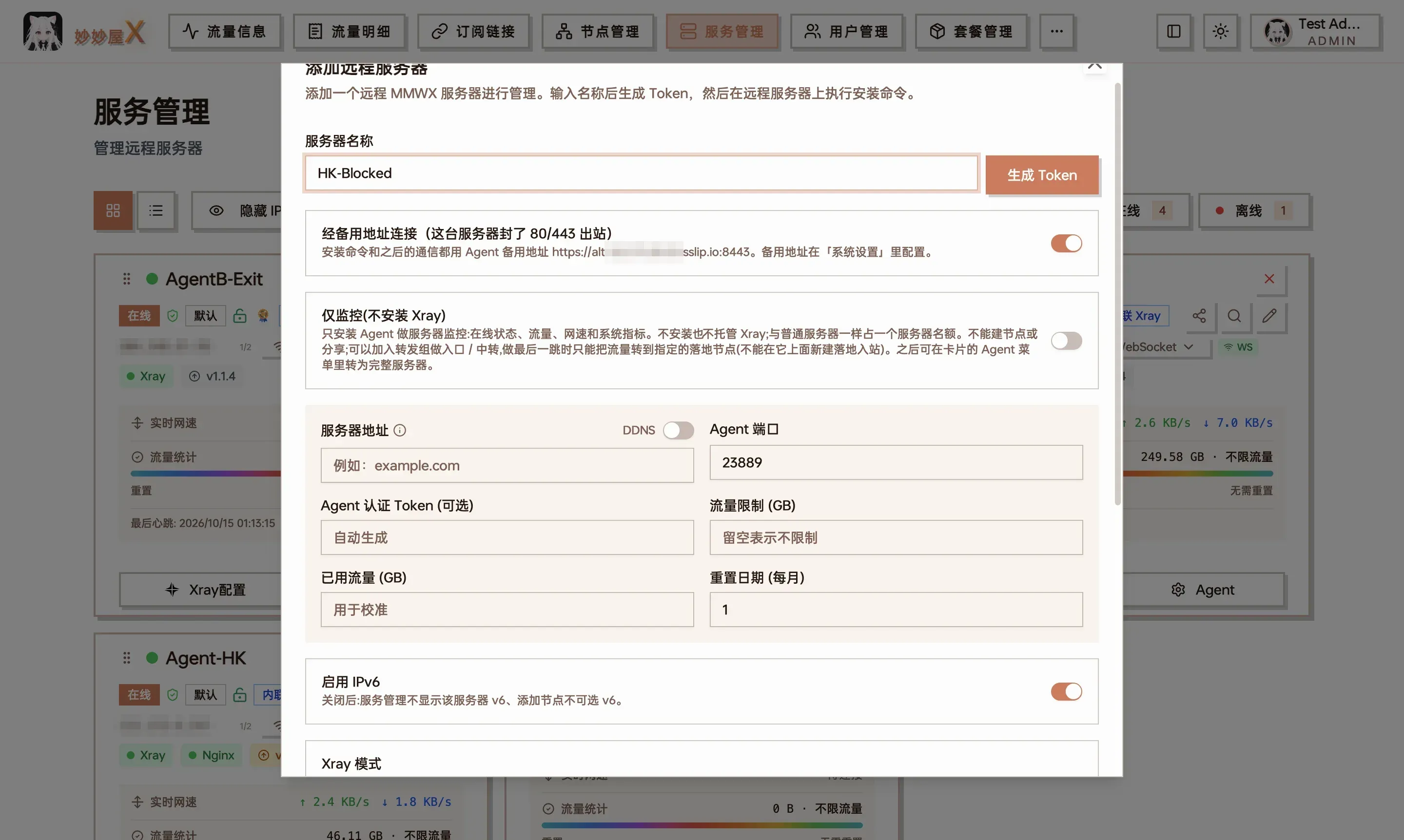
With the switch on, the install command uses the alternate address
Run the install command on the blocked server. The script:
- spends a few seconds probing outbound HTTPS and, if it is blocked, downloads the Agent from the master (the master fetches the official release and forwards it; the script still verifies the release signature, so the master cannot alter it);
- writes the alternate address into the Agent config, so the Agent connects to the master through it.
The install output contains something like this (actual output from a test machine with outbound 80 / 443 blocked; the address is replaced with an example):
Master Server: https://panel.example.com:8443...[4/6] Downloading MMWX binary...这台服务器连不上 https://dl.miaomiaowux.com/(出站 HTTPS 可能被封),改为先从主控下载 Agent。Downloading Agent from https://panel.example.com:8443/api/remote/agent-dist/<token>/mmw-agent-linux-amd64 ...Agent verified (.sig).Agent installed.[5/6] Starting service...Once installed, the server card shows it online, and it also appears in the Servers connecting via the alternate address list in System Settings.
Servers you already added
Section titled “Servers you already added”Under Servers connecting via the alternate address, pick the server and click Use alternate address:
- Online server: the master first has it probe the alternate address and only switches it if that works;
- Offline server (most likely because it cannot reach 443): it is only marked. Copy the install command from its server card and run it again; the command already uses the alternate address.
A server that connects through the alternate address is added to the list automatically, including one whose install command you edited by hand or one that failed over to it as a backup master address.
If 443 gets blocked on a server that is already running, nothing needs to be done by hand: after the main address has been unreachable for 2 minutes the Agent switches to the alternate address; the master sees it arrive through the alternate address and makes that its master address. From then on it no longer probes the unreachable main address, and connects straight to the alternate address after a restart. This requires the server to have received the alternate address before it got blocked (online Agents receive it automatically when you save the alternate address).
Older Agents
Section titled “Older Agents”On Agents older than v1.1.5-beta.1, the panel’s one-click upgrade runs the old upgrade script, which only downloads from the official channels and therefore fails on a blocked machine. Copy the install command from the server card and run it again on the server once (the server keeps its identity and nodes are unaffected) to get the new version; after that, one-click upgrades download from the master automatically.
After installation
Section titled “After installation”For servers connecting through the alternate address:
- Their master address stays the alternate address: reconnect resync, a new panel domain and switching the Agent address never change it to the 443 address, and the unreachable main address is not added to their backup master addresses;
- One-click upgrade from the panel (Agent v1.1.5-beta.1+): downloads from the master when the official channels are unreachable, with the same signature check;
- License renewal (Agent v1.1.5-beta.1+): if the license service cannot be reached directly, the request goes through the master (the master only relays the request the Agent signed);
- Geo data:
geoip.dat/geosite.datneeded by Embedded Xray are fetched from the master when they cannot be downloaded.
Other servers use the alternate address as a backup master address (an Agent tries backup master addresses after the main address has been unreachable for 2 minutes), so if their 443 gets blocked later they switch to it automatically.
To move a server back, click Switch back to main address in the list (the master has it probe the main address first). The alternate address cannot be cleared while any server still connects through it.
Can I just use the master’s port 12889 without a reverse proxy?
Section titled “Can I just use the master’s port 12889 without a reverse proxy?”Yes: choose http and enter the master’s own port (12889 by default) to connect straight to the master, no Nginx needed. Keep in mind:
- This is plain HTTP. Agent traffic is protected by the encrypted channel, but the token in the install command and the install script itself travel in plain text;
- The port must be open on the master’s host, and “Disable public access” must be off (when on, the master only listens on localhost; the check warns about it);
- It is not allowed while no master address is set: Agents then already connect straight to the master’s port, blocked servers included, so nothing needs to be done.
The master’s existing “HTTPS recovery address” (http://domain:12889) is an emergency path for when HTTPS is down entirely; it is separate from the alternate address.
The test fails
Section titled “The test fails”Go through the message:
- Connection timeout: the master’s firewall / security group does not allow the port, or the test server cannot reach the master on that port;
- Certificate error: the certificate does not cover the domain, or Cloudflare proxies the domain on a port it does not support;
- 404 / authentication failure: the proxy does not pass
/api/remote/, or forwards it to another service.
External Xray cannot be installed
Section titled “External Xray cannot be installed”External mode downloads Xray from GitHub during install, which always fails when outbound is blocked; the install script says so. Change the server’s Xray mode to Embedded Xray in the panel (Embedded Xray ships inside the Agent, nothing else to download).