
VLESS
Overview
Section titled “Overview”VLESS is Xray’s primary protocol. It is lightweight with no encryption overhead (relies on transport layer encryption) and supports the most transport and security layer combinations.
Supported Combinations
Section titled “Supported Combinations”| Transport | Security | Description |
|---|---|---|
| TCP | REALITY | Recommended, no domain or certificate required |
| TCP | REALITY + XTLS-Vision | Recommended, best performance |
| TCP | TLS | Requires domain and certificate |
| TCP | TLS + XTLS-Vision | Requires domain and certificate |
| WebSocket | TLS | WSS, suitable for CDN relay |
| gRPC | REALITY | Suitable for high concurrency |
| XHTTP | REALITY | Next-gen transport, replaces H2 |
XTLS-Vision
Section titled “XTLS-Vision”XTLS-Vision is a flow control mode exclusive to VLESS, enabled via flow: xtls-rprx-vision. It reduces TLS-in-TLS characteristics, improving detection resistance. Only supports TCP transport.
Creating it in the wizard
Section titled “Creating it in the wizard”In “Nodes → Add Node” with VLESS selected, the transport can be GRPC / TCP / WSS / XHTTP and the security REALITY / TLS / XTLS-Vision / XTLS-Vision-REALITY / ENC. The default is the recommended TCP + XTLS-Vision-REALITY:
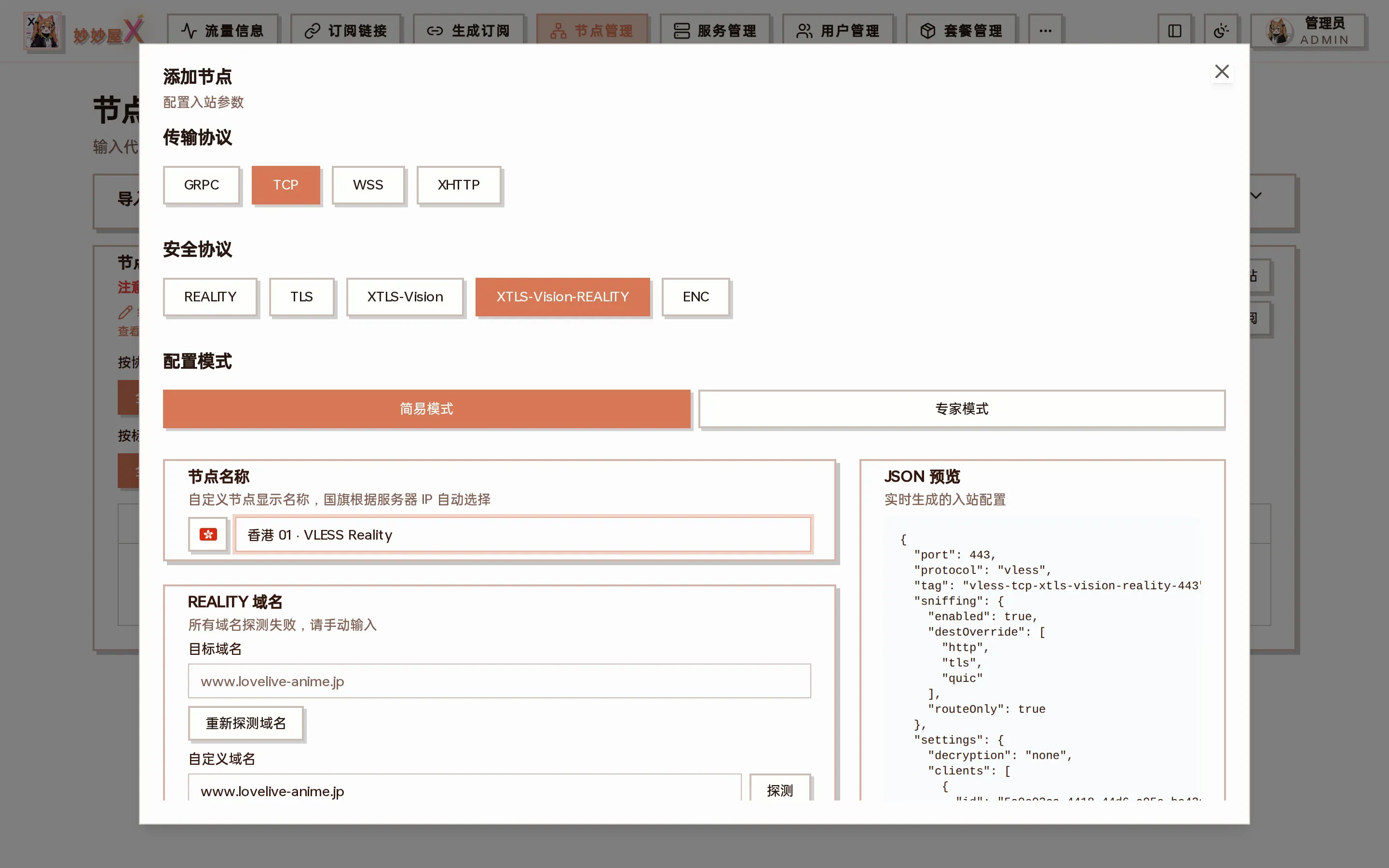
VLESS + TCP + XTLS-Vision-REALITY: the REALITY domain is probed for the lowest latency (or entered manually); “Prevent REALITY theft” creates a dedicated tunnel that only allows the serverNames; UUID and flow xtls-rprx-vision are filled in
- Simple mode: port, UUID and REALITY key pair are generated; just “Submit”
- Expert mode: edit port, listen address, sniffing, relay address …
- TLS / WSS combinations need a certificate on the server, otherwise step 1 shows the “SSL configuration” prompt first
Configuration Example
Section titled “Configuration Example”VLESS + TCP + REALITY + Vision (Recommended)
Section titled “VLESS + TCP + REALITY + Vision (Recommended)”{ "protocol": "vless", "settings": { "clients": [{ "id": "uuid", "flow": "xtls-rprx-vision" }], "decryption": "none" }, "streamSettings": { "network": "tcp", "security": "reality", "realitySettings": { "dest": "dl.google.com:443", "serverNames": ["dl.google.com"], "privateKey": "...", "shortIds": [""] } }}